Google describes Find Hub as an expanding partner ecosystem, so a fixed device count goes stale quickly. This guide covers representative current models from Chipolo, Pebblebee, and Motorola, plus popular trackers that use a different network.
- The current Chipolo family is POP, LOOP, and CARD. The older ONE/CARD Point and Spot models were discontinued in 2025.
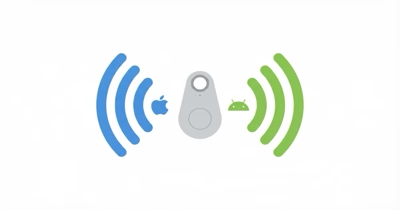
- Current Chipolo and Pebblebee models can use Find Hub or Apple Find My. Each physical tracker runs one network at a time and needs a reset to switch.
- Moto tag 2 adds UWB and Bluetooth Channel Sounding. Each nearby-finding mode needs compatible phone hardware, software, and regional availability.
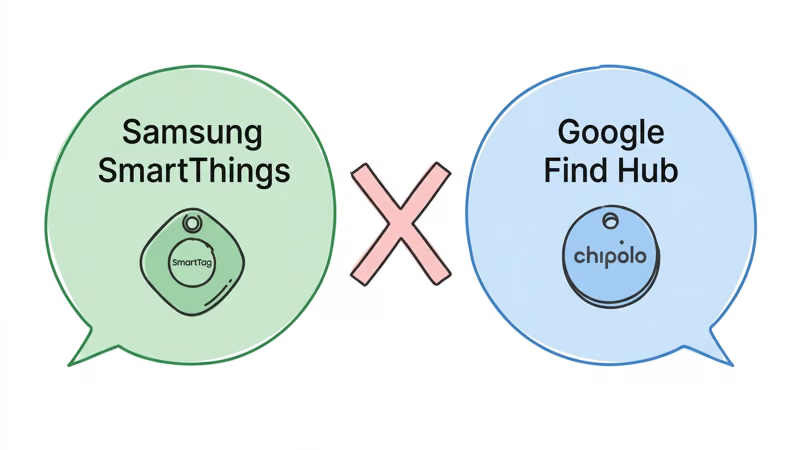
- Samsung SmartTag 2 does NOT work with Find Hub. It uses Samsung’s SmartThings network, a completely separate system.
- Plan on Android 9 or later for current third-party tags. Android 6+ refers to unknown-tracker alerts, not the full accessory setup and management requirement.
What Is Google Find Hub?
Google Find Hub is Android’s crowdsourced Bluetooth item-finding network. It evolved from Find My Device and now includes compatible tags, secure item sharing, nearby finding on supported hardware, and airline location-sharing tools.
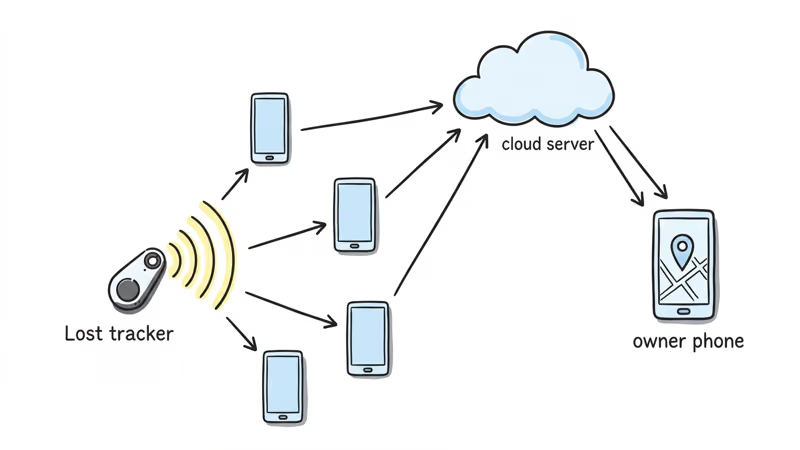
The network works like Apple’s Find My. When your tracker is out of direct Bluetooth range, it pings silently off any nearby Android device running Google Play Services (Android 9 or later). That device sends the tracker’s encrypted location to Google’s servers, and you see the updated position in the Find Hub app on your phone. This crowd-sourced relay is anonymous and encrypted end to end, so the location history stays private.
Google’s Find Hub data-protection page states that the network uses anonymized, end-to-end-encrypted location data that even Google can’t identify.
Because Find Hub relies on these passing pings, it shows a tracker’s last-known position rather than a full trail — our Find Hub location history explainer breaks down what it does and does not store.
Google’s Find Hub partner announcement describes a growing set of tags and built-in integrations rather than a closed certification list.
Current Chipolo, Pebblebee, and Motorola pages specify Android 9 or later for their Find Hub accessories. Before relying on the network, confirm your Find Hub offline finding settings, Bluetooth, location, and internet access.
Representative Google Find Hub Trackers
This list is not exhaustive. Confirm the exact model and region before buying.
| Tracker | Form | Battery | Water Rating | UWB | Network choice |
|---|---|---|---|---|---|
| Chipolo POP | Round key finder | CR2032, ~1 yr | IP55 | No | Find Hub or Find My |
| Chipolo LOOP | Rechargeable loop | USB-C, ~1 yr | IP67 | No | Find Hub or Find My |
| Chipolo CARD | Wallet card | Qi, ~1 yr | IP67 | No | Find Hub or Find My |
| Pebblebee Clip 5 | Clip | USB-C, up to 12 mo | IP66 | No | Find Hub or Find My |
| Pebblebee Card 5 | Wallet card | Wireless, up to 18 mo | IP66 | No | Find Hub or Find My |
| Pebblebee Halo | Safety device | USB-C, up to 12 mo | IP66 | No | Find Hub or Find My |
| Motorola moto tag | Round key finder | CR2032 | IP67 | Yes, supported phones | Find Hub |
| Motorola moto tag 2 | Round key finder | CR2032, over 500 days* | IP68 | Yes, supported phones | Find Hub |
*Motorola's published battery claim varies by market and usage assumptions. Treat it as an approximate manufacturer rating.
Chipolo's current comparison states that POP, LOOP, and CARD work with Find Hub or Find My and lists their current battery, sound, and water ratings.
Pebblebee's Find Hub collection confirms current Clip 5, Card 5, and Halo support. Each unit uses one finding network at a time.
Motorola's moto tag 2 page states that Find Hub needs Android 9+, while UWB requires supported hardware. Motorola also publishes IP68 testing and more than 500 days under stated assumptions.
Which Google Find Hub Tracker Should You Buy?
Start with the use case, not the brand. The current tracker families differ most in form, charging method, nearby-finding hardware, and whether they can switch between Google and Apple networks.
| Use case | Best pick | Why | Buy if |
|---|---|---|---|
| Best overall | Chipolo Pop | Replaceable battery and Find Hub or Find My setup | You want the safest default for keys, bags, or everyday carry |
| Best for UWB | Moto Tag 2 | UWB plus Bluetooth Channel Sounding on supported phones | Your Android phone supports UWB and you want directional finding |
| Best rechargeable | Pebblebee Clip 5 | USB-C charging, bright LEDs, and IP66 protection | You prefer annual charging over CR2032 battery swaps |
| Best safety device | Pebblebee Halo | Siren, strobe, flashlight, and optional network choice | You want an item tracker that can also act as a personal alarm |
| Earlier UWB option | Motorola Moto Tag | Find Hub-only design with UWB on supported phones | You find it at a better current price than moto tag 2 |
Chipolo Pop: Top Pick for Most Android Users
 Top Pick
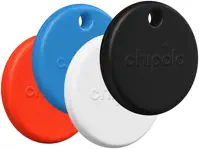
Chipolo POP earns the top spot because it combines a familiar key-tag shape, a replaceable battery, and a choice of Find Hub or Find My. Chipolo rates the speaker at about 120dB.
You pick one ecosystem at setup; switching requires a factory reset.
For an Android household, that one-network rule is simple. A mixed household can still switch networks later after following the manufacturer’s reset instructions.
Its replaceable CR2032 makes it the simplest current starting point for many Android users.
Pebblebee Clip 5
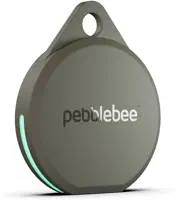
The Pebblebee Clip 5 supports both Find Hub and Apple Find My, but it runs one network at a time. Its differentiators are the built-in clip, rechargeable battery, and bright LEDs.
Only the network selected during setup can relay that physical tracker.
Pebblebee emphasizes a loud alert and bright LEDs rather than a UWB direction arrow. Its current product page lists IP66 water resistance.
USB-C charging trades coin-cell replacement for an occasional cable charge. Compare the live price with Chipolo POP before deciding.
Pebblebee Halo: Best for Personal Safety
 Hot
Hot
Pebblebee Halo is designed around personal safety rather than pure item finding. It combines Find Hub or Find My support with a siren, strobe, flashlight, and Alert Live sharing to trusted contacts.
As a finder it behaves like the Clip 5 — one network per setup, rechargeable — and the Halo itself carries an IP66 water-resistance rating. The deciding question is whether you want the safety hardware: nothing else here doubles as an alarm. It’s sold direct from Pebblebee, not Amazon.
Motorola Moto Tag 2: Best Value for UWB Precision Finding
 Best Value
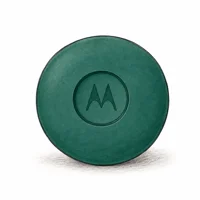
Moto tag 2 is the nearby-finding specialist. Motorola lists UWB direction and distance, Bluetooth Channel Sounding, a replaceable CR2032, and IP68 testing.
The compatibility caveat matters: UWB requires an Android phone with UWB enabled, while Channel Sounding requires supported Bluetooth 6.0 hardware and Android 16 or later. Availability can vary by region.
Trackers That Are Not Find Hub Compatible
Not every popular tracker works with Google Find Hub, and two names cause consistent confusion: Samsung SmartTag 2 and UGREEN FineTrack.
UGREEN FineTrack Slim is listed for Apple Find My, not Google Find Hub. Network compatibility matters more than its price or shape, so verify the exact model rather than assuming every Bluetooth finder works in the same app.
Chipolo’s older ONE Point, CARD Point, ONE Spot, and CARD Spot models were discontinued in 2025. Chipolo’s discontinuation notice confirms that POP, LOOP, and CARD replaced them.
Samsung SmartTag 2 and Google Find Hub Compatibility
No. SmartTag 2 uses Samsung’s SmartThings Find network, not Find Hub.
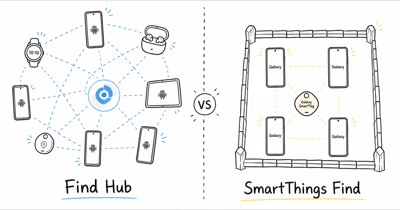
SmartThings Find relies on participating Samsung Galaxy devices, while Find Hub uses Google’s separate Android network. The apps don’t merge their item lists or relay the other network’s tags.
Google’s official Find Hub announcement describes its own compatible partner ecosystem. Samsung SmartTag 2 remains a SmartThings Find product rather than a Find Hub accessory.
Samsung Galaxy phone owners can use either SmartTag 2 (SmartThings) or any Find Hub certified tracker. Samsung phones support both systems. The SmartTag 2 won’t appear in the Find Hub app, and Find Hub trackers won’t appear in the SmartThings app.
Choosing the Right Google Find Hub Tracker
The right choice depends on two factors: whether you need UWB precision finding, and whether your household mixes iPhone and Android users.
Choose Chipolo Pop if...
- You want a replaceable-battery key tag
- You value Chipolo's approximately 120dB published rating
- You're Android-only but want the option to switch to Find My later
- You prefer a user-replaceable CR2032 battery
Choose Pebblebee Clip 5 if...
- Your household mixes iPhone and Android users
- You travel internationally where Android coverage varies by region
- You want bright LEDs and IP66 water resistance
- USB-C annual charging is simpler than buying replacement batteries
Choose Moto Tag 2 if...
- Your Android phone supports UWB and you want direction and distance
- Your phone supports Bluetooth 6.0 Channel Sounding and Android 16+
- You're committed to Android and don't need Apple Find My support
- You want IP68 testing and a long-life replaceable battery
Choose Pebblebee Halo if...
- You want a personal-safety alarm and tracker in one device
- A siren, strobe, and flashlight matter more than UWB
- You want pull-apart SOS that shares your live location with trusted contacts
- You're comfortable with Alert Live's terms after the included period
For many Android users, Chipolo POP is the simplest default because its battery is replaceable and the hardware can be reset for either network. If UWB matters more, see our Moto Tag vs Chipolo Pop breakdown.
How to Remove Old Devices From Find Hub
Phones, watches, and tablets drop off Find Hub once they’re factory reset, but Bluetooth headphones and earbuds used to stay listed indefinitely. A July 2026 Find Hub app update finally added a Remove from Find Hub option for that stuck audio gear.
To remove one: open the Find Hub app, tap the device you no longer use, then look for Remove from Find Hub. On many models the option sits behind the settings gear on the device page rather than at the top level, so check there if you don’t see it immediately. The rollout covers audio gear from brands like Sony, JBL, Nothing, and Google’s own Pixel Buds.
Trackers work differently. Remove a tag from its device detail page before you sell it, gift it, or pair it to another account, which unlinks it from your Google account and frees it for a fresh setup.
Google Find Hub and Apple Find My: How the Networks Compare
Network performance depends on participating devices near the lost item, privacy settings, region, and environment. Neither network promises a fixed update interval or universal local coverage.
Find Hub also supports phone-side satellite location sharing and airline baggage partnerships.
Moto tag and moto tag 2 can add UWB nearby finding when the paired Android phone, software, and region support it.
For a full breakdown of both ecosystems including network density by region, privacy protections, and UWB performance, see our Google Find Hub vs Apple Find My comparison. It covers the full picture alongside the AirTag 2 vs Chipolo Pop vs Tile Pro head-to-head for cross-ecosystem data.
Bottom Line
The ecosystem is growing, so this guide avoids a fixed device count.
Chipolo POP covers the replaceable-battery key-tag use case. Pebblebee Clip 5 is the rechargeable clip option, Card 5 covers wallets, and Halo combines item finding with personal-safety features.
Moto tag 2 is the pick when UWB nearby finding is your priority and your Android phone supports it. Our tracker comparison tool lets you compare battery, range, and current pricing side by side.
If you need the pairing steps first, follow our Moto Tag setup guide before comparing specs.
Two things to know before buying: Samsung SmartTag 2 is not Find Hub compatible, and UGREEN FineTrack is certified for Apple Find My only. The best Bluetooth trackers overall guide includes options across all ecosystems if you’re not committed to Android.
FAQ
What trackers are compatible with Google Find Hub?
Current examples include Chipolo POP, LOOP, and CARD; Pebblebee Clip 5, Card 5, and Halo; and Motorola moto tag models. This isn't an exhaustive registry, so confirm the exact model and region on the manufacturer's page.
Does Samsung SmartTag 2 work with Google Find Hub?
No. The Samsung SmartTag 2 uses Samsung's SmartThings Find network, which is separate from Google Find Hub. SmartThings relies on Samsung Galaxy devices; Find Hub uses all Android phones with Google Play Services. The two networks don't share infrastructure. Samsung Galaxy phone owners can use Find Hub trackers, but the SmartTag 2 itself won't appear in the Find Hub app.
Is Google Find Hub the same as Find My Device?
Yes. Google renamed Find My Device to Find Hub in May 2025. The core network is the same, but the rebrand came with significant upgrades: UWB support for compatible trackers, phone-side satellite location sharing, and airline baggage recovery integrations. If you're searching for information under the old name, both refer to the same system.
Do you need a Pixel phone to use Google Find Hub?
No. Current third-party tracker pages generally specify Android 9 or later with Google Play Services. UWB and Bluetooth Channel Sounding require additional supported phone hardware, software, and regional availability.
Can you use a Google Find Hub tracker with an iPhone?
Not through the native Find Hub app, which is Android-only. However, dual-network trackers offer a workaround. Chipolo Pop or Pebblebee Clip 5 can be registered to Find My instead of Find Hub, and the iPhone sees it normally. Each physical tracker still uses one network per setup; switching networks requires a factory reset and re-pair.
Which Google Find Hub tracker has the longest battery life?
Among the models covered here, Pebblebee rates Card 5 for up to 18 months per charge, while Motorola publishes more than 500 days for moto tag 2 in some markets. Manufacturer tests differ, so treat both as approximate.
What replaced Chipolo ONE Point and CARD Point?
Chipolo discontinued its Point, Spot, and older ONE families in 2025. The current POP, LOOP, and CARD models can be set up with Google Find Hub on Android or Apple Find My on iPhone, one network at a time.
How does Google Find Hub compare to Apple Find My in network size?
Both are large crowdsourced networks, but local performance depends on participating phones near the lost item, privacy settings, and region. Dual-network hardware lets you choose either ecosystem, but only one network stays active after setup.