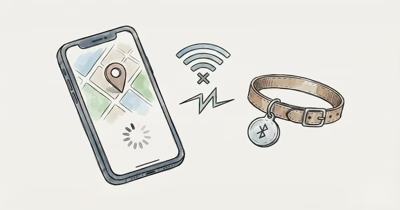
A Moto Tag 2 stuck on an old pin has no GPS and only refreshes when another Android phone passes within Bluetooth range. Turn on offline finding, set the network to everywhere, and check the battery.
The Moto Tag 2 isn’t a real-time tracker. Google states that the service runs on a crowdsourced network of over a billion Android devices, which means a tag in your bag updates only when a stranger’s phone walks past it. When the location looks stale, the cause is usually network density, an offline-finding setting, or a fading CR2032, not a broken tag.
- No GPS, no self-updating — the Moto Tag 2 refreshes only when an Android phone passes within Bluetooth range and reports it to Find Hub.
- Network density decides everything — by default Find Hub reports only in busy places, so a tag in a quiet area can sit hours between updates.
- Offline finding must be on for the tag and the phone — two separate switches, both required for crowdsourced updates.
- A weak CR2032 cuts the broadcast range first — low voltage can shorten the Bluetooth ping before the tag dies completely, even with a rated 500-day life.
- Location permission must be set to allow all the time — while-using-app permission stalls background reporting to the network.
Why Is My Moto Tag 2 Location Stale?
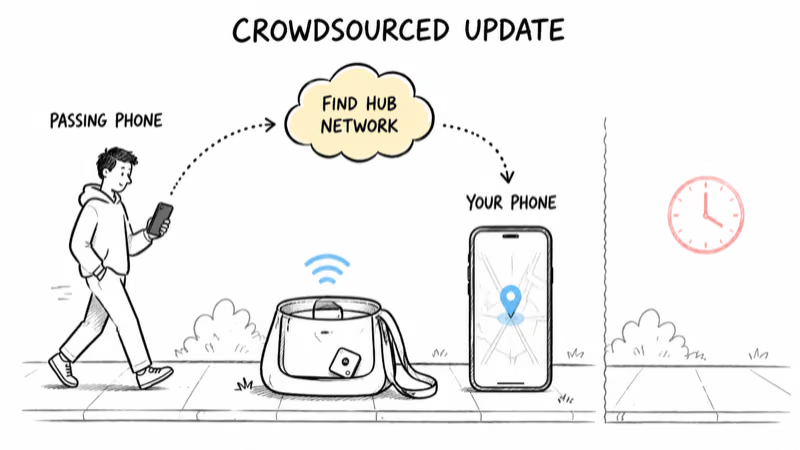
The single biggest cause is network density. Google’s documentation on how Find Hub aggregates locations states that the Find Hub network waits until multiple Android devices have detected a lost item before it shows you a refreshed pin. That’s a privacy feature, not a bug, and it has a direct cost to update frequency.
With crowdsourced trackers, the default setting is the trap. Google states that 1 of its 4 offline-finding modes, “with network in busy places only,” is the default for most phones. Android Authority found that this default makes the network less reliable for tracking items outside of high-traffic areas like airports or shopping centers.
A tag in a home office or a parked car in a quiet driveway may not get the two or three independent device passes Find Hub needs to commit a new location.
So a stale pin breaks down into three checks: is the tag in a low-traffic area, is offline finding set to report everywhere, and is the battery strong enough to broadcast far enough for a passing phone to catch it.
How Often Does the Moto Tag 2 Update Its Location?
There is no fixed interval. Unlike a GPS tracker that pings on a timer, the Moto Tag 2 updates only when a participating Android device detects its Bluetooth broadcast and forwards an encrypted report. Dense foot traffic usually refreshes faster; rural or quiet areas can stay stale until the tag moves back into traffic.
Two things widen that window. First, Bluetooth range shrinks through walls, cars, and bags. Second, Find Hub batches reports for privacy.
The takeaway: judge the Moto Tag 2 on its last known location, not on a live dot. If you need second-by-second tracking, a Bluetooth tracker is the wrong tool. We cover that trade-off in our full Moto Tag 2 review.
Turn On Offline Finding and Set It to Everywhere
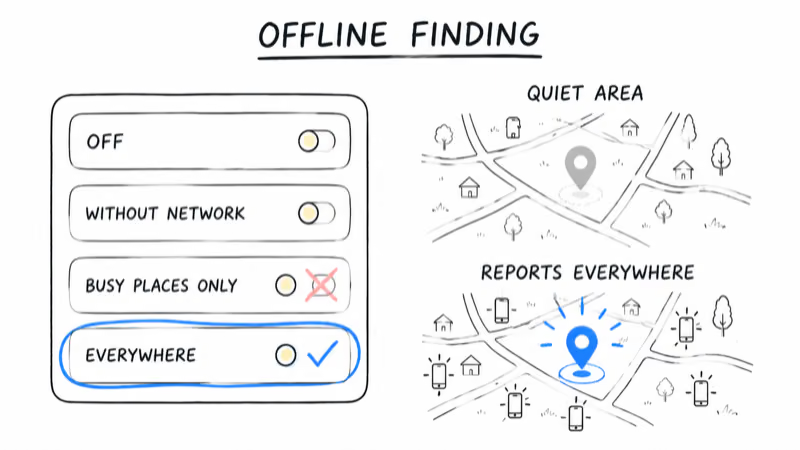
This is the fix that resolves most stale-location complaints. Offline finding is what lets other people’s phones report your tag, and the tag plus your own phone each have a switch.
1. Open the Find Hub app and tap your Moto Tag 2.
2. Open the tag’s settings and confirm offline finding is enabled for that tag.
3. On your phone, go to Settings, then Google, then Find Hub, and set the network mode. Change it from “busy places only” to with network everywhere so the tag reports even in low-traffic areas.
4. Confirm your phone itself is opted into the network, since a phone that doesn’t participate can’t relay your own tag when it’s near you.
Google’s offline finding modes run from off, to without network, to busy places only, to everywhere. The “everywhere” setting trades a sliver of privacy for far more frequent updates. If you only track everyday items like keys or a bag, that trade is usually worth it. Our guide to Find Hub offline finding settings walks through each mode in detail.
Fix Bluetooth, Location Permission, and Battery Optimization
If offline finding is already on and the pin still won’t move, the problem is on your phone, not the network.
Location permission must be allow all the time. Find Hub needs background location to report tags it detects. Open Settings, Apps, Find Hub, Permissions, Location, and set it to Allow all the time, not “while using the app.” While-using permission silently kills background reporting.
Exempt Find Hub from battery optimization. Aggressive battery savers freeze background scanning. In Settings, Apps, Find Hub, Battery, choose Unrestricted. On Pixel and Galaxy phones this is the most common reason a phone stops relaying nearby tags.
Keep Bluetooth and location services on. The network only works while Bluetooth is active. A phone with Bluetooth off contributes nothing and receives nothing. For wider Find Hub stalls across multiple tags, see our Find Hub tracker not updating fixes.
Check the CR2032 Battery Before Blaming the App
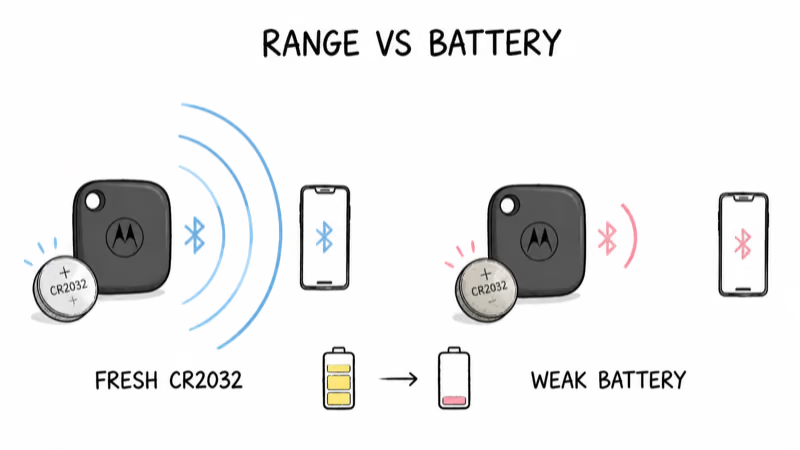
The Moto Tag 2 is rated for about 500 days on a single CR2032 coin cell, but a fading battery degrades the broadcast long before the tag goes silent. Lower voltage means a shorter Bluetooth range, which means fewer passing phones catch the signal, which means a staler pin.
Check the battery level in the Find Hub app on the tag’s detail screen. If it reads low, swap in a fresh CR2032 with the positive side up. A coin cell near depletion broadcasts over a shorter range than a fresh one, so a weak battery can leave the pin stale well before the tag goes silent.
Re-Register the Tag as a Last Resort
If none of the above moves the pin, the tag’s registration may be stuck. Reset it and pair it fresh.
1. In Find Hub, open the tag and remove it from your device list.
2. Press the tag’s button once, then press and hold for about five seconds until it beeps to perform a hardware reset.
3. Wake your phone, hold the tag close, and re-pair when the prompt appears.
4. Walk the tag through a busy area once so the network gets a clean first fix.
A re-register clears a corrupted offline-finding key, which is the rare software cause behind a permanently frozen location. If the tag won’t pair at all rather than just refusing to update, that’s a different issue, covered in our Moto Tag 2 not connecting guide.
UWB Precision Finding Does Not Fix a Stale Map Pin
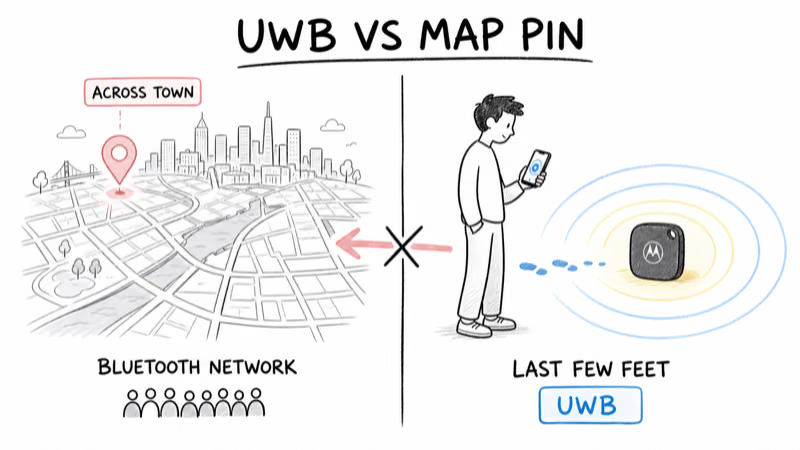
No, and this trips people up. The Moto Tag 2 supports ultra-wideband precision finding, but UWB only works when you are already within a few feet of the tag and your phone supports it. UWB does not refresh the map location across town.
The far-away location you see in Find Hub always comes from the crowdsourced Bluetooth network, never from UWB. So a stale pin is never a UWB problem. Use precision finding only for the last few feet once Find Hub has put you in the right room. For how the broader network compares against Apple’s, see our Find Hub vs Find My comparison, or browse the full Find Hub hub for related tracker guides.
Bottom Line
A Moto Tag 2 showing an old location is rarely defective. It updates only when other Android phones detect it, and the default “busy places only” setting starves it of reports in quiet areas. Switch offline finding to everywhere, set location permission to allow all the time, exempt Find Hub from battery optimization, and replace a weak CR2032. If the pin is still frozen, re-register the tag and walk it through a crowded spot once.
FAQ
Why does my Moto Tag 2 show an old location?
The Moto Tag 2 has no GPS. It refreshes only when another Android phone passes within Bluetooth range and reports it to Find Hub. An old pin usually means the tag is in a low-traffic area, offline finding is set to busy places only, or the battery is too weak to broadcast far enough.
How often does the Moto Tag 2 update its location?
There is no fixed interval. Updates happen only when a participating Android device detects the tag and forwards an encrypted report. Dense areas usually refresh sooner, while rural or quiet areas can stay stale until the tag moves back into foot traffic.
How do I make my Moto Tag 2 update more often?
Open Find Hub, go to the network setting, and switch it from with network in busy places only to with network everywhere. Also set the Find Hub location permission to allow all the time and exempt the app from battery optimization. Those three changes restore background reporting from nearby phones.
Does the Moto Tag 2 use GPS for location?
No. The Moto Tag 2 is a Bluetooth tracker that relies on Google’s crowdsourced Find Hub network. The location you see is borrowed from the GPS of whatever Android phone last detected the tag, not from any GPS chip inside the tag itself.
Will a low battery stop the location from updating?
Yes, gradually. A fading CR2032 shortens the Bluetooth broadcast range before the tag goes fully silent, so fewer passing phones catch the signal and the pin grows staler. Check the battery level on the tag’s detail screen in Find Hub and replace it with a fresh CR2032 if it reads low.
Does UWB precision finding fix a stale location?
No. Ultra-wideband only works once you are within a few feet of the tag and your phone supports it. The across-town location in Find Hub always comes from the crowdsourced Bluetooth network, so UWB has no effect on whether the map pin refreshes.
Why does my Moto Tag 2 only update when it’s near my phone?
That means your phone is the only device reporting it, which happens when offline finding is set to busy places only or off. Switch the network mode to everywhere and confirm offline finding is enabled for both the tag and your phone so other people’s devices can also report it.