A Tractive that needs charging every night is almost never a faulty battery. Tractive’s own battery page states that “Smart features like Power Saving Zones help extend battery life.”
- No Power Saving Zone is the top cause — without a home WiFi zone the radios run full-time, and you lose roughly half your runtime versus the rated figure
- LIVE Tracking drains fastest — streaming a position every 2 to 3 seconds can flatten a full charge in a single search, so it’s for emergencies, not all-day use
- Weak LTE coverage forces high power — in fringe signal the cellular modem ramps transmit power and retries, draining far faster than in strong coverage
- The DOG 6 is rated up to 14 days in a Power Saving Zone and up to 6 days without one, so a 1-day result means a setting is wrong, not the cell
- Cold weather cuts capacity temporarily — below freezing the battery shows less charge and recovers once it warms up, so a winter dip is usually not a defect
Why Does My Tractive Drain So Fast?
The honest answer: a real-time LTE tracker spends most of its power on the cellular radio, not GPS, and that radio’s draw swings wildly with your settings and signal. Tractive’s tracker product page states that the DOG 6 runs up to 14 days in a Power Saving Zone and up to 6 days without one.
That gap maps directly to the zone setting. With no zone configured and normal tracking on, the rated runtime sits near the 6-day mark, which means charging every five to six days. Add a home WiFi Power Saving Zone and the rated runtime climbs toward the two-week figure, because most of the tracked day is spent at home where the zone idles the radios.
The implication is clear. A tracker that dies in a single day is reporting a configuration problem, not a worn-out cell, and the fix is almost always free.
There are five settings or conditions that drain a Tractive faster than its rating:
- No Power Saving Zone — the radios never idle, even when your pet is asleep at home
- LIVE Tracking left running — a 2-to-3-second update interval is the heaviest mode there is
- Weak LTE coverage — the modem burns extra power hunting and holding a marginal signal
- High update frequency — more frequent position reports mean more radio wake-ups
- Cold weather — low temperatures temporarily lower the charge the battery can deliver
Work through the fixes below in order. Most owners recover multi-day runtime by the second step.
How Do Power Saving Zones Extend Battery?
A Power Saving Zone is a trusted WiFi area, usually your home, where the tracker switches to low-power mode because your pet is somewhere safe and stationary. Instead of running GPS and LTE continuously, it leans on the known WiFi network and wakes the radios far less often. This is the feature Tractive points to first on its battery page: “Smart features like Power Saving Zones help extend battery life.”
The payoff is large. On the DOG 6 the published runtime jumps from up to 6 days to up to 14 days purely by adding a zone, because the bulk of a tracked day is usually spent at home. To set one up, open the Tractive app, go to the tracker settings, find Power Saving Zone, and connect it to your home WiFi. Press the tracker’s power button once to confirm it’s detecting the network before you trust the zone.
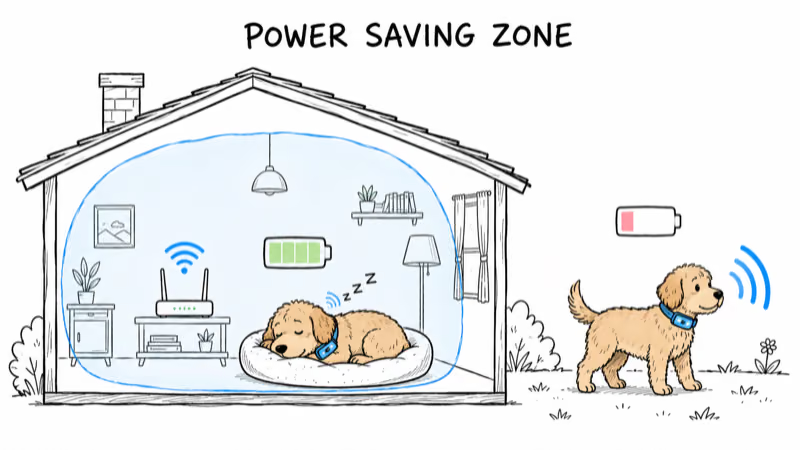
A few practical notes before you rely on the zone:
- The zone only saves power while the pet is actually inside it; once they leave, normal tracking resumes automatically
- Disabling a zone, or never creating one, is the fastest way to halve your runtime
- A weak or intermittent home WiFi signal can stop the tracker from “seeing” the zone, so place your router where the collar usually rests
If you are still shopping and battery life is your priority, our best GPS trackers for pets guide ranks the current field by published runtime, subscription cost, and charging tradeoffs.
LIVE Tracking Is the Heaviest Drain
LIVE Tracking streams a new position every 2 to 3 seconds, which is exactly what you want during an active search and exactly what you don’t want as an all-day default. In LIVE mode both the GPS and LTE radios stay awake continuously, so a charge that would last days in normal tracking can drop quickly.
The most common mistake: an owner opens LIVE during a scare, finds the pet, and forgets to close it. The tracker streams for hours afterward and the battery craters.
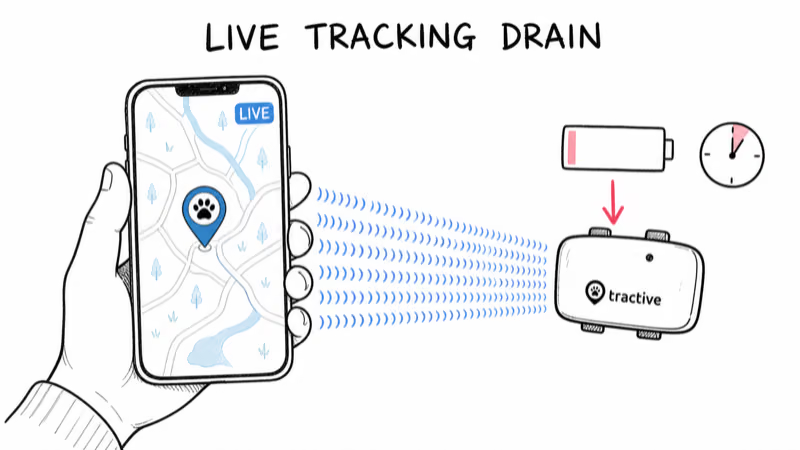
Update frequency matters even outside LIVE mode. A higher reporting rate means more radio wake-ups per hour, and each wake-up costs power. If your app lets you choose a tracking interval, a slightly slower interval during routine days is a cheap way to add runtime without losing meaningful coverage.
Weak LTE Coverage Forces High Power
This is the cause people overlook. When a Tractive sits in fringe coverage, the cellular modem raises its transmit power and retries the connection, both of which burn extra energy.
The DOG 6 uses an LTE-M (Cat-M1) modem, a low-power cellular standard designed for exactly this kind of device. According to Wikipedia’s LTE-M overview, an LTE-M module supports “18 dB better coverage” than a baseline LTE Cat-0 modem and is built for multi-year battery life in good conditions. The catch is that those efficiency gains evaporate in poor signal, where the radio works hardest.
The effect is large. A DOG 6 that comfortably reaches its rated runtime in strong coverage can lose a meaningful share of that runtime at a weak one-bar rural property, from signal alone.
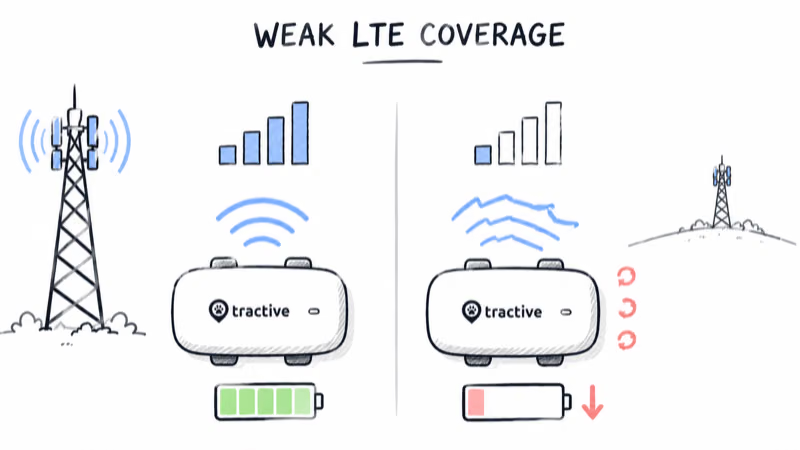
A simple way to picture it: a tracker that lasts comfortably at home in strong coverage can run much shorter at a rural property or a basement-level kennel with one bar of LTE. If runtime is poor only in one location, suspect signal there before you suspect the hardware. A Tractive Base Station, which extends a Power Saving Zone over WiFi, can help in spots where home cellular coverage is weak but WiFi is solid.
Cold Weather and Battery Age, Explained
Both do, and both are easy to mistake for a defect. Lithium-ion cells temporarily lose usable capacity in the cold. As Wikipedia’s lithium-ion battery article explains, “at lower temperatures the internal resistance of the battery may increase, resulting in slower charging and thus longer charging times.”
That higher resistance also means the cell delivers less of its rated charge while cold. A Tractive that drops from a week to a few days during a January cold snap is usually behaving normally, and runtime climbs back as temperatures rise.
Battery age is the slower factor. Like any rechargeable cell, a Tractive’s capacity fades gradually over hundreds of charge cycles. If a tracker that once held a charge for ten days now manages four even with a Power Saving Zone, LIVE mode off, and warm weather, the cell itself is aging. That is the point to contact Tractive about a battery service rather than keep chasing settings.
For owners comparing whether to repair or replace, our Tractive GPS pet tracker review covers battery ratings across models, and our Tractive vs Fi comparison weighs runtime against the other big subscription tracker.
The 7-Step Fix to Recover Runtime
Run these seven steps in order. Many short-runtime cases are solved by the early settings checks.
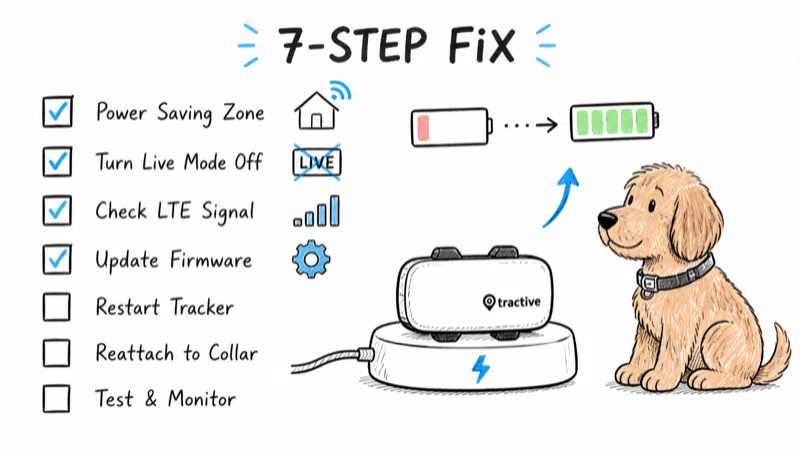
1. Confirm a Power Saving Zone is active. Open the Tractive app, check the tracker settings, and make sure a zone is connected to your home WiFi. No zone is the leading cause of fast drain, and adding one can nearly triple rated runtime.
2. Turn LIVE Tracking off after any search. LIVE streams a position every 2 to 3 seconds and will flatten a charge in hours. Confirm the app has returned to normal tracking, not LIVE, once your pet is found.
3. Check your LTE signal at the trouble spot. If runtime is poor only in one place, the modem is likely fighting weak coverage there. Move the home zone closer to good signal or add a Base Station over WiFi.
4. Lower the update frequency for routine days. If your app offers a tracking interval, a slightly slower rate cuts radio wake-ups and adds hours without losing useful tracking.
5. Update the tracker firmware. Open the app and apply any pending firmware update. Power-management improvements ship in firmware, and an out-of-date tracker can drain faster than a current one.
6. Rule out cold weather. If drain spikes only when it’s freezing, the dip is temporary. Bring the tracker indoors to charge, since charging a cold cell is slower and less complete.
7. Compare against the rating before blaming the cell. Charge fully, enable a Power Saving Zone, keep LIVE off, and watch a normal day. If you still fall far short of the 6-to-14-day range and the tracker is old, contact Tractive about a battery service.
One reassuring point: none of these fixes risk your data. Adjusting zones, intervals, or firmware does not erase your Location History, so you can experiment with settings freely while you hunt for the cause. If the pin is also stale or frozen rather than just short on battery, that is a separate problem covered in our Tractive not updating location guide.
If you would rather avoid the subscription-and-battery juggle entirely, our best dog GPS tracker without subscription roundup covers options with no monthly LTE plan, though most trade real-time range for longer-lived Bluetooth tracking.
Bottom Line
A Tractive that drains fast is almost always a settings issue, not a dead battery. Add a Power Saving Zone tied to your home WiFi, turn LIVE Tracking off after any search, and check your LTE signal where runtime is worst. Those three moves recover most of the rated 6-to-14-day window. If a charged tracker with a zone set and LIVE off still dies fast in warm weather, the cell is aging, and that is the time to contact support.
FAQ
Why is my Tractive battery draining so fast?
The most common reason is no Power Saving Zone, which leaves the radios running full-time. Leaving LIVE Tracking on after a search and sitting in weak LTE coverage are the next two causes. Add a home WiFi zone, turn LIVE off, and check your signal before assuming the battery is faulty.
How long should a Tractive battery last?
The DOG 6 is rated up to 14 days in a Power Saving Zone and up to 6 days without one, per Tractive. Continuous LIVE Tracking, weak coverage, or cold weather will lower that. If you fall well short with a zone set and LIVE off, the cell may be aging.
Does LIVE Tracking drain the Tractive battery?
Yes, more than any other mode. LIVE streams a position every 2 to 3 seconds with both radios awake, which can flatten a charge quickly. Use it only during an active search, then confirm the app returns to normal tracking afterward.
How do Power Saving Zones extend battery life?
A Power Saving Zone is a trusted home WiFi area where the tracker drops to low power because your pet is safe and stationary. It wakes the GPS and LTE radios far less often. On the DOG 6 a zone roughly doubles rated runtime, from up to 6 days to up to 14 days.
Does cold weather affect Tractive battery life?
Yes, temporarily. Lithium-ion cells deliver less charge when cold because internal resistance rises, so runtime dips in freezing weather and recovers as it warms. A winter drop from a week to a few days is usually normal, not a defect. Charge the tracker indoors for a fuller charge.
Will updating settings erase my Tractive history?
No. Changing Power Saving Zones, update intervals, or applying firmware updates does not delete your Location History. You can adjust settings freely while troubleshooting battery drain, and your past tracking data stays intact in the app.
When should I contact Tractive about the battery?
Contact support when a fully charged tracker with a Power Saving Zone set and LIVE off still dies in a few days during warm weather. That points to an aging cell rather than a setting. Note the timeframe and the LED status when you press the power button, since support uses those to read the device state.