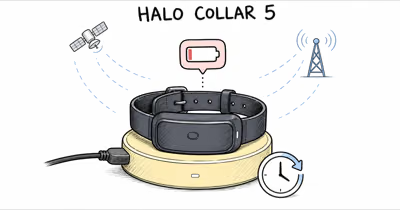
A Fi collar that won’t charge usually has a dead Base, dirty contacts, bad seating, or a deeply drained battery. Confirm a blue Base light, clean the contacts, and re-seat.
A Fi collar not charging is usually a power, contact, or seating problem, not a dead device. According to Fi’s Fi Base troubleshooting guide, the first checks are the power outlet, the cables seated in their ports, and a Base reset before you assume the collar itself failed.
- The Base light tells you the state: a properly docked Fi Series 3 collar should turn the Base light blue, so no light means the Base, not the collar, is the first suspect.
- A full charge can take hours, so a short dock test is too brief to judge a charging problem.
- Dirty contacts break the circuit; dog grime, hair, and dried saliva on the collar pins or Base pad stop current before the battery ever sees it.
- A deeply drained battery wakes slowly; a collar at 0 percent can sit several minutes before any light appears as the cell recovers.
- The Base reset is a 5-second hold on the button next to the micro-USB port, and a healthy reset flashes the Base light yellow.
Why Won’t My Fi Collar Charge?
Start with the battery itself, because a deeply drained Fi collar behaves differently from a healthy one. Wikipedia’s lithium-ion battery overview confirms that a Li-ion cell charges in 2 stages: constant current and constant voltage, and a very low cell has to climb back into that constant-current stage before it shows normal progress.
That battery behavior means a dead Fi collar can sit on the Base with no light for several minutes before the charge indicator wakes up.
A fully drained collar can take a few minutes on the Base before the first charge light appears, so don’t pull it off after 30 seconds and call it broken. Leave it docked for at least 15 minutes before judging it.
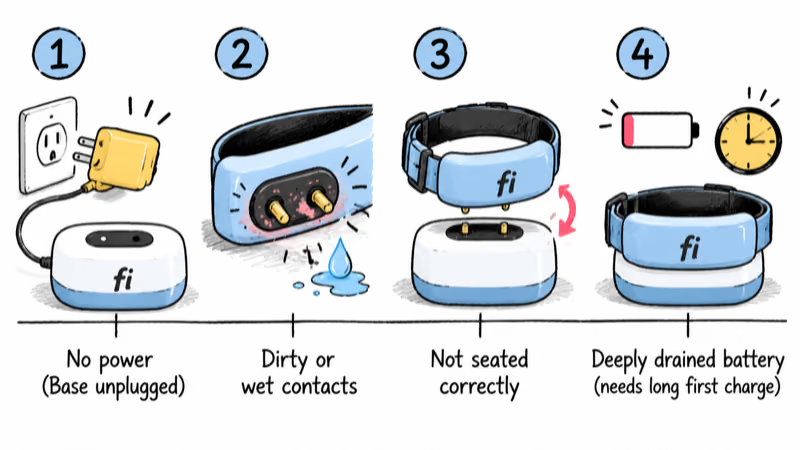
The four most common charging blockers, in order of how often they bite:
1. Base has no power. A dead outlet, loose cable, or unplugged adapter means the collar never had a chance.
2. Dirty or wet contacts. The collar pins and the Base charging pad must touch metal-to-metal. Hair, dried mud, and saliva are the top offenders.
3. Bad seating or alignment. If the collar is not docked squarely, the pins miss the pad and the Base light stays off.
4. Deeply drained battery. A long-dead collar needs a patient first charge, not a quick tap on the Base.
Many “won’t charge” cases trace back to seating or contact problems, not a failed device. For the collar’s normal battery behavior, our Fi Series 3 review covers standard runtime in more detail.
Why Is the Fi Base Light Off?
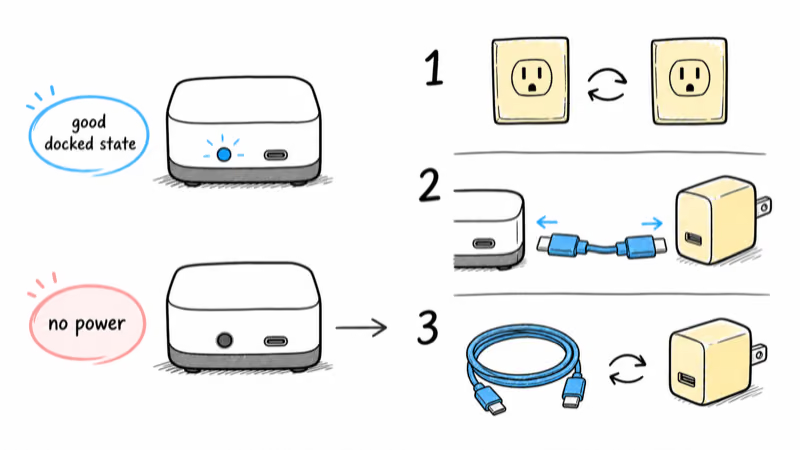
The Base light is your fastest diagnostic. A properly docked Fi Series 3 collar should turn the Base light blue, which confirms power is reaching the device. If the light is off entirely, the problem is upstream of the collar.
Fi’s Base troubleshooting steps walk through this in order: confirm the outlet works by plugging in another USB device, try a second outlet, and check that the cables sit firmly in their ports and are not loose. A surprising number of dead Bases trace back to a cable that wiggled half-out of the port.
Test the power chain in three steps:
1. Swap the outlet. Move the Base to an outlet you know works, ideally one not on a switch or surge strip that may be off.
2. Reseat both cable ends. Push the USB cable fully into the Base and into the adapter. A loose port connection is the single most common cause of a dark Base.
3. Try a different cable and adapter. A frayed cable or a weak adapter can pass enough power to look alive but not enough to charge.
If the Base still shows no light after all three, it’s a hardware fault, and you move to the reset below.
Clean the Fi Charging Contacts
Once you confirm the Base has power but the collar still won’t charge, the contacts are the next suspect. Fi collars charge through small metal pins that press against the Base pad, and any film between them breaks the circuit.
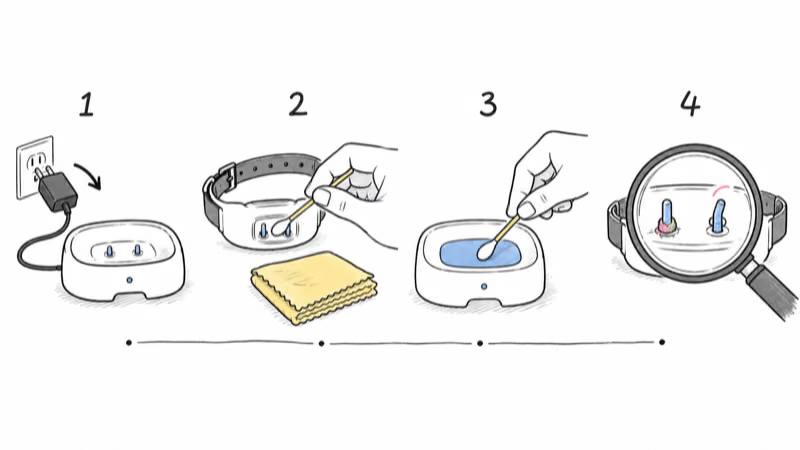
Clean both sides before anything else:
1. Power down first. Unplug the Base so you are not wiping live contacts.
2. Wipe the collar pins. Use a dry microfiber cloth, then a cotton swab lightly dampened with isopropyl alcohol to lift dried saliva and grime.
3. Clean the Base pad. Wipe the charging surface the same way and let it dry fully before docking.
4. Inspect for corrosion. Look for green or white residue or bent pins. Corrosion needs a gentle scrub; bent pins need Fi support.
Dirty contacts are easy to underestimate because the collar looks fine. A working dog wears mud, pond water, and saliva straight onto the exact spot the charger depends on. With intermittent charging, contacts are a more common cause than the battery. If your collar charges some days and not others, clean the pins before you suspect the cell.
Reset the Fi Base
Power, clean contacts, and correct seating all check out? Reset the Base before contacting support.
According to Fi’s reset instructions, a 5-second hold resets the Base: unplug it, hold the reset button on the back next to the micro-USB port, plug the Base back in while still holding, and keep holding for about five more seconds. A successful reset flashes the Base light yellow.
After the reset, dock the collar again and watch for the blue light. If the collar is also unresponsive, you can reset the collar itself from the Base, which is a separate step from the Base reset and useful when the collar shows as offline in the app. A stale connection state is a common reason a charged collar still reads wrong, the same handoff issue we cover in our Fi collar not updating location guide.
When the Collar Charges but Drains Fast
Sometimes the collar charges fine but dies far sooner than expected, which feels like a charging fault. It usually is not. Fi’s battery life depends heavily on activity mode, and Lost Mode is the biggest drain.
If the collar reaches 100 percent but drops quickly, suspect mode and coverage before hardware. Lost Mode and weak-signal searching are normal battery drains.
A battery that won’t hold a full charge after a clean cycle is the real warning sign. Fi’s charging-to-100-percent guide points to contacts, cable, and Base power before battery health.
Lithium-ion cells still lose capacity over time, and a collar that once lasted weeks but now lasts a day has likely aged out after a year or more of daily charging. At that point the fix is a battery service or replacement, not another reset.
Real-world owner reports help set expectations. A FiDogCollar discussion mixes battery and charging frustrations with owners reporting no issues. Treat those as user reports, not specs.
7 Fi Collar Charging Fixes
Work through these seven fixes in order. Most charging problems clear in the first four steps, long before a warranty claim.
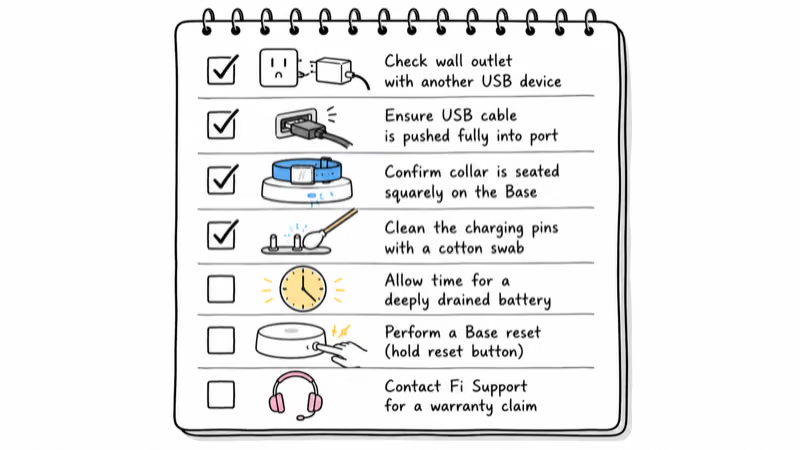
1. Confirm the Base has power. Plug another USB device into the same outlet, or move the Base to an outlet you know works.
2. Reseat both cable ends. Push the cable fully into the Base port and the adapter. A loose port is the top cause of a dark Base.
3. Dock the collar squarely and watch for blue. A properly seated Fi Series 3 collar turns the Base light blue. No blue means bad alignment or dead contacts.
4. Clean the contacts. Wipe the collar pins and Base pad with a dry cloth, then isopropyl alcohol on a swab. Let them dry before re-docking.
5. Wait out a deeply drained battery. Leave a 0 percent collar on the Base for at least 15 minutes before judging it. A full charge can take hours.
6. Reset the Base. Hold the button by the micro-USB port while plugging in, then five more seconds, until the light flashes yellow. Re-dock and recheck.
7. Contact Fi support for warranty. If the Base never lights, the collar never charges after a clean reset, or the battery dies within a day of a full charge, open a ticket with your last charge time and Base light behavior.
If you decide the Fi platform is not the right fit, our best GPS trackers for pets guide compares Fi against Tractive, Jiobit, and other pet trackers by battery, charging, and coverage. You can also browse every live-location option in our GPS tracker hub.
Bottom Line
A Fi collar that won’t charge is usually a power, contact, or seating problem, not a dead device. Confirm the Base lights blue when the collar is docked, clean the pins and pad, and give a deeply drained battery a patient 15-minute start before judging the charge. If the Base never lights or the battery dies within a day of a full cycle, reset the Base, then contact Fi support for a warranty check.
FAQ
Why is my Fi collar not charging at all?
The most common causes are a Base with no power, dirty charging contacts, or a collar that is not seated squarely on the Base. Confirm the outlet and cables first, then clean the collar pins and Base pad, and dock the collar until the Base light turns blue. A deeply drained battery can also take several minutes before any charge light appears.
Why is the Fi Base light off?
A dark Fi Base usually means it’s not getting power. Try a different outlet, make sure the cable is pushed fully into both the Base port and the adapter, and test a different cable. If the Base still shows no light after those checks, reset it by holding the button next to the micro-USB port while plugging it in for about five seconds.
How long does a Fi collar take to charge?
A Fi collar can take hours to charge from empty to 100 percent. A short test of a few minutes isn’t enough to judge a charging problem, especially if the battery was deeply drained. Leave a dead collar docked for at least 15 minutes before assuming it’s broken.
What color should the Fi Base light be when charging?
When a Fi collar is docked correctly, the Base light should turn blue to confirm the device is properly seated and receiving power. If the light stays off, the collar is likely misaligned or the contacts are dirty. A yellow flash appears specifically during a Base reset, not normal charging.
How do I clean my Fi collar charging contacts?
Unplug the Base first, then wipe the collar pins with a dry microfiber cloth. For stubborn grime, use a cotton swab lightly dampened with isopropyl alcohol on both the collar pins and the Base pad, and let them dry fully before docking. Check for corrosion or bent pins, which need Fi support rather than cleaning.
Why does my Fi collar charge but die so fast?
Fast draining usually points to mode and coverage, not a charging fault. Lost Mode and weak signal searching can drain a full charge much faster than normal mode. A battery that no longer holds a charge after a clean full-charge cycle, especially on a collar charged daily for a year or more, has likely aged and needs a battery service.
How do I reset my Fi Base if charging fails?
Unplug the Base, hold the reset button on the back next to the micro-USB port, plug the Base back in while still holding, and keep holding for about five more seconds. The Base light flashes yellow to confirm the reset. Re-dock the collar afterward and watch for the blue charging light.