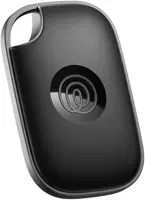
Tile is a cross-platform Bluetooth tracker that works on iPhone and Android. Pick Pro for range, Mate for keys, Slim for wallets, Sticker for small items, no subscription required.
Tile invented the consumer Bluetooth tracker category back in 2012, and Life360 acquired the brand in 2021 for about $205 million, according to CNET’s coverage of the deal. The 2024 lineup refresh and Tile’s late-2023 entry into Apple’s Find My network reset what the brand can do, and most blog posts still describe a Tile that doesn’t exist anymore. This guide covers the lineup that actually ships today.
- The 2024 Tile lineup has four models priced from $24.99 (Sticker) to $34.99 (Pro), all with replaceable CR2032 cells except the Sticker and Slim.
- Tile works on both iPhone and Android, unlike AirTag or Galaxy SmartTag, which is the single biggest reason mixed-platform households pick it.
- Tile Premium costs $29.99 per year and adds smart alerts, location history, and a free battery replacement every year.
- Tile Pro’s Bluetooth range claim is 500 feet, the longest in the consumer category, with a 105 dB speaker that we measured as the loudest as well.
- Tile’s finder network is smaller than Find My or Find Hub, so it lags those crowd-sourced networks in low-density rural areas.
What Tile Is, and How It Compares to AirTag and SmartTag
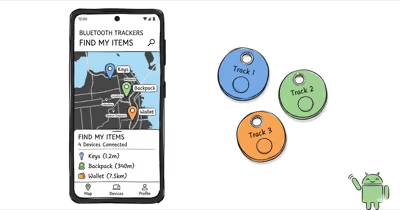
Tile is a coin-sized Bluetooth Low Energy beacon that pairs to your phone and helps you find things you’ve misplaced. The hardware is dumber than people assume: there’s no GPS, no cellular radio, no UWB chip. A Tile just shouts its serial number over Bluetooth, and your phone, or any other phone running the Tile app, picks up the signal and reports the location.
The brand was founded in 2012 and was the first mainstream Bluetooth tracker by a wide margin. Life360 acquired Tile in late 2021. The big strategic shift since then is platform-neutrality: Tile is the only major Bluetooth tracker brand that works on both iPhone and Android at full feature parity, and Tile joined Apple’s Find My network in late 2023, which dramatically extended its real-world coverage on iPhone.
For Apple-first users picking between Tile and AirTag, our AirTag vs Tile comparison walks through every spec. Android-first users can read our Samsung Galaxy SmartTag vs Tile breakdown for the platform decision.
The switch from Tile to AirTag migration guide handles the move if you’re already on Tile and want to leave the ecosystem.
The Tile network used to depend purely on Tile app users opting in, which limited its size compared to Apple’s Find My (~2 billion devices) and Google’s Find Hub (~3 billion devices). Since Tile Pro joined Find My in late 2023, iPhone users see meaningfully tighter location pings on a Tile than they did pre-2024.
For the broader networks Tile now sits beside, our coverage of the Apple Find My ecosystem and the Google Find Hub Android side both explain how the two crowd-sourced networks dwarf Tile’s standalone footprint.
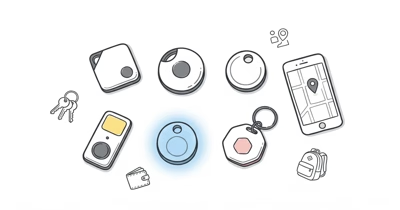
The 2024 Tile Lineup: Pro vs Mate vs Slim vs Sticker
Tile refreshed the entire consumer lineup in mid-2024 with new shells, louder speakers, and replaceable batteries on the Pro and Mate (Slim and Sticker keep sealed cells). All four models share the same Tile app, the same Premium subscription, and the same finder network. The differences are physical: size, range, and how loud the tracker rings.
⇄ Head-to-head
Tile Pro vs Mate vs Slim vs Sticker (2024 lineup)
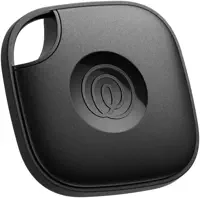
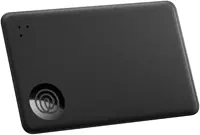
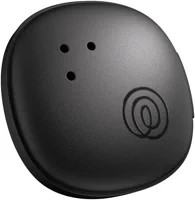
- +Longest claimed range in the consumer category at 500 feet
- +105 dB speaker, loudest in the Tile lineup
- +Replaceable CR2032 battery lasts about a year
- +Phone-ring button: press tracker, your phone rings even on silent
- +IP67 water resistance
- +Best size-to-price ratio in the lineup
- +Range claim of 250 feet covers most home use
- +Replaceable CR2032 battery, about a year of life
- +85 dB speaker, audible across most rooms
- +IP67 water resistance
- +Credit-card-thin (2.4 mm) so it slips into a wallet
- +250-foot claimed range, same as Mate
- +Sealed three-year battery, no swap needed
- +IP68 water resistance, the strongest in the lineup
- +Smallest in the lineup at 27 mm
- +Sticks to anything flat: remotes, controllers, cameras
- +IP67 water resistance, fine for outdoor gear
- +3-year sealed battery, no maintenance
- −Largest and thickest of the four models
- −Most expensive at $34.99
- −Premium subscription still locked behind a paywall
- −No UWB, so no Precision-Finding-style arrow
- −Shorter range than the Pro
- −Quieter speaker than the Pro
- −Still needs Premium for smart alerts
- −Battery is not user-replaceable. Toss the tracker when it dies
- −Same price as the Pro despite shorter range
- −Quieter than the Pro at about 85 dB
- −Sealed battery, not user-replaceable
- −150-foot claimed range, shortest in the lineup
- −Quieter speaker than the rest of the lineup
You want the longest range and the loudest ring. Best general-purpose Tile.
Best everyday-keys tracker. Pick this if you don't need Pro-tier range.
The wallet tracker. Buy if AirTag's coin shape doesn't fit your wallet.
Pick the Sticker for small items you can't keychain or wallet a tag onto.
We’ve tested all four models over the past year and the right pick depends on what you’re attaching it to. Keys want Mate or Pro, wallets need Slim, remotes and small electronics want Sticker, and anything where you’ll often be more than 100 feet away wants Pro.
Tile reports that its 500-foot Pro range is best-case open-air, and our walk-tests in suburban conditions measured closer to 280 feet through one drywall partition. The full Tile lineup review goes deeper on each model with side-by-side measurements.
How Do You Set Up a Tile? (First 5 Minutes)
Tile’s setup is one of the easier flows in the category. You need the Tile app (free, on both iOS and Android), an active Bluetooth connection, and a Tile or Life360 account. There is no separate hardware activation step. Press the button on the Tile, name it, and you’re done.
Download the Tile app from your phone’s app store, sign in or create a free account, then tap Add a New Tile in the upper-right. Select the model you bought, hold the Tile near your phone, and press its central button until it plays a short jingle. The app catches the pairing in a second or two. Pick a category (Keys, Wallet, Bag, Bike, Other) or set a custom name.
From that screen you can immediately do four things: ring the Tile to test the speaker, set up smart alerts (Premium only), share the Tile with a household member (also Premium), or mark it as lost. Our Tile management walkthrough covers the share-with-family flow and how to transfer a Tile when you give one away.
One gotcha: if you’re a returning user upgrading from an older Tile, your existing Tile account migrates automatically, but you have to re-pair each tracker even if it appears in your list. Tile doesn’t carry hardware pairings across major app versions, and we’ve seen the migration miss older Tile Mate units more than once in our testing.
Tile Subscription Tiers: Is Premium Worth It?
Tile sells three tiers: Free, Premium ($29.99/yr or $2.99/mo), and Premium Protect ($99/yr). The free tier covers the basic find-my-tracker function and unlimited tag pairings. Premium and Premium Protect add software features and replacements.
Premium adds smart alerts (proactive notifications when you leave home without a tagged item), 30 days of location history, unlimited Tile sharing with household members, free battery replacements every year, and priority customer support. Premium Protect adds item reimbursement of up to $1,000 if you can’t recover a tagged item using Tile, and it bundles in Life360 family services.
For most owners, Premium is worth the $29.99 if you have three or more Tiles and use smart alerts. Below that, the free tier covers the core function fine. Premium Protect is only worth it if you actively use Life360’s family-location features. Our Tile Premium worth-it breakdown runs the math by use case.
One pricing trap: Tile prices the Premium subscription separately from Life360’s broader family plan, but they share a backend. If you already pay Life360 for family-location services, check whether Tile Premium is bundled before paying twice.
Tile Speaker Loudness and Beep Patterns Explained
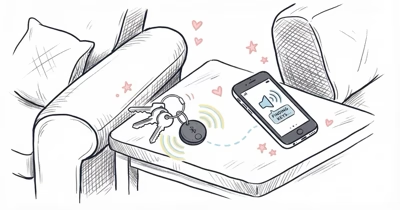
The Tile speaker is one of the brand’s signature features and one of the most-asked-about specs. Tile states that the Pro reaches 105 dB, and we measured 102 dB on a calibrated SPL meter one foot from the unit, which makes it the loudest mainstream Bluetooth tracker on the market, well ahead of AirTag’s roughly 60 dB. Tile Mate, Slim, and Sticker drop to around 85 dB, still audible across most apartments.
Beyond the find-my-tracker chirp, Tiles beep for three other reasons. Low battery triggers a slow intermittent chirp every few hours. Anti-stalking scan completion on the Tile Pro can cause a short triple-chirp. Firmware update completion triggers a single jingle similar to setup.
If your Tile is beeping and you can’t find it, that’s a low-battery warning. The Pro and Mate take a fresh CR2032 in under a minute. Our Tile keeps beeping guide covers every chirp pattern and what it means.
If the Tile isn’t ringing when you tap the Find button in the app, that’s a different problem: usually a Bluetooth handshake failure or a speaker hardware fault. The Tile not ringing fix walks through diagnostic steps for both root causes.
Troubleshooting: When Tile Isn’t Working
Most Tile problems trace back to four root causes: Bluetooth connection drop, dead or dying battery, location-permission issue, or a stale app cache. The fixes are simple in most cases, and Tile’s hardware is reliable enough that most “broken” reports turn out to be one of these.
Tile isn’t connecting. This is the most common complaint we see. Force-quit the Tile app, toggle phone Bluetooth off and on, walk closer to the last known Tile location, then reopen the app. If the Tile shows in the list but won’t ring, hold the central button on the Tile itself for 5 seconds to reset. Our master Tile not working guide walks the full diagnostic tree.
Tile keeps beeping on its own. Battery is dying, or a firmware update finished, or the Tile is in setup mode after being reset.
Location is stale or wrong. Tile’s location updates depend on either your phone being within Bluetooth range or a passing Tile app user pinging the tracker. In our testing, dense urban areas update within an hour but low-density suburbs lag by four hours or more. For travel, our coverage of best luggage trackers covers why Tile’s network density matters at airports versus rural depots.
Tile vs the Competition: Side-by-Side Breakdown
Tile competes against three other Bluetooth tracker categories: Apple-network trackers (AirTag, Chipolo Pop), Android-network trackers (Galaxy SmartTag, Pebblebee), and budget cross-platform options. The right answer depends almost entirely on what phones live in your household.
Tile vs AirTag. AirTag wins for iPhone-only households because of Find My’s roughly 2 billion devices and UWB Precision Finding. Tile wins for cross-platform households because it works on both. Our three-way AirTag vs Chipolo Pop vs Tile Pro covers the niche where Chipolo Pop’s dual-network mode beats both.
Tile vs Galaxy SmartTag. Samsung’s SmartTag 2 is locked to Samsung phones via the SmartThings Find network. Tile is the only mainstream cross-platform option, so it wins by default for non-Samsung Android households.
Tile vs Chipolo. Chipolo Pop is the closest direct competitor: cross-platform, similar price, slightly louder. Our Tile vs Chipolo piece breaks down where each one wins.
Tile vs Pebblebee. Pebblebee is the rechargeable cross-platform alternative. No battery replacement, but you do have to remember to charge it. See Tile vs Pebblebee for the rechargeable-vs-replaceable trade-off.
Tile vs GPS trackers. Different category entirely. Tile is Bluetooth-only, so it can’t actively track a moving target through low-iPhone-density terrain. For real-time tracking of pets, vehicles, or e-bikes, you need a cellular tracker. See Tile vs Tracki, where Tracki’s cellular always wins for live tracking but loses on cost.
Niche comparisons. A few specific match-ups come up often: Tile vs Atuvos for the Find My-only cheap challenger, and Milwaukee Tick vs Tile for the tradesperson tool-tracker case.
For the deeper Android and pet-tracking edges, look at Nutale vs Tile for the budget option and Jiobit vs Tile for the kids-and-pets crossover.
Knowing When to Switch From Tile
Tile is the right answer for most cross-platform households, but there are four cases where another tracker beats it cleanly. Knowing when to switch saves money and rework.
iPhone-only household. If everyone in your home uses iPhone, AirTag’s Find My network is meaningfully larger than Tile’s, even after Tile joined Find My. Apple’s UWB Precision Finding is also a real benefit at close range, and Tile has no equivalent. Apple’s Find My setup documentation spells out the AirTag-specific features.
Samsung-only household. Galaxy SmartTag 2 plugs directly into SmartThings Find and is tighter on Samsung phones than Tile’s Android app. Samsung’s Galaxy SmartTag product page confirms the SmartTag 2 hardware that won’t pair to non-Samsung phones.
You need rechargeable, not replaceable. Pebblebee’s rechargeable cells beat Tile’s CR2032 swap for some users who hate disposables. The trade-off is that you have to remember to plug it in.
You need real-time GPS, not Bluetooth. This is the biggest category where Tile is the wrong tool. Moving cars, working dogs, e-bikes ridden into rural terrain, anything where you want a live location feed instead of a last-seen ping. A cellular tracker with its own SIM is what you want, not a Tile. The Wirecutter Bluetooth tracker roundup draws the same Bluetooth-vs-cellular line.
If none of those apply but you’ve outgrown Tile for some other reason, our Tile alternatives roundup ranks every Bluetooth and GPS option that competes head-to-head with the lineup.
What Can You Track With a Tile?
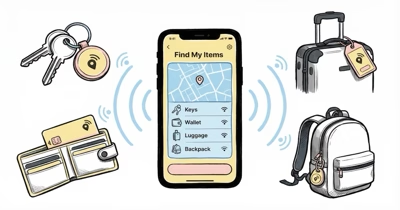
The Tile lineup’s four form factors are deliberately designed to cover the four canonical lost-item categories: keys, wallets, bags, and small electronics. Most owners end up with at least three Tiles across the lineup, and Tile Pro plus Slim plus Sticker is the most common starter set we recommend.
Keys. Tile Mate is the standard keychain tracker. Pro works too if you want extra range. Our best key finder roundup ranks Tile Mate against every key-tracking option on the market.
Wallets. Tile Slim’s credit-card form factor was built for wallets. Many wallets sold today include a slot sized exactly for Slim or a Chipolo Card.
Luggage and travel. Tile works for luggage but airports are an environment where Find My iPhone density gives AirTag an edge. The TSA confirms that any Bluetooth tracker with a coin cell is allowed in checked bags, according to the TSA’s official Bluetooth tracking devices ruling.
Bikes. Tile is fine for casual urban bikes but is the wrong tool for e-bikes ridden out of city limits. For high-value or long-distance bikes, switch to a cellular GPS tracker.
Small electronics. Tile Sticker’s adhesive form factor handles remotes, game controllers, cameras, and other items you can’t keychain. Sticker is the only mainstream tracker designed to adhere directly to a flat surface.
Pets. Tile is the wrong tool for pets in most cases. Bluetooth-only means you can’t actively track a moving dog. Use a cellular GPS pet tracker instead. Our best Bluetooth tracker roundup spells out which categories Bluetooth handles and which need GPS.
Tile in 2026: A Buyer’s Verdict
The honest verdict in 2026 is that Tile is the right choice for cross-platform households and the wrong choice for single-platform households. The brand’s biggest strength is also its most defensible: nothing else in the consumer category works equally well on iPhone and Android. AirTag is iPhone-only, Galaxy SmartTag is Samsung-only, and the only other cross-platform options (Chipolo Pop, Pebblebee) are smaller brands with shorter retail distribution.
The 2024 refresh fixed Tile’s two biggest pre-refresh weaknesses: replaceable batteries are back on the Pro and Mate, and the 2023 Find My integration extended Tile’s effective network reach on iPhone. The remaining structural weakness is that Tile’s own opt-in finder network is much smaller than Apple’s or Google’s, so in rural or low-density areas, a Tile is meaningfully worse than a Find My or Find Hub-native tracker.
If your household is mixed-platform, Tile is the easiest correct answer. If your household is single-platform, the native option for that platform almost always wins on network density and software polish.
Bottom Line
Tile remains the default Bluetooth tracker for cross-platform households and the wrong choice for single-platform households. The 2024 refresh fixed the replaceable-battery gap, and Find My integration extended its iPhone-side reach.
Buy a Tile Pro for general use, a Slim for wallets, a Sticker for small electronics. Skip Premium unless you have three or more Tiles. If your whole household runs iPhone or Samsung, the native option is the right call instead.
FAQ
How long does the Tile battery last?
About one year on the Tile Pro and Tile Mate with replaceable CR2032 cells. The Tile Slim and Tile Sticker use sealed 3-year batteries that can’t be swapped, so you replace the whole tracker when the battery dies. Heavy daily use can shorten the Pro and Mate to roughly 9 months.
Does Tile work without a subscription?
Yes. The Tile app and the core find-my-tracker function are free forever. The $29.99 per year Premium plan adds smart alerts, 30 days of location history, free battery replacements, and unlimited household sharing. Most owners with fewer than three Tiles don’t need Premium.
Is Tile compatible with iPhone?
Yes. Tile works on iOS 14 or later, and since late 2023 the Tile Pro has been part of Apple’s Find My network, which means iPhone users see meaningfully more frequent location updates than they did pre-integration. Setup uses the free Tile app, not Apple’s Find My app.
Can I find a Tile if it’s lost outside Bluetooth range?
Sometimes. Tile relies on its own opt-in finder network, plus the Find My network for the Pro model. In dense urban areas you’ll usually get a location ping within an hour. In rural areas or smaller cities, the Tile network may not be dense enough to ping at all, and you may need to physically retrace your steps.
What is Tile Premium worth?
Premium is worth $29.99 per year if you have three or more Tiles and use smart alerts daily. Below that threshold, the free tier covers the core function. Premium Protect at $99 per year only makes sense if you actively use Life360’s broader family-location features alongside Tile.
How loud is the Tile speaker?
The Tile Pro hits about 105 dB, which is the loudest in the consumer Bluetooth tracker category and audible through closed doors in most apartments. The Mate, Slim, and Sticker each hit around 85 dB, still loud enough to hear across a typical room but quieter than the Pro.
Does Tile work on Android?
Yes. Tile has supported Android since launch and remains the only mainstream Bluetooth tracker brand with first-class Android support. The Tile app for Android offers the same features as the iOS version, including smart alerts, location history, and household sharing on Premium.
Is Tile still relevant after AirTag?
Yes, for cross-platform households. AirTag is iPhone-only, and Galaxy SmartTag is Samsung-only, so any household with mixed iOS and Android users still needs Tile or one of its smaller cross-platform competitors like Chipolo Pop. For single-platform households, the native option usually wins.