For iPhone photographers, the AirTag 2 is the best tracker for camera gear at $29, with over a billion Find My devices behind it. Android shooters should pick the Tile Pro (2024) for its 500-foot range. For wallet-style accessory pouches, the Chipolo CARD slips into a 2.5 mm card slot. The Pebblebee Clip 5 is the rechargeable pick that avoids CR2032 swaps on long shoots.
A good tracker for camera gear has to survive TSA X-rays, fit inside a Peak Design zipper pocket, and still ping through a Pelican case’s polypropylene shell. This guide compares four Bluetooth tags on those exact demands: airport screening, accessory-pouch fit, and signal through a hard case. The picks below prioritize accessory-pouch fit and platform match over raw range.
- AirTag 2 weighs 11 g and hides inside a Peak Design Everyday accessory pocket with no visible bulge
- Chipolo CARD is 2.5 mm thin, the only pick that slides into a wallet-shape pouch
- Tile Pro (2024) has a 500 ft Bluetooth range, the longest in this guide, and works on Android natively
- Pebblebee Clip 5 recharges over USB-C about once a year, eliminating the CR2032 swap before international trips
- Pelican cases attenuate Bluetooth by 20 to 30 percent but won’t block location updates when the tracker sits near a foam edge
Camera Gear Trackers at a Glance
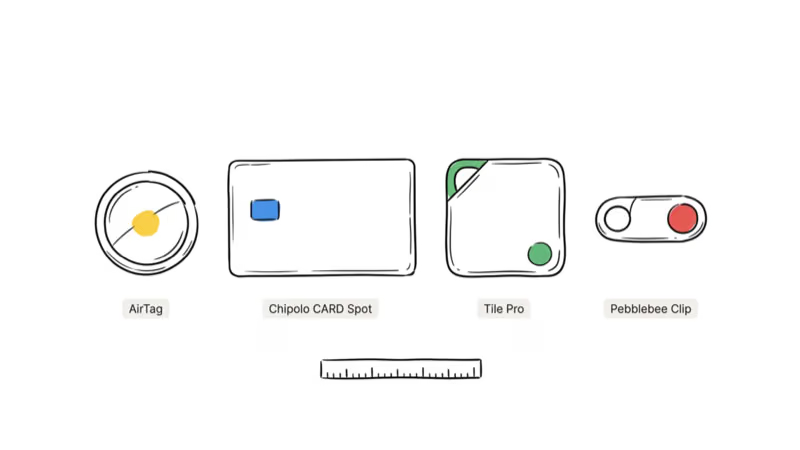
The table below summarizes the four picks compared later. Price, platform, and form-factor differences drive most buyer decisions; range matters less inside a camera bag than people think.
| Tracker | Form factor | Platform | Battery | Price |
|---|---|---|---|---|
| Apple AirTag 2 | Disc, 31.9 mm, 11 g | Apple Find My | CR2032, ~12 months | $29 |
| Chipolo CARD | Card, 2.5 mm thin | Find My or Find Hub | Qi rechargeable, ~1 yr | $38.99 |
| Tile Pro (2024) | Keyfob, 35x41 mm | Life360 and Google Find Hub | CR2032, ~12 months | $35 |
| Pebblebee Clip 5 | Clip, 40x30 mm | Apple Find My and Google Find Hub | USB-C rechargeable, 12 months | $35 |
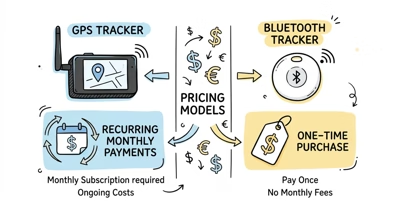
None of these trackers need a subscription. All four run on crowd-sourced finding networks (Apple Find My or Google Find Hub) that cost zero per month. Cellular GPS trackers are a different product category and the wrong form factor for a camera bag. For a broader shortlist, our best Apple Find My trackers guide compares card, keyring, and pet-friendly options.
How Do You Choose a Tracker for Camera Gear?
Phone platform first. Bag pocket second. Battery strategy third.
The first decision isn’t brand. It’s your phone platform.
A Bluetooth tag only reports a location when a nearby phone on the same network pings it. Drop an AirTag in a Pelican at a rural airshoot and only iPhones within Bluetooth range will relay its ping to iCloud.
Apple’s Find My network overview confirms that more than a billion active iPhones, iPads, and Macs act as relay nodes. That’s the reason the AirTag 2 is our top pick for any photographer who uses an iPhone. Android users get a smaller network, which is why platform match beats raw Bluetooth range for this use case. Platform match wins every time inside a camera bag.
The second decision is pouch fit. A Peak Design Everyday Backpack has a zippered accessory sleeve in the back panel that fits a 32 mm disc with room to spare. A Wandrd Prvke has a side pouch designed for a passport, which the 2.5 mm Chipolo CARD slides into flat. A Pelican 1510 has a foam insert where a tracker tucks between foam layers near the lid seam.
Third is battery strategy. Replaceable CR2032 is cheap and well-understood; sealed 2-year batteries are maintenance-free but leave the tracker as e-waste at end of life; USB-C rechargeable lets you top off before a long trip without buying a coin cell at an airport convenience store.
Our AirTag vs Chipolo vs Tile Pro head-to-head covers network range and signal caveats in detail for readers who want the raw numbers.
The 4 Best Trackers for Camera Gear in 2026
Each pick below is matched to a common camera-bag fit scenario: the AirTag 2 in a Peak Design Everyday 20L, the Chipolo CARD in a Wandrd Prvke 21L side pouch, the Tile Pro on a Lowepro ProTactic BP 450 AW II camera strap, and the Pebblebee Clip 5 clipped to the internal divider of a Pelican 1510.
⇄ Head-to-head
Camera-bag tracker shootout
- +Densest finding network (~1B+ devices)
- +UWB Precision Finding to the exact pocket
- +CR2032 swap in 30 seconds, $2 cell
- +IP67 rain + splash rated
- +2.5 mm thin; only pick that fits a wallet-shape pouch
- +Works on Apple Find My or Google Find Hub
- +Qi rechargeable, about a year per charge; IP67 waterproof
- +500 ft Bluetooth range (rated)
- +Native Android via Life360 + Find Hub
- +Loud chirper for in-room search
- +USB-C rechargeable; no CR2032 airport runs
- +Dual-network: Find My + Find Hub
- +IP66; best of the four for outdoor shoots
- −iPhone-only setup
- −Disc shape adds bulk in wallet pouches
- −No built-in clip
- −One network at a time; switching needs a reset
- −Needs a Qi pad to recharge (none in box)
- −No UWB Precision Finding
- −Smaller relay network than Find My
- −Subscription pushes for premium features
- −Network pick locked at setup
- −Bulkiest of the four
- −USB-C cable required about once a year
Your kit includes an iPhone and you want the densest finding network.
Your camera bag has a credit-card-shaped accessory slot.
You shoot on Android and want the longest Bluetooth range.
You shoot internationally and want one tracker that survives platform switches.
Each pick below has pouch-fit notes, network reach commentary, and Pelican-case attenuation notes.
Apple AirTag 2: Best for iPhone Photographers
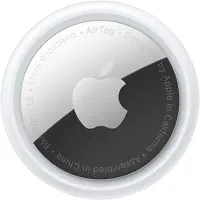
The AirTag 2 is the default pick when your kit includes an iPhone and you want the largest finding network available.
 Top Pick
Apple’s Find My network draws on over a billion Apple devices worldwide, per Apple’s Find My announcement. That crowd turns every iPhone in a hotel lobby or rental-car counter into a relay node for your bag.
Inside a Peak Design Everyday 20L zippered accessory pocket, the 11-gram disc is small enough to sit beside lens cloths or filters without taking over the pocket. See our AirTag 2 review for Precision Finding range numbers.
Chipolo CARD: Best for Wallet-Style Accessory Pouches
The Chipolo CARD wins when your bag has a credit-card-shaped accessory slot.
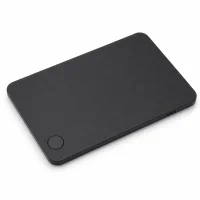
At 2.5 mm thin, the CARD is shaped for the passport pocket on a Wandrd Prvke, the RFID slot on a Peak Design Travel 45L, or the flat layers in a Pelican organizer. The 2026 CARD is Qi rechargeable rather than sealed, so it tops up on a wireless pad; see our Chipolo review for detail.
Tile Pro (2024): Best for Android Photographers
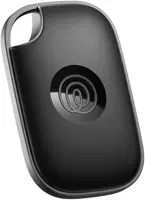
The Tile Pro is the pick when your phone runs Android and you want a published 500-foot Bluetooth range.
 Best Value
Tile’s 2024 refresh added Google Find Hub relay, which lets any Android phone report your bag’s location even when no Tile user is nearby. Its 500-foot Bluetooth range is a marketing figure that, like all Bluetooth range ratings, falls short when walls and bodies are in the way, but it remains the longest reach of the four picks.
That gap between a rated Bluetooth range and practical reach is wide and common, exactly the kind of pattern covered in our marketing-versus-range guide.
The triple compare linked earlier in this guide breaks down the range test in more detail.
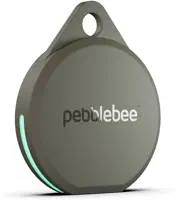
Pebblebee Clip 5: Best Rechargeable for Long Shoots
The Pebblebee Clip 5 is the pick when you hate swapping CR2032s before a carnet trip.
 Hot
HotIt recharges over USB-C, holds a charge for about 12 months, and reports on both Apple Find My and Google Find Hub at setup, which makes it the only pick here that doesn’t force a platform decision. Clipped to the internal divider of a Pelican 1510, that rated 12-month charge covers international carnet trips without a mid-trip low-battery warning. Our Pebblebee Card 5 review covers the card-shape sibling.
How Pelican Cases Affect Bluetooth Trackers
Short answer: attenuate, yes. Block, no.
Pelican hard cases attenuate Bluetooth signal but don’t fully block it. The polypropylene resin and the foam insert each absorb a fraction of the 2.4 GHz signal, so a tracker seated near a foam edge inside a closed Pelican 1510 still reports to the Find My or Find Hub app once a relay phone is nearby.
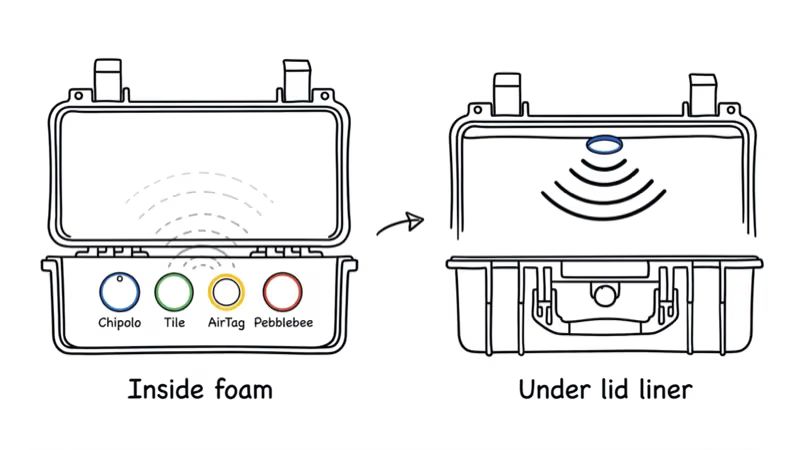
The trick is placement.
A tracker buried in the bottom foam has the most material between it and nearby phones; at the lid seam, the path out is thinner.
Pelican’s Protector case specifications don’t publish RF attenuation numbers, because Pelican cases aren’t designed as Faraday cages. Signal loss is an incidental effect of the polymer shell, not a product feature. If you store your camera gear in a locked hard case, put the tracker near the top-edge foam, not buried under the camera body.
Where Should You Hide a Tracker in a Camera Bag?
Stealth placement depends on the bag style. A photographer who wants to recover a stolen bag needs the tracker somewhere a thief won’t immediately find and discard; a photographer who wants to locate a bag left at a gate needs the tracker somewhere reachable without unpacking.
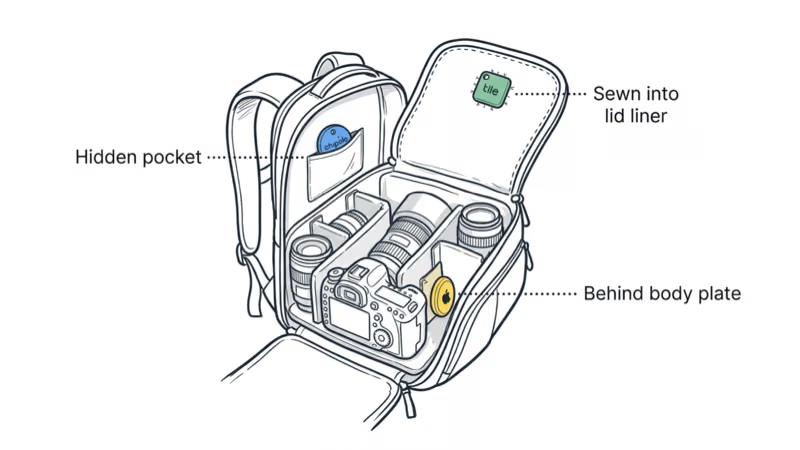
Here’s the pocket map by brand.
Peak Design Everyday Backpack. The zippered back-panel sleeve designed for a 16-inch laptop has a smaller accessory pocket at the bottom that fits an AirTag perfectly. Peak Design’s Everyday spec page confirms the sleeve dimensions.
Wandrd Prvke. The side passport pouch is the stealth spot for a Chipolo CARD. A thief rifling through the main camera compartment won’t check a passport sleeve.
Lowepro ProTactic. The internal strap channel on the back panel has enough slack for a Tile Pro or Pebblebee Clip.
Pelican hard case. Slide the tracker between foam layers near the lid seam, not the case bottom. Cut a small foam recess if the tracker is too thick to seat flat. This keeps the signal close to the weakest point of the shell.
Our best AirTag wallet roundup covers wallet-style pouches in more detail, because many of the same fit principles apply to camera-bag accessory sleeves.
Airport Security and Trackers: What Photographers Need to Know
Bluetooth trackers are allowed in carry-on and checked camera bags. TSA’s What Can I Bring guidance confirms that tracking devices using lithium button-cell batteries (CR2032) are permitted in both carry-on and checked luggage, and the FAA PackSafe lithium battery rules clarify that CR2032 cells under 2 grams of lithium content ship normally.
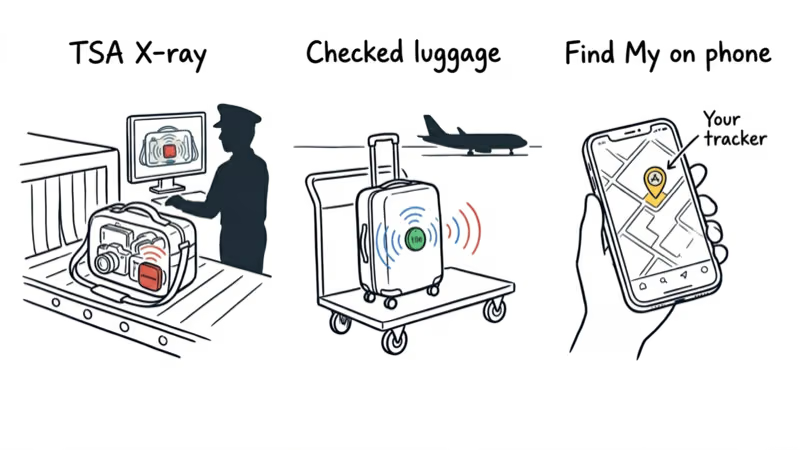
X-rays don’t hurt the tracker. The electromagnetic frequency used in checked-bag CT scanners isn’t expected to affect the battery, the PCB, or the Bluetooth radio.
Unknown-tracker alerts are real. If your AirTag travels in a rental car or a checked bag shared with someone else, their phone may show an unknown-tracker alert. Apple’s unwanted tracking support page states that iOS surfaces an unknown AirTag alert once the tag has been moving with you over time, away from its owner. Name your tracker after yourself so the recipient sees your contact info if they scan it with NFC.
For readers traveling internationally with kit worth more than $20,000, our best luggage trackers guide covers cellular GPS alternatives that don’t rely on the finding network.
Bottom Line
Pick by platform first.
For an iPhone photographer carrying a Peak Design or Wandrd camera bag, the AirTag 2 at $29 is the correct first buy. The largest finding network, the smallest disc, the easiest CR2032 swap.
Android shooters should skip the AirTag entirely. Pick the Tile Pro (2024) for 500-foot range and native Android setup, or the Pebblebee Clip 5 if you want Google Find Hub without buying into Life360.
The Chipolo CARD is the specialist pick for a wallet-shape accessory pouch where a disc sits awkwardly, and the working photographer hauling a Pelican 1510 on carnet trips will find the Pebblebee’s USB-C recharge worth the $6 premium over the AirTag over a three-year kit-ownership window.
FAQ
Can a Bluetooth tracker survive being checked with my camera bag?
Yes. Bluetooth trackers using CR2032 batteries are allowed in checked camera bags under current TSA and FAA rules. X-ray and CT scanners don’t damage the radio, battery, or PCB. The only failure mode is lost signal during the flight itself, since your bag is far from any relay phone. As soon as your bag lands near a crowd, the tracker pings Apple’s or Google’s network and shows up on your app.
Will a Pelican hard case block an AirTag signal?
No, but it attenuates the signal by roughly 20 to 30 percent. Polypropylene resin and foam absorb a fraction of the 2.4 GHz Bluetooth signal; a Pelican 1510 isn’t a Faraday cage. Placement matters: a tracker near the lid seam shows much better signal than one buried under the camera body in the bottom foam layer. For best results, cut a foam recess at the top edge and seat the tracker there.
How do I put an AirTag in a camera bag without it being obvious?
Use the zippered accessory sleeve inside the back panel rather than the main camera compartment. A Peak Design Everyday has a 16-inch laptop sleeve with a smaller pocket at the bottom that accepts an AirTag flush. A Wandrd Prvke has a side passport pocket that works for a Chipolo CARD. The goal is to place the tracker where a thief rifling through gear won’t check and where the tracker sits against soft padding.
Does TSA allow trackers in carry-on camera bags?
Yes, explicitly. TSA’s What Can I Bring guidance confirms tracking devices are permitted in carry-on and checked bags. Lithium button-cell CR2032 batteries and rechargeable lithium cells in Pebblebee trackers both comply with FAA PackSafe rules. You don’t need to remove the tracker at security.
Which tracker fits inside a Peak Design Everyday Backpack accessory pocket?
The AirTag 2 fits best in the laptop-sleeve accessory pocket because the disc shape sits flat against the padding. The Chipolo CARD fits too and is even thinner at 2.5 mm, making it better for the Peak Design Travel Backpack’s RFID wallet pocket. The Tile Pro and Pebblebee Clip 5 are too bulky for an accessory sleeve and work better clipped to an internal strap or gear loop.
Can I track a camera bag on Android with an AirTag?
Partially. Android phones can detect a nearby AirTag via the Tracker Detect app, but they can’t set up, own, or view the location of an AirTag on a map. Android photographers should pick the Tile Pro (2024) for native Android ownership, or the Pebblebee Clip 5 if they want Google Find Hub relay support. Both give a real-time bag location on an Android phone without iOS dependency.
Are rechargeable trackers like Pebblebee worth it for photographers?
For photographers who travel internationally or shoot on carnet trips, yes. A Pebblebee Clip 5 recharges over USB-C in about an hour roughly once a year, which fits a travel workflow where you’re already topping off camera batteries the night before. A CR2032-powered AirTag needs a new coin cell roughly once a year, and finding a CR2032 at 2 a.m. in an airport convenience store is harder than plugging in a cable you already carry.