A Tracki stops updating when it loses GPS or 4G signal, sits in power-save mode, runs flat, or has a lapsed plan. Take it outside under open sky for 10 minutes first.
A Tracki needs GPS for the satellite fix and 4G to send it. Lose either radio and the pin freezes.
According to GPS.gov’s accuracy data, a consumer receiver hits about 4.9 m under open sky but degrades near metal, buildings, and trees.
- The most common cause is signal, not a fault — metal, walls, and roofs block GPS, so move the device outside and wait 10 minutes before assuming it’s broken
- A stale pin in a cellular dead zone is expected — the tracker buffers positions and uploads them the moment it regains 4G coverage, so missed time fills back in
- A lapsed plan kills every update — Tracki’s data plan (from roughly $9.95 per month) carries the location, and without it the device powers on but reports nothing
- Battery drives the update interval — power-save mode reports far less often than LIVE mode, and a dead unit shows the last known location until you recharge it
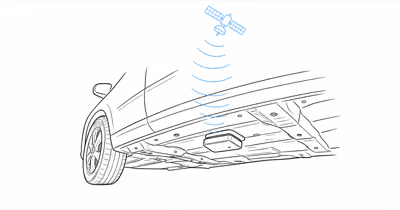
- Metal placement breaks GPS — a trunk, engine bay, or metal toolbox can block the satellite signal entirely, so mount the device with a view of the sky
Why Does My Tracki Show No GPS?
“No GPS” means the tracker has cellular coverage but can’t get a satellite fix. The fix tells the device where it sits; 4G only sends that answer to your app. According to Tracki’s official troubleshooting guide, the device needs a “clear view of the sky” so satellite signals can reach the antenna, which is why indoor and metal-enclosed placement is the leading cause.
Metal blocks the weak satellite signal. Move the tracker to a spot with a clearer sky view before suspecting hardware.
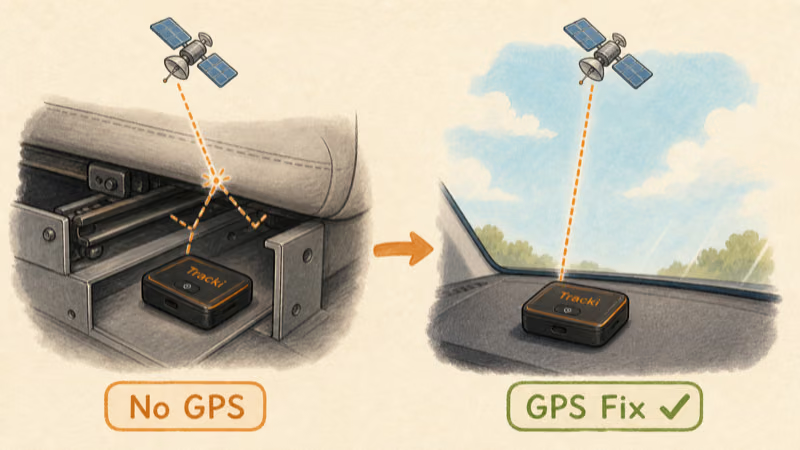
A cold satellite fix is also slow by design. The Time to First Fix overview on Wikipedia states that a receiver with no recent almanac needs up to 12.5 minutes to download orbital data. So a Tracki that’s been off, indoors, or boxed in metal takes longer to report its first outdoor position.
There are five technical reasons the satellite or cell link drops:
- Indoor, covered, or metal placement — the GPS antenna can’t see enough sky
- Weak 4G coverage — rural dead zones leave the fix with nowhere to upload
- Power-save reporting interval — the device updates far less often to save battery
- Low or dead battery — the radios shut down to preserve charge
- Lapsed subscription — the data plan that carries the position has expired
How Often Should Tracki Update Its Location?
Update frequency depends on the mode you choose, not a fixed clock. In standard tracking, a Tracki reports a new position based on motion and signal, often a few minutes apart while moving. In LIVE mode it streams a position every few seconds, which is the mode to use when something is actually missing.
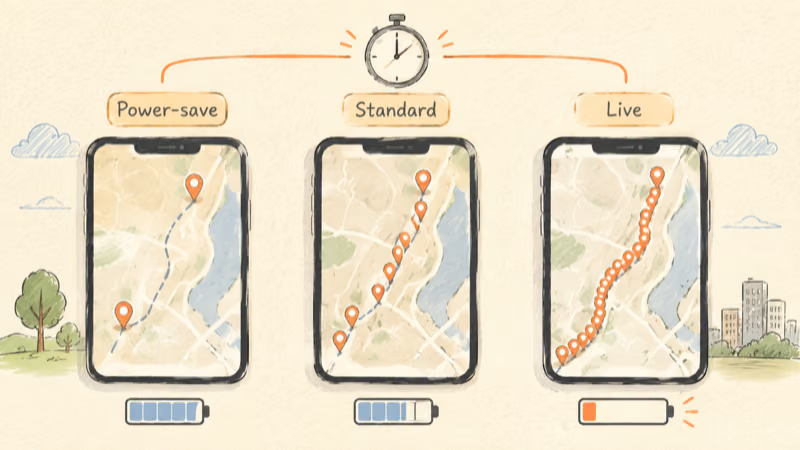
| Mode | Typical update interval | Best for |
|---|---|---|
| Power-save | Minutes to hours apart | Long-term asset monitoring |
| Standard tracking | Every 1 to 5 minutes while moving | Daily vehicle monitoring |
| LIVE tracking | Every few seconds | An active search or theft event |
If you expect second-by-second pins but the device is in power-save mode, nothing is broken. Switch to LIVE in the app to force the fast interval. A LIVE session refreshes the pin every few seconds but drains the battery noticeably within an hour, so reserve it for active searches rather than all-day use.
One motion detail trips up owners: a parked Tracki slows its reporting to save power. A pin stuck for hours often just means the vehicle never moved.
When a Dead Zone Freezes the Pin
This is the cause people miss most often. A Tracki in a coverage gap is not malfunctioning; it’s waiting. Tracki’s troubleshooting guide states a device in a “cellular dead zone and will update as soon as it moves out of that area,” buffering positions until it reconnects.
A stale timestamp isn’t the same as lost data.
Once the device regains 4G, it uploads the track it captured offline, and the gap on your map fills in automatically.
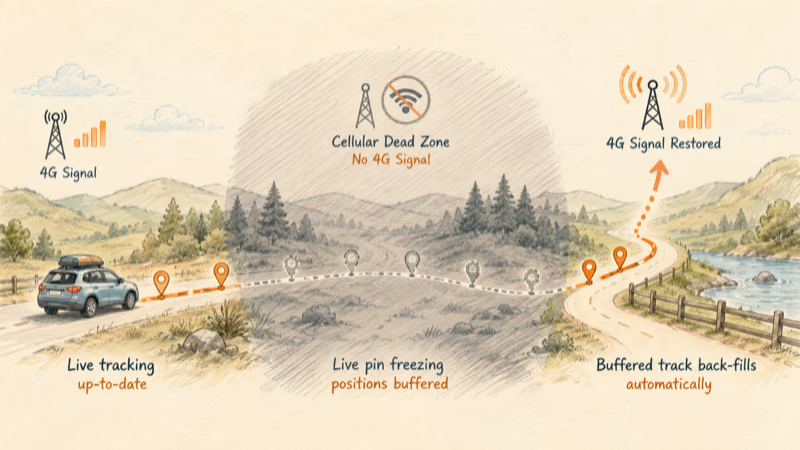
Before you blame the hardware, check two things in this order: whether the last-update timestamp is climbing (a sign of a dead battery, not a dead zone) and whether the route ran through known low-signal terrain.
Subscription and Battery: The Two Hidden Causes
A Tracki is two separate dependencies: hardware you own and a data plan you rent. Both have to be alive for a position to reach your phone.
Your subscription carries every position over 4G. Plans start at roughly $9.95 per month depending on term length. If the plan lapses, the device still powers on and its LED still blinks, but no position ever reaches your app because there is no data channel to carry it. Check the plan status in the Tracki app before you blame the hardware.
The battery is the other half. A dead Tracki does not show a blank map; it shows the last known location indefinitely, which fools owners into thinking the pin is stuck when the device is simply off. If your last-update timestamp is hours old and climbing, recharge fully before troubleshooting anything else. The long-life Tracki Pro sidesteps frequent recharges with its 10,000 mAh cell, but even it goes dark once the battery is flat.
For the full hands-on breakdown of battery life, accuracy, and plan costs across the lineup, see our Tracki GPS tracker review. If you are weighing whether a SIM-based tracker is the right architecture at all, our best GPS trackers with a SIM card guide covers the coverage trade-offs.
The 7-Step Fix Checklist
Work through these seven steps in order. Most stale-location cases resolve by step 3.
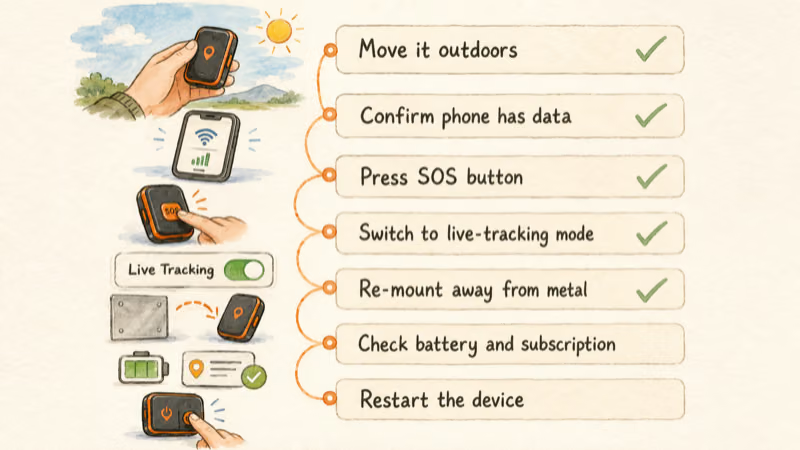
1. Move it outside under open sky for 10 minutes. Hold the device in your hand away from metal and watch the app for a moving pin. This alone fixes most “No GPS” reports, since covered or metal placement is the leading cause.
2. Confirm your phone has data. Your handset needs Wi-Fi or cellular data to pull updates and run LIVE tracking. A phone in airplane mode shows a stale map even when the tracker is fine.
3. Press the SOS key for 5 seconds. A single SOS press forces the device to report its current position immediately, which confirms whether it can still reach the network.
4. Switch to LIVE mode. If the pin updates only occasionally, you may simply be in power-save mode. Tap LIVE to force a position every few seconds and confirm the device is actually reporting.
5. Re-mount away from metal. A trunk, engine bay, or metal toolbox blocks the satellite signal. Move the device to a spot with a view of the sky, such as under a non-metal dashboard panel.
6. Verify the subscription and battery. Open the app and confirm the data plan is active, then make sure the battery is above 20 percent. Charge it fully if you are unsure.
7. Restart the tracker. Power the device off and on to clear a temporary software glitch. A restart does not erase your location history or settings.
One reassuring detail: any positions the device missed while offline are not gone. It keeps retrying, and once it reconnects it uploads the buffered track, so your location history fills in the gap.
When to Contact Tracki Support
If a device is still dark outdoors after a full charge, an active plan, and a restart, the problem is likely hardware or account-level rather than signal. At that point Tracki support can read the device logs to see whether the SIM is registering on the network at all.
Leave the device powered on and outdoors so it keeps trying to connect while you reach out, and note your last successful update time, since support uses it to read the failure window. A unit that has been rained on or submerged should also be dried fully before you retry charging; the Pro carries an IP67 rating, but a wet charging contact can stall a recharge and mimic a dead battery even when the cell is fine.
If you are deciding whether to repair or replace, compare your options against the field in our best GPS tracker for a truck guide or browse our full GPS tracker hub.
If your no-update problem is on a pet collar instead, our Tractive GPS not updating location walkthrough covers that ecosystem.
Bottom Line
A Tracki that stops updating is almost always a signal or power issue, not a defect. Move it outside for 10 minutes, press SOS to force a report, confirm the plan and battery, and re-mount away from metal. A stale pin in a dead zone back-fills automatically once 4G returns. If it’s still dark outdoors after a full charge and restart, contact Tracki support with your last update time.
FAQ
Why does my Tracki say No GPS?
No GPS means the tracker has cell coverage but can’t get a satellite fix, almost always because it’s indoors, covered, or surrounded by metal. The antenna needs a clear view of the sky. Move the device outside, hold it away from metal for ten minutes, and the fix usually returns within a couple of minutes.
How often should a Tracki update its location?
It depends on the mode. Standard tracking reports every one to five minutes while the device is moving, while LIVE mode streams a position every few seconds. Power-save mode updates far less often, and a parked device intentionally slows reporting to save battery until it moves again.
Does Tracki work without a subscription?
No. The 4G data plan, starting around $9.95 per month, is what carries every position from the tracker to your phone. Without an active subscription the device still powers on and its LED blinks, but it reports no location at all.
Why is my Tracki stuck on the last location?
A frozen pin usually means the battery has died, the device is in power-save mode, or it has lost 4G coverage. A dead tracker shows the last known location indefinitely rather than going blank, so check the battery level and the last-update timestamp before assuming a hardware fault.
Will I lose the locations my Tracki missed in a dead zone?
No. The device keeps retrying and buffers the positions it captured while offline. Once it moves out of the cellular dead zone and regains coverage, it uploads that track, and the missing pins fill into your location history automatically.
How do I force my Tracki to update right now?
Press the SOS key for about five seconds to force an immediate position report, or switch the device to LIVE mode in the app to stream a fix every few seconds. Both confirm whether the tracker can still reach the network from its current spot.
Does hiding a Tracki in metal stop it from updating?
Yes. Metal enclosures such as a trunk, engine bay, or toolbox block the GPS satellite signal and can stop updates entirely. Mount the device where it has a view of the sky, such as under a non-metal dashboard panel, for a reliable fix.