Start by naming what you’re leaving. Households quit Life360 for three different reasons, and each one points at a different replacement. Getting that wrong is how people end up paying a second subscription for the same thing they already had.
Key Takeaways
- Two popular “alternatives” belong to Life360. Life360 owns Tile and Jiobit, and its current support docs say Tiles can be activated and managed in the Life360 app.
- Apple and Google already include family location sharing at no extra cost, which covers the single feature most Life360 households actually use.
- An app can’t locate a child who has no phone — that gap is what a cellular wearable exists to fill, but Jiobit’s old hardware line is currently out of stock.
- Family Link shows one device at a time, the most actively used one, so a child signed in on a phone and a tablet won’t appear twice.
- Emergency dispatch, driver reports, and roadside assistance are what you lose. If a teen driver is the reason you subscribed, Apple and Google’s free sharing tools don’t replace those services.
Why Households Actually Leave Life360
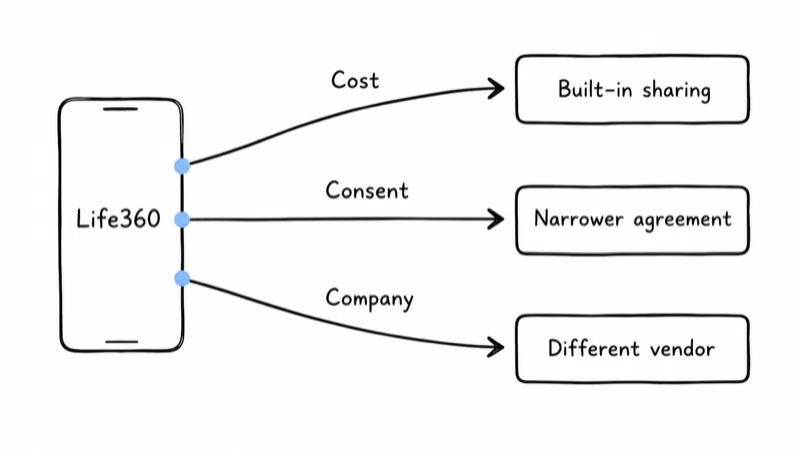
The three exits look similar from the outside and lead to different places.
Cost. Someone subscribed for one feature, then watched the tier structure grow around it. If that’s you, the question isn’t which rival app is cheaper. It’s whether the free sharing on the phones you already own does the same job.
Consent. Teenagers negotiate, and a household that started with whole-family tracking usually lands somewhere narrower.
The company. Some people are uneasy about a location business as a business, and want their family’s movement data held somewhere else entirely. That’s a legitimate reason to switch, and it’s also the one where the shortlist gets tricky, because the obvious names are not as independent as the shelf makes them look. Life360 acquired both Tile and Jiobit.
Our broader look at family location apps versus GPS trackers covers the category choice itself. This guide assumes you’ve already made it and want out of one specific app.
Which Alternatives Are Still Life360?
If you’re switching to escape the company, check the ownership first, because the consolidation here is heavier than most shoppers realize.
According to Life360’s November 2021 announcement, the company agreed to acquire Tile in a deal valued at $205 million. Life360’s current support guide confirms that Tiles can now be activated and managed in the Life360 app.
Jiobit went the same way earlier that year. Life360’s current Jiobit stock notice states: “Although the current Jiobit line remains out of stock.” The company says it’s developing future GPS products.
Jiobit still has value for existing owners.
Our Jiobit Gen 3 review explains the hardware, but the stock status removes it from a current shopping shortlist. If stock returns, “I’m leaving Life360 for Jiobit” would still be a product change, not a vendor change.
If vendor separation is the goal, the moves that actually achieve it are Apple’s ecosystem, Google’s, or a hardware brand outside the Life360 portfolio.
The Free Options You Already Paid For
Most households subscribing to a location app are using one feature: seeing where everyone is. Both phone platforms ship that.
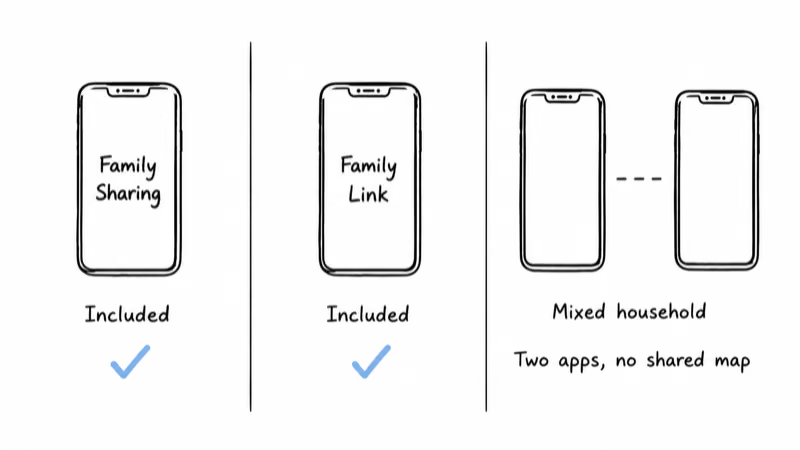
On iPhone, Family Sharing plus Find My covers it. Apple’s guide to sharing your location with iPhone documents choosing a sharing duration and stopping it later, which is the granularity that makes a teenager negotiation workable. There’s no tier to buy.
On Android, the equivalent is Family Link. Google’s help page on managing a child’s location states that a family manager sees the location of one device at a time, the most actively used one, once device location sharing is turned on. It also does arrival and departure notifications, device ringing, and remaining battery.
Two honest limits before you cancel anything:
- Mixed-platform households lose the single map. An iPhone parent and an Android teen is exactly the case Life360 was built for, and the free route means living in two apps.
- A phone-based app is only as good as the phone. Dead battery, left at a friend’s house, or powered off, and there’s nothing to report.
What Replaces the App for a Child With No Phone?
This is the one scenario where leaving Life360 means buying something. No app can report the location of a kid who isn’t carrying a phone, and for elementary-age children that’s the normal state.
Jiobit Gen 3 (Existing Owners Only)
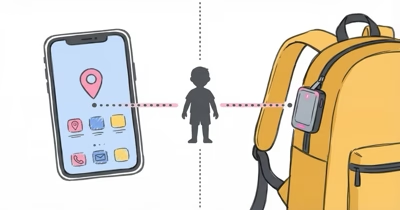
The clip-on wearable remains a useful reference for families who already own one: it goes on a belt loop or inside a backpack, and it reports over cellular rather than depending on a handset. It’s not a current purchase recommendation because Life360 says the old Jiobit line remains out of stock.

Apple Watch SE 3
For a child old enough to wear and charge a watch, Apple Watch For Your Kids, formerly called Family Setup, is the option that leaves the Life360 portfolio entirely. Apple’s guide to Apple Watch family setup covers pairing a cellular watch to a child who has no iPhone of their own, which turns the watch into the phone substitute rather than an accessory.

For non-Apple households, the kids-watch route runs through carrier and Gabb-style devices instead, and our roundup of the best GPS trackers for kids sorts them by age rather than by brand.
Aging Parents Need a Different Shortlist
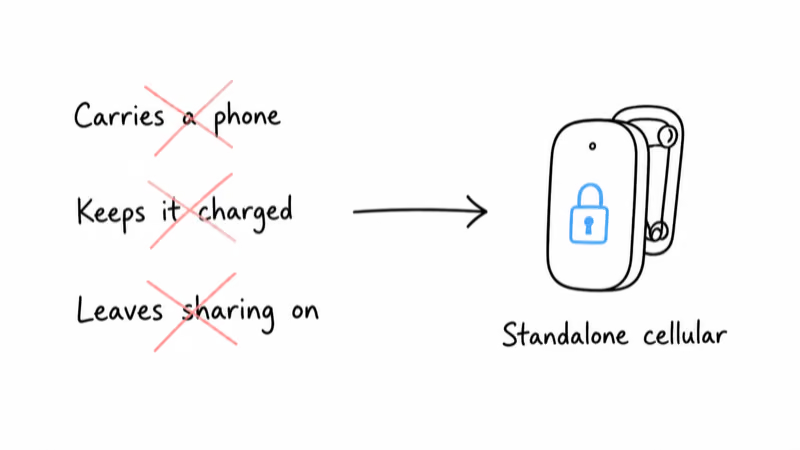
Life360 gets recruited for elderly care, and it’s a poor fit there for a reason that has nothing to do with price. The app assumes a cooperative user who carries a charged phone and keeps sharing switched on.
Dementia care inverts every one of those assumptions. The devices built for it use lockable fasteners and standalone cellular hardware rather than a handset, and they alert on pattern deviation rather than on a geofence someone remembered to draw. A parent who removes an unfamiliar phone, or leaves it charging on the counter, defeats a phone-based app entirely, which is the failure that sends families looking for a different category rather than a different app.
Our guide to tracking elderly parents covers the consent conversation, and the AngelSense review covers the category that exists specifically because a phone app can’t do this job.
When the Real Problem Is Things, Not People
A quiet share of Life360 subscriptions exist to answer “where’s the car” and “where are the keys,” which is a hardware question wearing an app’s clothing.
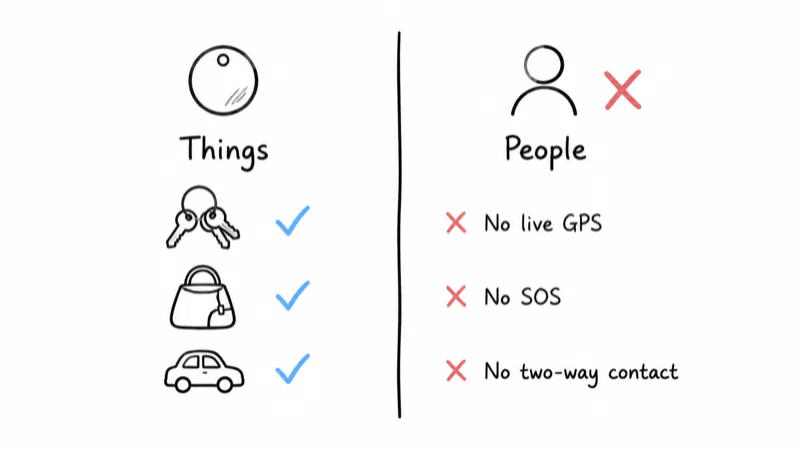
An AirTag solves that narrower job for a one-time price and no service plan at all. On a keyring, in a backpack, or in a car you own, it reports through the Find My network without a monthly line item.
Apple AirTag 2

The mistake to avoid is treating a tag as a child tracker. It has no live GPS, no SOS button, and no way for the person carrying it to reach you.
What You Give Up by Switching
An honest alternatives list has to include the features that don’t have free equivalents, because this is where switchers get surprised three weeks later.
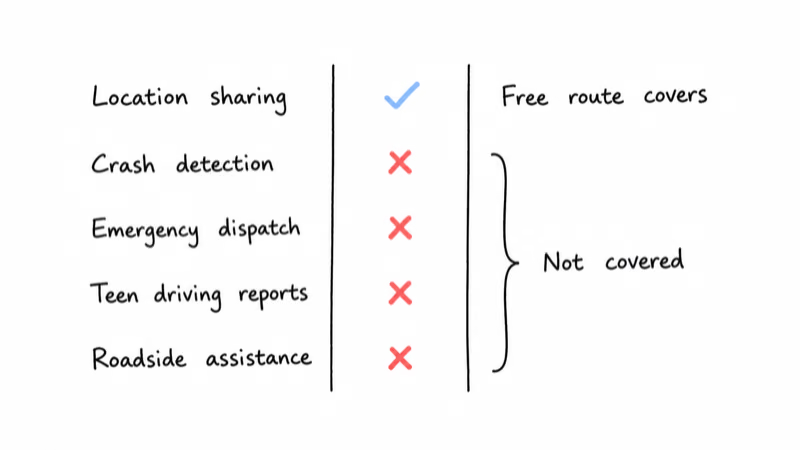
- Emergency dispatch. Life360’s current Gold and Platinum tiers pair crash detection with emergency dispatch, while Apple and Google’s free location sharing does not include a dispatch service.
- Driving reports for a teen. Speed, hard braking, and phone use during a drive are a distinct product from a map pin.
- Roadside assistance and identity monitoring. These are insurance-style benefits attached to the higher tiers; compare them against what your car insurance already includes before deciding they’re lost value.
If any of those is the reason you subscribed, price the replacement individually before cancelling, and check the current tiers on Life360’s own plans page rather than a screenshot from a review, because the lineup has changed repeatedly.
Bottom Line
Name the reason first: if it’s cost, the sharing already built into iOS and Android covers the feature most families actually use, at no charge. If it’s a child with no phone, you’re buying a wearable, and the choice is between a clip-on tracker and a watch that also makes calls.
If it’s the company, check the badge on the box, because Tile and Jiobit are both Life360. And if emergency dispatch or teen-driving reports are why you subscribed, price a real replacement before cancelling.
FAQ
Is there a free alternative to Life360?
Yes, if the core job is seeing where family members are. Apple's Family Sharing with Find My provides location sharing on Apple devices you already own, while Google's Family Link does the same for a supervised child on Android and can add arrival and departure alerts.
Neither route replaces Life360's paid emergency dispatch, individual driver reports, roadside assistance, or one shared map for a mixed iPhone and Android household. Before cancelling, test the built-in option for a week with every family member, confirm that location permissions and notifications survive normal daily use, and list any paid safety feature that still needs a separate replacement.
Does Life360 own Tile and Jiobit?
Yes, Life360 owns both brands. Life360 announced its agreement to acquire Tile in November 2021 for 205 million dollars, after acquiring Jiobit earlier that year, and current support documentation says Tiles can be activated and managed in the Life360 app.
The company also says the old Jiobit hardware line remains out of stock while it develops future GPS products. Switching from Life360 to either brand can change the device and interface, but it does not give your family's location data to a different parent company, so anyone leaving over vendor ownership should choose Apple, Google, or an independent hardware provider.
What can I use if my child doesn't have a phone?
Use a currently available cellular wearable, because a phone app has nothing to report when the child carries no phone. A cellular Apple Watch SE 3 set up with Apple Watch For Your Kids can share location and support two-way calling without the child owning an iPhone, although the watch still needs compatible service and regular charging.
Jiobit shows how a smaller clip-on tracker can fit a backpack or belt loop, but Life360 says its old hardware line remains out of stock, so it's context for existing owners rather than a new purchase. Compare coverage, service availability, monthly plan cost, charging habits, and who the child can contact before choosing.
Can an AirTag replace Life360 for tracking my kid?
No, an AirTag is not designed to replace a family location service. It has no live GPS, no SOS button, and no way for the person carrying it to contact you, while its reported position depends on nearby Apple devices rather than a continuous cellular connection.
That makes it useful when the real job is finding a backpack, keys, luggage, or a car you own, especially when avoiding another monthly plan matters. For a child, choose a wearable designed for people, check who can call it, confirm cellular coverage where the family travels, and agree on when location sharing will be used.
Will I lose emergency dispatch if I cancel Life360?
Yes, unless you replace it separately. Life360's current Gold and Platinum tiers include crash detection with emergency dispatch, individual driver reports, and roadside assistance, while Apple and Google's free location-sharing tools don't reliably include those services during every trip or in every coverage area.
Some phones and cars provide their own crash detection, and a carrier, insurer, credit card, or vehicle warranty may already include roadside help. Write down the specific benefit your household actually uses, verify who responds and in which regions, then price that replacement before cancelling instead of assuming a free map covers the entire safety bundle.
Is Life360 a good option for elderly parents?
It can work for an independent parent who willingly carries a charged phone, leaves sharing enabled, and understands who can see the location. The fit gets weaker when memory loss, charging difficulty, or resistance to carrying a handset makes any one of those conditions unreliable.
Devices built for dementia care use standalone cellular hardware, secure or lockable fasteners, and alerts based on unusual movement patterns rather than only a manually drawn geofence. Discuss consent first, match the device to the parent's actual routine, and treat a tracker as one layer of a care plan rather than a substitute for human support.
How do I move a family off Life360 without a fight?
Change the agreement before changing the tool. Decide together who can see whom, whether sharing runs continuously or only for trips and late arrivals, what counts as an emergency, and what happens when someone intentionally turns location sharing off.
Apple's location sharing lets a person choose a duration and stop later, which can support a narrower agreement than permanent monitoring. Set up the replacement while Life360 is still installed, test it during ordinary routines for a week, confirm that everyone understands the controls in normal daily use, then cancel only after the family agrees that the replacement covers the promised use.