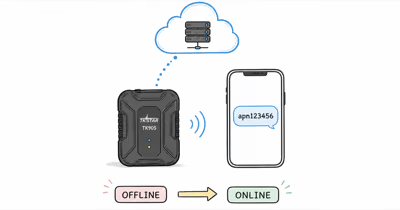
The TKSTAR TK905 SMS commands are the only way to configure the tracker before its app works. According to the TK905 user manual, every setting is changed by texting a short code to the device.
Use these commands only on trackers you own or are authorized to manage.
Treat the official manual and app as the primary setup method for your exact hardware version. Don’t configure a tracker to monitor another person, vehicle, or property without consent.
- Default password is 123456 — it sits inside every command, with a space before the value (
apn123456 value) - The device texts back a reply like
apn okorbegin okso you can confirm a command landed begin123456reboots the tracker;reset123456clears settings — two different commands for two different jobsG123456#returns the current location as a Google Maps link with coordinates, speed, and battery- A missing space or wrong APN casing is the most common reason a command is silently ignored
How Do TKSTAR TK905 SMS Commands Work?
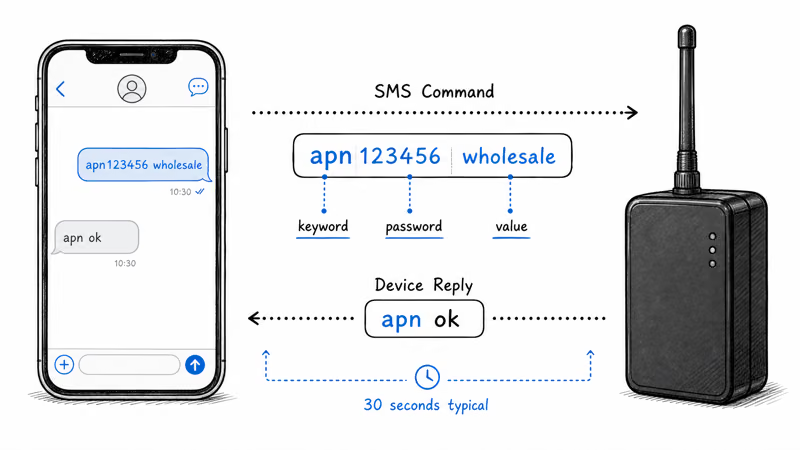
Every TK905 setting is changed by sending a plain text message to the phone number of the SIM card inside the tracker. The TK905 user manual states: “It works through sms commands which the user sends the device from the own mobile phone number.” On a working SIM, a correctly formatted command returns a short acknowledgement, so you can confirm each step before moving to the next.
The command pattern never changes. It’s a keyword, the password, an optional space, then a value, and the factory default password is 123456. A command to set the APN reads apn123456 wholesale: the keyword is apn, the password is 123456, and wholesale is the value. Commands that need no value, like a reboot, drop the value entirely and read begin123456.
Learn the shape of one command and you’ve learned them all. Every command fits a single text with room to spare, since according to Wikipedia a standard SMS message holds 160 characters.
Two rules trip up most owners. The password is part of the keyword with no space before it, but there is a space after it when a value follows. The tracker also replies to confirm, so a command that succeeds returns a short acknowledgement such as apn ok or time ok!. Silence means the message didn’t parse and the device kept its old setting.
Change the password right after setup. Anyone who knows your tracker’s SIM number and the default 123456 can reconfigure or locate your device, so swapping in a private password is a basic security step.
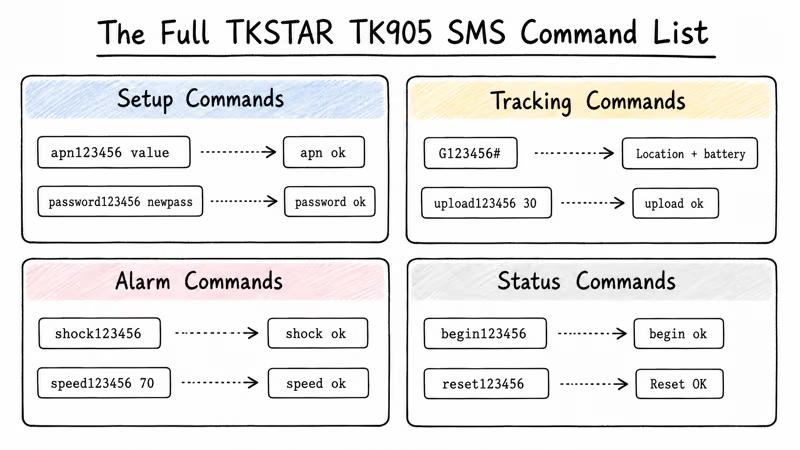
The Full TKSTAR TK905 SMS Command List
This is the master reference, grouped by job. The command strings below match the syntax documented for the TK905 4G in the manufacturer manual. Send each one as a normal text message to the tracker’s SIM number, then watch for the device reply in the third column. If no reply comes back after a short wait, the command failed and the device kept its old setting unchanged.
Setup Commands
| Purpose | Command syntax | Device reply |
|---|---|---|
| Set the data APN | apn123456 APNname | apn ok |
| Set APN username (if carrier needs one) | apnuser123456 username | apnuser ok |
| Set APN password (if carrier needs one) | apnpasswd123456 password | apnpasswd ok |
| Change the device password | password123456 newpass | password ok |
| Set the time zone (GMT offset) | timezone123456 -5 | time ok! |
| Add an admin (alert) number | admin123456 phonenumber | admin ok |
| Remove the admin number | noadmin123456 | noadmin ok |
The admin number is where every alarm text is delivered. Without it set, the tracker still detects overspeed and shake events but has nowhere to send the alert, so you’d never see them. Set the admin number before enabling alarms.
Tracking Commands
| Purpose | Command syntax | Device reply |
|---|---|---|
| Request current location | G123456# | Google Maps link, speed, battery |
| Set the upload interval (seconds) | upload123456 30 | upload ok |
| Turn on GPRS (app/data mode) | GPRS123456 | GPRS OK |
| Switch back to SMS-only mode | SMS123456 | SMS OK |
Reporting frequency is set by the upload123456 value. A lower number means more frequent updates and faster battery drain. Use a short interval only for active vehicle tracking; the manual’s default interval is far longer, which is what protects the 5000mAh battery’s manufacturer-listed 30-day standby rating when the tracker just sits parked.
Alarm Commands
| Purpose | Command syntax | Device reply |
|---|---|---|
| Turn on the shake (vibration) alarm | shock123456 | shock ok |
| Turn off the shake alarm | noshock123456 | noshock ok |
| Turn on the movement alarm | move123456 | move ok |
| Turn off the movement alarm | nomove123456 | nomove ok |
| Set an overspeed alarm (km/h) | speed123456 70 | speed ok |
| Cancel the overspeed alarm | nospeed123456 | nospeed ok |
The three alarms don’t all work the same way. According to the manufacturer manual, the movement alarm fires once the device drifts about 500 meters from where it was armed, while the overspeed alarm watches live speed against the threshold you set. The low-battery alert needs no command at all. The manual confirms the tracker warns the admin number automatically once charge drops below roughly 30 percent.

Status and Maintenance Commands
| Purpose | Command syntax | Device reply |
|---|---|---|
| Reboot the tracker | begin123456 | begin ok |
| Factory reset (clears settings) | reset123456 | Reset OK |
| Re-detect a new SIM | reset123456 | Reset OK |
Keep this whole list saved in your phone’s notes. The TK905 has no on-screen menu, so the command table is the only interface you get.
TK905 First-Time Setup: The Command Sequence
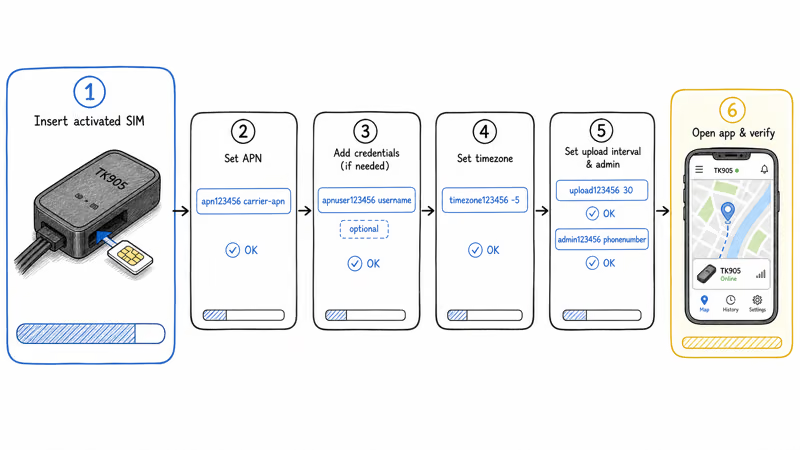
Out of the box, the TK905 needs a short, ordered command sequence before the app shows a live position. Most of the delay comes from SIM activation and GPS lock rather than typing commands.
Run these steps in order. Skipping ahead, especially past the APN, leaves the tracker unable to report at all.
Step 1, insert an activated SIM. Disable the SIM’s PIN lock first, then seat the micro-SIM and power on. If you haven’t chosen a carrier yet, our best SIM card for the TK905 guide picks plans and lists the APN string for each one.
Step 2, set the APN. Send apn123456 followed by your carrier’s APN string. According to Wikipedia, an APN is “the name of a gateway between a mobile network and another computer network” that decides how the data connection gets built, which is exactly why the wrong string blocks every report the tracker tries to send.
Step 3, add APN credentials if needed. A few carriers require a username and password as well. Send apnuser123456 and apnpasswd123456 only when your carrier publishes them. Most prepaid plans don’t.
Step 4, set the time zone. Send timezone123456 -5 for US Eastern, adjusting the offset to your zone.
Step 5, set the upload interval and admin number. Send upload123456 30 for 30-second reporting, then admin123456 with your phone number so the alarm texts have somewhere to land.
Step 6, open the app. Add the tracker by its IMEI and confirm a live fix on the map. With the tracker configured, decide where to mount it using our TK905 installation guide.
For the full buying context, plus accuracy and battery details, see the TKSTAR TK905 review.
TK905 Reboot vs Factory Reset
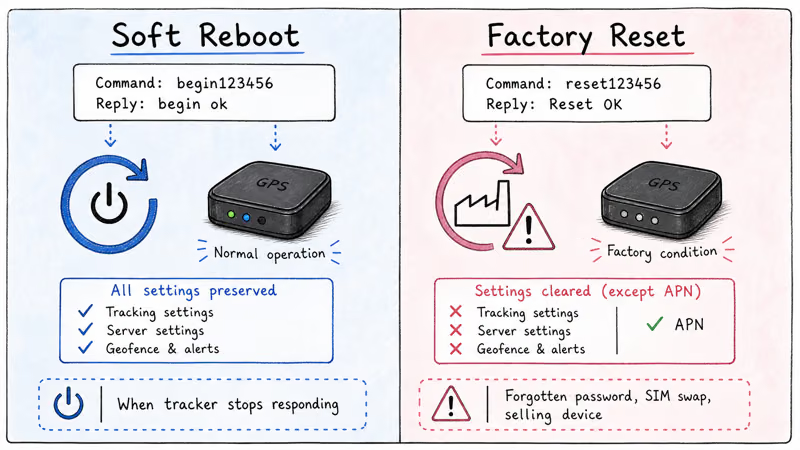
The TK905 has two reset commands that do very different things, and confusing them is a common mistake. Here is exactly what each one clears, because the names give no hint of the difference.
begin123456 is a soft reboot. It power-cycles the tracker without wiping a single setting. According to the manufacturer manual, sending begin123456 returns begin ok and restarts the device. That’s the right move when the tracker stops responding but you know its settings are correct.
reset123456 is the factory reset, a heavier action entirely. It returns settings to their out-of-box state and replies Reset OK. The manual confirms one detail that matters: the APN survives a factory reset, while everything else in your configuration is wiped. Reach for the factory reset when you’ve forgotten a changed password, when you’re selling the device, or when you swap to a new SIM and the tracker refuses to register it.
After any factory reset, re-send your time zone, upload interval, and admin number. If the tracker still won’t connect after a SIM swap, re-send the APN too, rather than trusting that the reset preserved it cleanly.
Why Won’t My TK905 SMS Command Work?
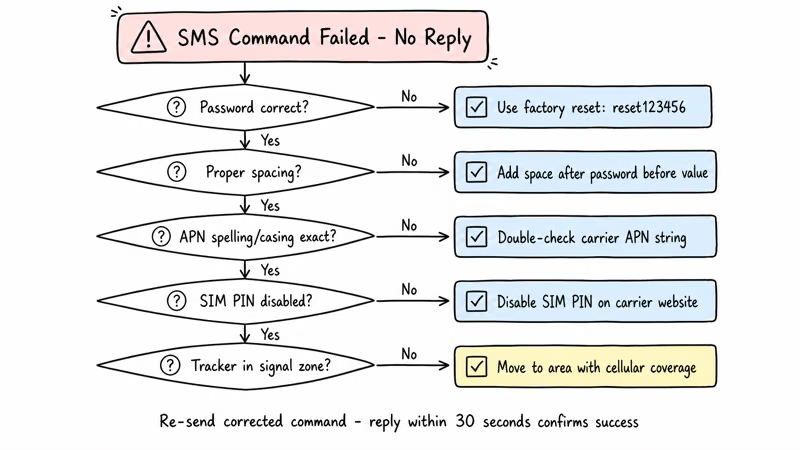
When a command gets no reply, the cause is almost always one short list of formatting or signal problems that trip up most first-time TK905 owners. Re-sending a corrected text usually fixes the issue without replacing hardware, so a silent command is rarely a dead device. Work through the faults below in order, and you’ll almost always find the one that’s blocking your reply before you ever suspect the hardware itself.
The most frequent fault is a wrong or forgotten password. If you changed 123456 and lost the new value, nothing will parse, and the factory reset above is the only recovery.
A missing space after the password ranks close behind. The string apn123456wholesale fails where apn123456 wholesale works. The third common fault is APN casing or spelling, because carriers publish the APN exactly and the tracker matches it literally with no autocorrect.
Some causes have nothing to do with the text you sent. A SIM PIN that was never disabled stops the tracker from using the SIM at all. A tracker sitting in a cellular dead zone, like a deep parking garage, simply can’t receive the message. And a 2G-era TK905 on a 4G-only carrier will never connect, because 3G and older 2G networks have been shut down across the major US carriers.
Telling a Setup Problem From a Signal Problem
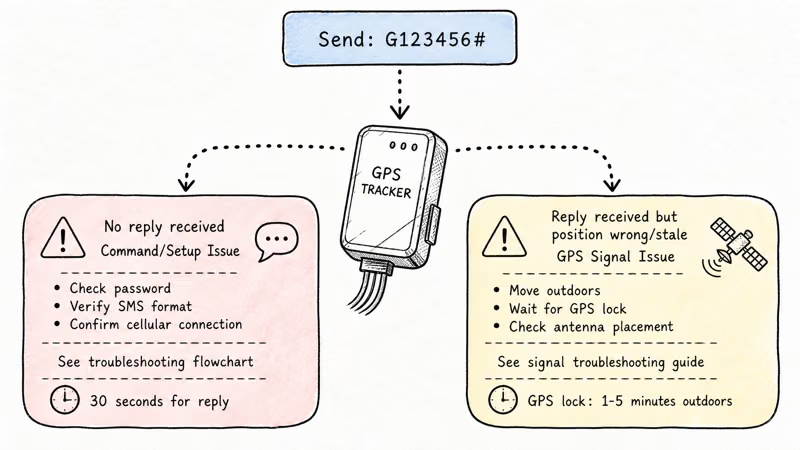
A failed command and a failed GPS lock look similar from your phone, but they have different fixes. The G123456# location request is the fastest way to tell them apart.
If G123456# replies with a text but the position is wrong or stale, that’s a GPS lock problem, not a command problem. Our TK905 indoor signal fixes guide covers cold-start delays and indoor blockage. If G123456# produces no reply at all, the fault sits somewhere in the command itself, the password, or the cellular link, so work back through the failure list above.
One closing note on syntax across models. The command123456 value form documented here is the standard for the TK905 4G, and the related TK905B and TK915 share the same command keywords, so this list carries over to them. If your printed manual instead shows a KEYWORD,value# format, you have an older 2G-era unit and should follow its own card.
Bottom Line
Save this command list somewhere you can reach it from your phone, because the TK905 gives you no other interface. Once the APN, time zone, upload interval, and admin number are set, the tracker runs as one of the cheapest no-subscription vehicle trackers available.
The hardware costs near $40 once, plus a SIM around $5 a month. SMS setup is a one-time tax, not a recurring chore. Our GPS trackers with no monthly fee roundup explains why that trade still wins over three years.
FAQ
What is the default password for the TKSTAR TK905?
The factory default password is 123456. It sits inside every SMS command, directly after the keyword, with no space before it. Change it after setup by sending password123456 followed by your new password, because anyone with your tracker’s SIM number and the default password can reconfigure the device.
How do I find the SIM card’s phone number to text commands to?
Commands go to the phone number of the SIM card inside the tracker, not to the tracker itself. Your carrier assigns that number when you activate the SIM. Check your carrier account dashboard or the activation confirmation email or text. If you can’t find it, call the carrier’s support line and ask for the line’s phone number.
What SMS command resets the TKSTAR TK905 to factory settings?
Send reset123456 to the tracker’s SIM number. The device replies Reset OK and returns its settings to the out-of-box state. The APN setting survives the reset, but the time zone, upload interval, admin number, and changed password don’t, so re-send those afterward.
How do I check whether the TK905 received my command?
The tracker texts a confirmation back for every command it accepts. A correct command returns a short reply such as apn ok, time ok!, or begin ok. If you get no reply, the message did not parse, usually because of a wrong password or a missing space.
Why is the TK905 not replying to my text messages?
The usual cause is a formatting error: a changed password you forgot, or a missing space after 123456. Other causes are an APN typo, a SIM PIN that was never disabled, or the tracker sitting in a cellular dead zone. Re-send the command with corrected text first, and confirm the SIM is active and has signal.
Do I need the app, or can I run the TK905 with SMS commands only?
You can run the TK905 entirely by SMS. Sending G123456# returns the current location as a Google Maps link with speed and battery, and alarms go to your admin number by text. The app adds a map history and live tracking, which is why most owners enable GPRS, but it’s optional.
What command sets how often the TK905 reports its location?
Send upload123456 followed by the interval in seconds. For example, upload123456 30 reports every 30 seconds. A shorter interval gives more frequent updates but drains the battery faster, so a long interval protects the manufacturer-listed 30-day standby figure while a short one suits active vehicle tracking.
Do these SMS commands also work on the TK905B?
Yes. The TK905B and the related TK915 share the same command keywords as the TK905 4G, so this list works on those variants. The only exception is older 2G-era units, which sometimes use a different KEYWORD,value# syntax printed on their own manual card.