- A case is best for Fire TV and Apple TV remotes — a molded silicone case with an AirTag slot adds the least bulk and never peels off.
- Adhesive stickers tag any remote — a 3M stick-on cover works on Roku, cable, and smart-TV remotes that have no dedicated case, from about $2.50 each in a 4-pack.
- You still need an AirTag — none of these holders include the tracker, which adds about $29 (or $25 each in a 4-pack).
- Glow-in-the-dark helps after dark — the Firsticks case is visible at night even before you ping it from your phone.
- It only works near a phone — an AirTag finds the remote by Bluetooth within a room, not by GPS, so it’s a couch-cushion finder, not a citywide tracker.
The average household loses the remote often enough that “where’s the remote” is a running joke. An AirTag turns it into a 10-second fix: tap your phone, follow the chirp.
The catch is attaching the tag, because a remote has no keyring hole. Apple’s AirTag setup guide states that the tag pairs to your Apple ID and then rings on command, and that Find My draws on a network of more than a billion Apple devices. So the only real decision is which holder fits your remote, and we sorted the options by remote type below.
The Best AirTag Remote Holders at a Glance
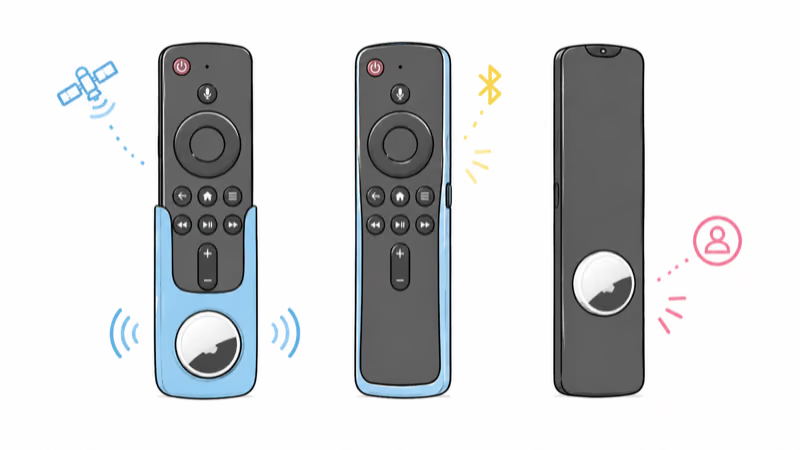
There is no single best holder, because remotes are shaped too differently for one case to fit them all. A molded case is the cleanest result when one exists for your remote, while an adhesive sticker is the universal fallback for everything else (it’s the do-anything option). The table below maps each pick to the remote it fits.
| Holder | Best for | Mount | Price |
|---|---|---|---|
| Firsticks Remote Case | Fire TV remotes | Molded silicone case | about $12 (2-pack) |
| AhaStyle Siri Remote Case | Apple TV remotes | Molded silicone case | about $13 |
| Aimtel Adhesive Sticker | Any other remote | 3M stick-on cover | about $10 (4-pack) |
Firsticks Remote Case: Best for Fire TV Remotes
Firsticks Remote Case with AirTag Holder
§ Review summary
Firsticks Remote Case
≡ Specs
- Fits
- Fire TV / Fire TV Stick remote
- Mount
- Molded silicone case
- Tracker slot
- AirTag or Tile Sticker
- Pack
- 2-pack
- Extra
- Glow-in-the-dark
✓ Pros
- +Molded to fit Fire TV and Fire TV Stick remotes, full button access
- +Built-in slot holds an AirTag or a Tile Sticker
- +Glow-in-the-dark silicone is visible at night before you even ping it
- +Ships as a 2-pack, enough for two remotes or a spare
✗ Cons
- −Fits Fire TV remotes only, not Apple TV or Roku
- −The AirTag and the case together add noticeable thickness
- −AirTag is not included
§ Buy if
- ·Your streaming runs on a Fire TV or Fire TV Stick
- ·You want a snug case rather than a stick-on cover
- ·Finding the remote in the dark matters to you
- ·You have more than one remote to cover
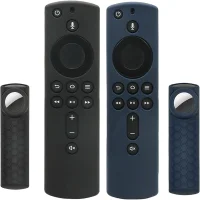
The Firsticks case is the cleanest answer for the most common streaming remote in US homes. It wraps the Fire TV remote in soft silicone with cutouts for every button, and a recessed pocket on the back grips an AirTag so it can’t rattle loose. Because the silicone glows, owners report they can spot the remote on a dark couch before they bother pinging it.
An AirTag finds a remote by sound and Bluetooth proximity, not by a map pin, so the last few feet are on you. The glow shortens that final search in a dark living room. Across 92 ratings the case averages 4.6 stars, and reviewers report the most common gripe is the added bulk once a tag is inside.
The trade-off is fit. This case is shaped for Fire TV remotes, so Apple TV and Roku owners need a different pick. If you’ve already tagged your keys and bags, our guide to AirTag holders and accessories covers the rest of the house.
AhaStyle Case: Best for the Apple TV Siri Remote
AhaStyle Apple TV Remote Case with AirTag Holder
§ Review summary
AhaStyle Siri Remote Case
≡ Specs
- Fits
- Apple TV Siri Remote (2021/2022)
- Mount
- Molded silicone case
- Tracker slot
- AirTag
- Extra
- Lanyard hole, anti-slip
- Reviews
- 4.6 stars, 1,356 ratings
✓ Pros
- +Molded for the Apple TV Siri Remote (2021 and 2022, 2nd and 3rd gen)
- +Built-in AirTag holder keeps the tag flush against the back
- +Anti-slip silicone makes the slim Siri Remote easier to grip
- +Lanyard hole lets you add a wrist strap
✗ Cons
- −Fits the 2021-onward Siri Remote only, not the older aluminum remote
- −Silicone attracts lint and dust
- −AirTag is not included
§ Buy if
- ·You stream on an Apple TV 4K (2021 or later)
- ·You want a case that also adds grip to the thin Siri Remote
- ·You would use a wrist lanyard
- ·You prefer a tag tucked flush over a stick-on bump
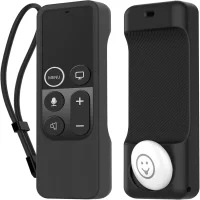
The redesigned Siri Remote is the easiest premium remote to lose, because it’s small, flat, and slides between cushions without a sound. The AhaStyle case fixes two problems at once: it adds a grippy silicone shell so the remote is harder to drop, and it holds an AirTag flush against the back so it never rattles. With more than 1,350 ratings at 4.6 stars, it’s also the most-reviewed pick here.
One fit note that buyers raise often: this case is built for the 2021-onward Siri Remote, not the older aluminum-and-glass remote. According to AhaStyle, the case fits the second and third generation, so check which remote shipped with your Apple TV before buying. Setup is the same as any tag, and our AirTag setup walkthrough covers the one-minute pairing flow.
Aimtel Adhesive Stickers: Best for Any Other Remote
Aimtel AirTag Adhesive Sticker (4-Pack)
§ Review summary
Aimtel AirTag Adhesive Sticker
≡ Specs
- Fits
- Any remote (adhesive)
- Mount
- 3M stick-on cover
- Tracker slot
- AirTag 1st/2nd gen
- Pack
- 4-pack
- Reviews
- 4.5 stars, 3,246 ratings
✓ Pros
- +Sticks to any remote shape: Roku, cable, Samsung, smart-TV, soundbar
- +Strong 3M adhesive back holds the cover in place
- +4-pack tags every remote in the house for about $2.50 each
- +Also works on a phone, laptop, or anything else without a hole
✗ Cons
- −An adhesive cover can peel over time on textured remotes
- −The tag sits on the back as a small bump rather than tucked inside
- −AirTag is not included
§ Buy if
- ·Your remote is a Roku, cable box, or anything with no dedicated case
- ·You want to tag several remotes cheaply at once
- ·You need one universal solution for mixed gear
- ·You are fine with a slim stick-on bump on the back
Most remotes aren’t Fire TV or Apple TV remotes, and almost none of them have a case you can buy. That’s where an adhesive sticker wins.
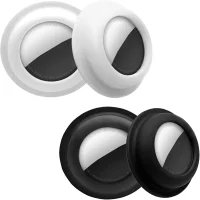
The Aimtel cover holds an AirTag and sticks to the flat back of any remote with 3M tape, so a Roku, a cable box, or a soundbar remote becomes findable in seconds. With more than 3,200 ratings, it’s the most-reviewed holder of any kind in this guide, which tells you how universal the adhesive approach is.
The honest downside is permanence. Owners report a stuck-on cover can lift at a corner over months, especially on a ribbed remote, and the tag rides as a small bump rather than tucked inside a case. For a remote with no other option, that’s a fair trade. The same stickers work beyond remotes too, which is why a 4-pack is handy: tag the remote, then put the spares on a laptop lid or a passport.
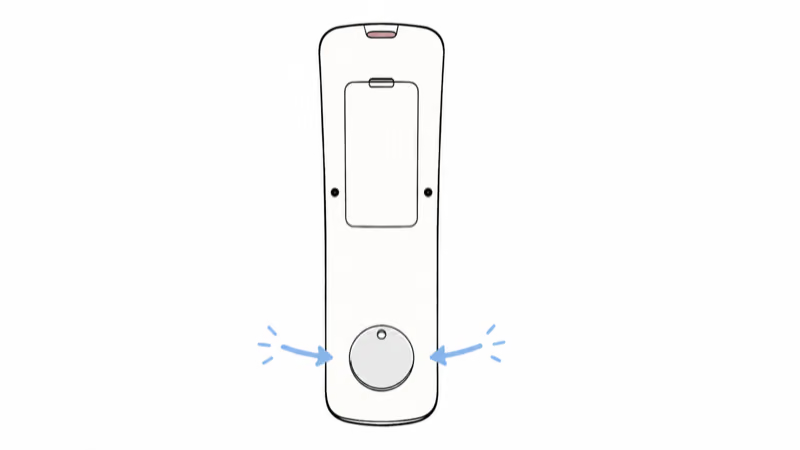
How Do You Put an AirTag on a TV Remote?
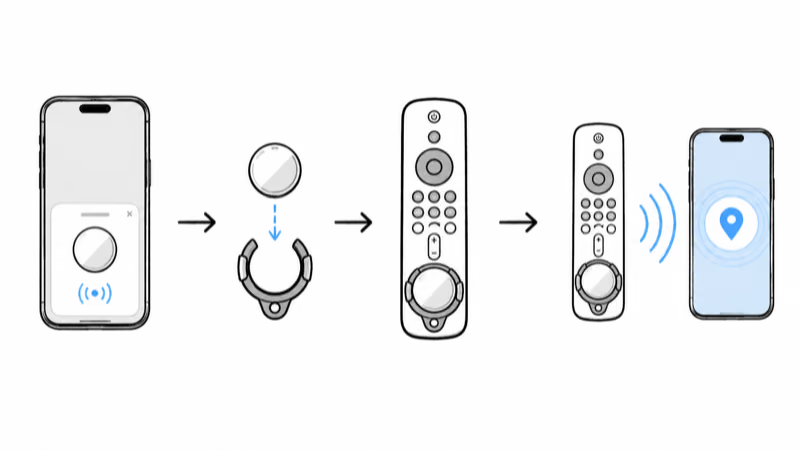
The process is tool-free:
1. Pair the AirTag. Pull the battery tab, hold the tag near your iPhone, and tap Connect. Apple’s Find My documentation notes the tag then reports its location through the Find My network of nearby Apple devices.
2. Seat the tag in the holder. Snap it into the case pocket, or press it into the adhesive cover until it clicks flat.
3. Attach it to the remote. Slide the case over the remote, or peel the 3M backing and press the sticker onto a clean, flat spot on the back for 30 seconds.
From then on, opening Find My and tapping Play Sound rings the remote. If the remote is close, your iPhone shows a direction arrow; if it’s buried, the sound does the rest. According to Apple, the AirTag runs on a standard CR2032 coin battery you can swap yourself, so a tagged remote stays findable for years.
The same workflow that finds a remote also finds anything else you tag, from a bike to a bag. It works the same whether your household is on iPhone or a mix that includes Android phones.
Which AirTag Remote Holder Should You Buy?
Choose a molded case if…
- You have a Fire TV or Apple TV remote with a case made for it
- You want the tag tucked flush with no peeling risk
- You would also use the extra grip or glow
Choose an adhesive sticker if…
- Your remote is a Roku, cable, or other shape with no case
- You want to tag several remotes at once on a budget
- You need one universal fix for mixed devices
If the remote’s already gone for good or has stopped responding, a holder won’t bring it back. Our sister site has a full Fire TV remote replacement guide for that situation, and tagging the new remote on day one stops the cycle.
Bottom Line
An AirTag is the simplest cure for the lost-remote problem, and the only real choice is the holder you put it in. Match it to your remote: the Firsticks case for Fire TV, the AhaStyle case for the Apple TV Siri Remote, and Aimtel adhesive stickers for everything else. Budget about $29 for the AirTag itself, tag the new remote the day it arrives, and the couch-cushion hunt is over.
FAQ
Can you put an AirTag on a TV remote?
Yes. Because a remote has no keyring hole, you use a holder: a molded silicone case with an AirTag slot for Fire TV and Apple TV remotes, or a 3M adhesive cover for any other remote. Once the tag is attached, you ring the remote from the Find My app.
Does the AirTag come with the holder?
No. Every case and sticker here holds an AirTag but doesn’t include one. A single AirTag is about $29, or roughly $25 each in a four-pack, which is worth buying if you plan to tag several remotes and other items.
Will an AirTag track a remote anywhere?
No. An AirTag has no GPS. It finds a remote by Bluetooth and sound within a room or home, and only updates its location when an Apple device passes nearby. For a lost remote at home that’s exactly what you need, but it’s not a long-range tracker.
Do these holders work with Tile or Samsung SmartTag?
Some do. The Firsticks case lists a Tile Sticker as an alternative to an AirTag, and many adhesive covers are sized for round trackers. The molded Apple TV case is shaped specifically for an AirTag, so check the listing if you use a different tracker.
Will an adhesive sticker damage the remote?
The 3M adhesive is designed to peel away cleanly, but on some textured or rubberized remotes it can leave a faint residue. Press it onto a flat, smooth area and clean it first for the best hold. A molded case is the no-residue option where one exists.
Can I use one holder for the Apple TV and Fire TV remotes?
Only the adhesive sticker. Molded cases are shaped for one remote model, so a Fire TV case won’t fit an Apple TV Siri Remote and vice versa. If you have a mix of remotes, the Aimtel stickers are the single solution that fits them all.
Where should I stick the AirTag on the remote?
Use the flat back near the bottom, away from the battery door and the infrared window at the top. That keeps the tag clear of the buttons and the signal path, and leaves the door accessible for battery changes.