Your phone says the bag is 400 feet away; the agent says it’s untraceable. Both can be true at once. According to Apple’s January 2026 announcement, more than 50 partner airlines now accept AirTag location links, so here’s the hour-by-hour playbook for closing that gap.
- Airline systems track barcode scans, not Bluetooth — a bag can sit one belt away from the carousel and still read “untraceable” in the tracing database.
- File the PIR before you leave the airport — many carriers tighten the mishandled-bag reporting window to as little as 4 to 24 hours after landing.
- More than 50 airlines accept a Share Item Location link as of Apple’s January 2026 count; the link, not your phone screen, gets the pin into their workflow.
- Never self-recover from a private address — if the pin leaves the airport, the correct move is a police report plus your airline file reference, every time.
- DOT caps domestic liability at $4,700 per passenger, and the Montreal Convention caps most international claims at 1,519 SDR (about $2,000), so keep receipts from hour one.
Why Can't the Airline Find a Bag Your AirTag Can See?
The core mismatch: airline tracing runs on barcode scans, not live location. Between scans the bag is invisible to the agent’s screen; your AirTag fills exactly that gap.
An NBC Los Angeles investigation into a United case reported that a traveler with AirTags in 4 checked bags watched the missing bag’s pin at the airport while the desk told him, “We don’t go by AirTags, we go by our own system.” The airline later reimbursed about $230. The finding worth repeating: an accurate AirTag pin doesn’t help until it enters the airline’s own workflow.
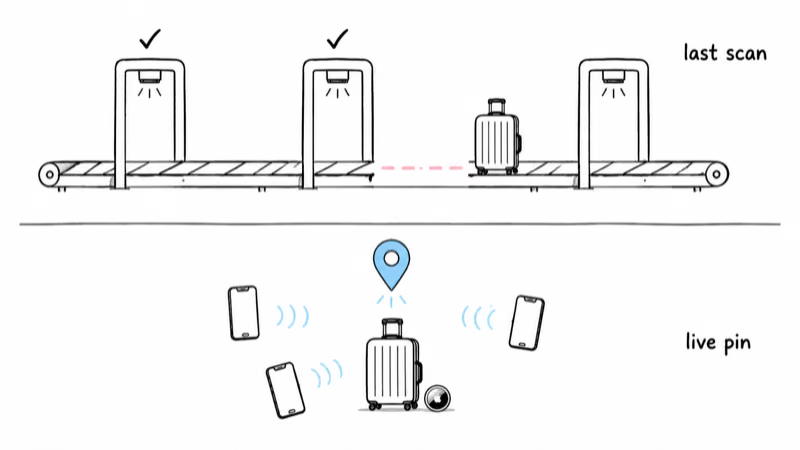
There are three common physical explanations for the standoff:
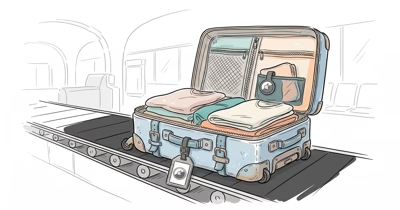
- The bag is in a container or behind the belt. Airports stage bags in ULD containers and holding rooms near the gate. Your pin reads “at the airport” while the bag sits unscanned in a bin nobody has opened yet.
- The bag missed a scan point. A torn tag or a manual transfer means WorldTracer’s trail goes cold even though the bag is 200 feet from you.
- The bag is with a last-mile courier. Once delivery is outsourced, the airline’s visibility often ends at the warehouse handoff, and only your AirTag sees the van.
One caveat before you trust the pin absolutely: AirTag location comes from passing iPhones, so a bag in a low-traffic baggage room can show a stale position for hours. If the timestamp looks old, our guide to AirTag location not updating explains how to read the “last seen” time before you build your case on it.
First 60 Minutes: Lock In the Evidence
Everything you’ll claim later, compensation, escalation, even a police report, depends on paper you create in the first hour. Do these four things before leaving the airport.
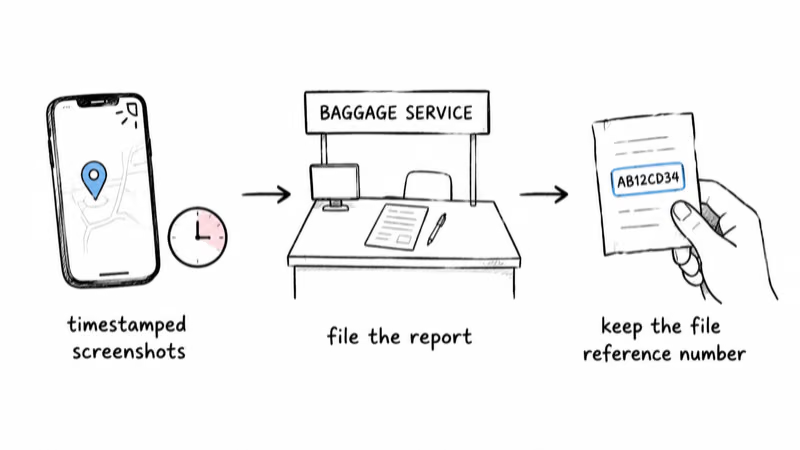
- Screenshot the AirTag pin with the timestamp visible. Open Find My, tap the item, and capture the map, the address, and the “last seen” time in one frame. Repeat every time the pin moves. A dated series beats a single screenshot.
- File the PIR (Property Irregularity Report) at the baggage service office. This is the document that officially starts the clock on your claim. Skip it and, to the airline, the bag was never mishandled.
- Get the file reference number in writing. It’s usually a 10-character code (like LAXUA12345). Every later phone call, email, and web form asks for it first.
- Note the names and the time. One line in your phone: who you spoke to, at which desk, at what time, and what they said the next step was.
Airlines set short deadlines for reporting a mishandled bag, and some cut the window to hours for damage claims. Filing in person, before you leave, removes the airline’s easiest reason to deny the claim later.
Don’t hand over your only evidence, either. Show screenshots, email copies, keep originals on your phone. The PIR desk doesn’t need your unlocked phone, and you don’t need to surrender it.
How Do You Get the Airline to Act on AirTag Data?
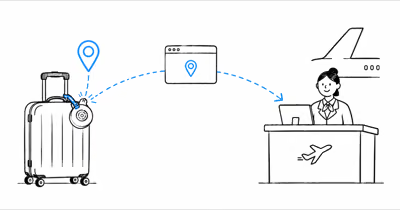
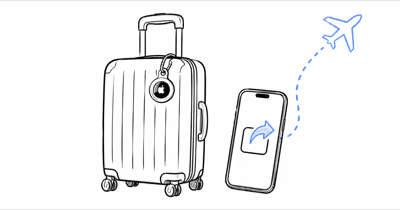
Pointing at your screen rarely works, because the agent can’t put your phone into their tracing system. What works is the handoff Apple built for this exact conflict. Generate a link from Find My and share your AirTag location with the airline so the pin appears inside the tools their staff already use.
Apple’s Find My guide states that the link is a temporary webpage needing no Apple account or app, and that it stops working after 7 days, when you tap Stop Sharing, or the moment you’re reunited with the item. That design is why baggage offices accept it: it’s a browser tab, not a security exception.
If the desk still won’t engage, climb the ladder one rung at a time, and attach the same three items at every rung: file reference, Share Item Location link, screenshot series.
- Rung 1, the desk: “I’ve filed PIR [reference]. Here’s a live location link your tracing team can open in any browser. Can you note it in the file?”
- Rung 2, the central baggage service line or web form: “My PIR is [reference]. The bag has shown at [location] since [time], per the attached link. I’m asking for a trace against that location.”
- Rung 3, social channels or written executive-relations contact: a short, dated timeline of rungs 1 and 2, with the link. Public posts get routed fast; keep yours factual and calm.
Airlines aren’t legally required to act on AirTag data. But a written record showing you handed them a working location link, repeatedly, is exactly the evidence that strengthens a claim if the bag never comes back. It also shortens the argument at every rung, because nobody can say you only pointed at a phone screen.
When the Bag Is Somewhere It Should Not Be
Sometimes the pin doesn’t sit at the airport. It shows a residential street, a self-storage lot, or a city your itinerary never touched. This is the moment people make the worst mistake in the whole scenario.
Don’t go to the address, and don’t knock on the door. You don’t know who’s there, whether the bag was stolen or misdelivered, or whether your tracker is even reading the right building. Find My pins in dense housing can land a door or two off. Confronting a stranger over luggage risks your safety and can wreck the legal claim you’re building.
Here’s the sequence that actually recovers bags:
- Screenshot the new location with its timestamp, same habit as hour one.
- File a police report with the local department for that address. Give them the AirTag history and your airline file reference. Officers can knock on a door you can’t.
- Update the airline file with the police report number. In writing: “PIR [reference]: item now shows at [address] per attached history. Police report [number] filed.”
The distinction matters for your wallet, too. A bag moving to a private address after landing looks like theft or misdelivery rather than routine mishandling, and the police report is what forces both the airline’s claims team and any travel insurer to treat it that way. In the NBC Los Angeles case above, the traveler watched his bag drive out of Barcelona; the reporting, not a doorstep visit, is what got it on record.
If the pin stops moving and goes quiet at that address, that’s normal, not proof the bag is gone. The tracker only updates when an iPhone passes nearby, so a garage or basement can mute it for days.
Claim Deadlines and Compensation That Actually Apply
While the trace runs, the claim clock is already ticking. The rules split by itinerary, and the numbers below are current as of mid-2026; both get revised on a schedule, so confirm against the linked source before you file.
Domestic US flights. Under DOT baggage rules, airlines are liable for up to $4,700 per passenger for a lost, delayed, or damaged bag, a cap DOT raised in January 2025. Carriers must cover reasonable, verifiable incidental expenses during the delay, and flat daily caps like $50 a day aren’t allowed. Most airlines declare a delayed bag lost between 5 and 14 days.
International flights. The Montreal Convention governs most itineraries between its member countries. ICAO announced that baggage liability rose to 1,519 SDR, roughly $2,000, effective December 28, 2024, in its revised limits notice. The written-claim windows are tight: 7 days from receipt for damage, 21 days for delay expenses, and a bag undelivered after 21 days can be treated as lost.
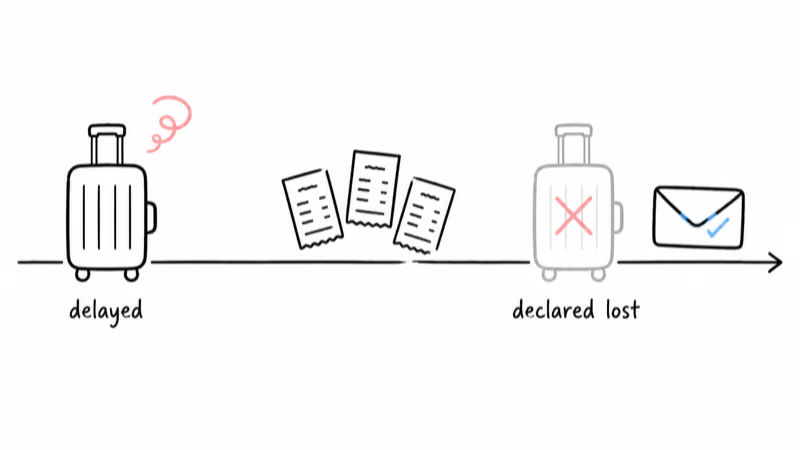
Three habits decide how much of that money you actually see:
- Keep every receipt for clothes, toiletries, and essentials bought during the delay. “Reasonable and verifiable” means itemized paper, not estimates.
- Claim in writing, inside the window. A phone call doesn’t preserve Montreal Convention rights; a dated email or web form does.
- Attach the AirTag timeline. A pin history showing the airline knew where the bag was, and when, undercuts the “we couldn’t trace it” defense on a contested claim.
Excess valuation is worth a mention at check-in, not after. For domestic trips you can declare a higher bag value for a fee; once the bag is missing, the standard cap is what you get.
Prevention for the Next Flight
You can’t control ramp handling, but you can make the next dispute shorter. The playbook above works noticeably better with a louder, longer-range tracker in the bag, because carousel-area disputes usually end when a staffer can hear the tag or walk to it with Precision Finding.
That’s the practical case for the current-generation AirTag: an improved speaker and expanded Precision Finding range over the original, aimed at exactly this crowded-belt scenario.

Placement changes outcomes as much as hardware. Bury the tracker in a padded interior pocket rather than an outside zip, both to survive handling and to stay with the bag if the outer pocket is opened. Our AirTag checked-luggage rules and placement guide covers the battery rules and the placement spots that survive real baggage systems.
One tracker per family member’s bag beats one tracker in one suitcase, which is the honest argument for the 4-pack on a family itinerary. And if your routes lean on carriers outside the Find My partner list, or on Android-heavy destinations, compare the best luggage trackers across networks before defaulting to Apple.
Bottom Line
An AirTag pin the airline “can’t see” isn’t a dead end; it’s evidence waiting for a paper trail. File the PIR before leaving the airport, hand over a Share Item Location link instead of your phone screen, and escalate in writing with the same file reference every time. If the bag surfaces off-airport, a police report, never a doorstep visit, turns your map into a recovery. Deadlines run shorter than the standoff feels, so start the claim today.
FAQ
Why does the airline say my bag is untraceable when my AirTag shows it at the airport?
Airline tracing systems like WorldTracer log barcode scan events, not live position. If your bag missed a scan or is sitting in a container between scan points, the agent's screen shows nothing even while your AirTag pin is accurate. The fix is getting your data into their file: share the location link and have the file reference note it.
Can I go pick up the bag myself from where the AirTag shows it?
Only from public, authorized places like a baggage service office that confirms the bag is there. Never enter restricted airport areas, and never visit a private address the pin points to. If the bag shows anywhere it shouldn't be, file a police report with the AirTag history and your airline reference number, and let officers make the contact.
Do airlines have to act on AirTag location data?
No law forces them to. More than 50 airlines accept Share Item Location links as of Apple's January 2026 count, which puts your pin into the baggage team's own workflow. For carriers outside the program, submit the link through the delayed-bag form anyway and note it in the file; a documented, ignored location link strengthens a later claim.
How long before a delayed bag is officially lost?
On US domestic itineraries, most airlines declare a bag lost between 5 and 14 days, and DOT expects carriers not to stretch that unreasonably. Under the Montreal Convention, you can treat a bag as lost once it has been undelivered for 21 days. The declaration matters because it moves you from incidental-expense reimbursement to the full lost-bag claim.
What compensation can I claim, and what receipts do I need?
Up to $4,700 per passenger on US domestic flights, and up to 1,519 SDR (about $2,000) on most international ones. Airlines must cover reasonable, verifiable expenses during a delay, so keep itemized receipts for essentials from day one. File in writing within the deadline windows, and attach your AirTag screenshot timeline to counter any untraceable claim.
Does AirTag 2 make luggage disputes easier?
It helps at the margins that matter. The second-generation model adds an improved speaker and extended Precision Finding range over the original, which makes near-carousel disputes faster to resolve because staff can walk to the exact bag. The escalation process is identical for both generations, since the Share Item Location link works the same way.