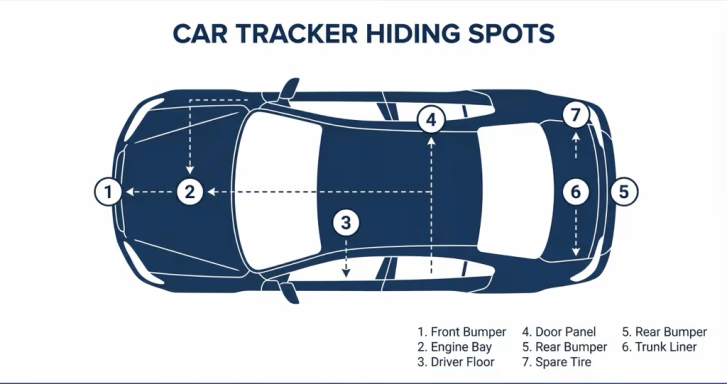
Car theft in the U.S. hit a 20-year high in 2023, and AirTag has become a popular last line of defense. But placement matters enormously—a badly hidden AirTag either loses signal inside thick metal or gets found and discarded within minutes by an experienced thief. This guide covers the seven best spots, ranked by concealment, signal reliability, and battery access.
What Makes a Good AirTag Hiding Spot in a Car
Before listing specific locations, it helps to understand what you’re optimizing for. A great hiding spot satisfies four criteria simultaneously:
- Signal penetration: AirTag uses Bluetooth 5.3 and UWB. Thick metal (body panels, frame rails) blocks or severely attenuates signal. You want the AirTag as close to the passenger or trunk interior as possible, where signal can escape through glass and door gaps to reach passing Apple devices. See how AirTag accuracy works for the full breakdown of range vs detection modes.
- Concealment depth: A thief who finds the car stopped or parked has roughly 2–5 minutes before needing to leave. Spots requiring disassembly to access (door panels, trunk lining) buy you critical time.
- Battery access: The CR2032 battery lasts about 12 months. A spot you can’t access without major effort becomes a problem at renewal time.
- Stability: The AirTag must not rattle, shift, or fall during normal driving. A loose AirTag in a wheel well can destroy itself or the wheel.
The 7 Best Hiding Spots Ranked
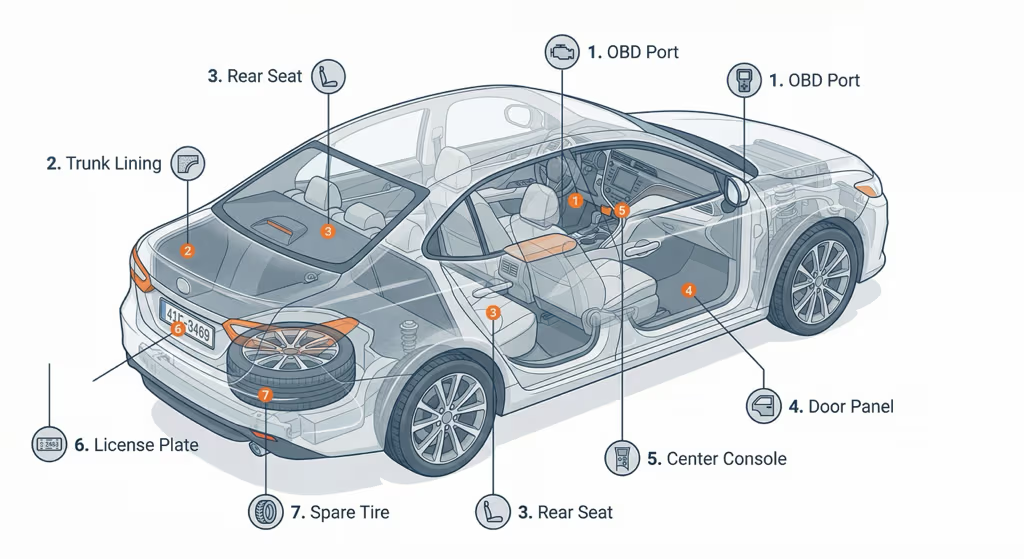
1. OBD-II Port Area (Under Dashboard)
Best for: Signal reliability, no drilling or modification required
The OBD-II port is typically located under the driver’s side dashboard, recessed but accessible. The area behind and around the port often has small plastic cavities where an AirTag fits snugly in a silicone skin or wrapped in a thin adhesive pad. The dashboard cavity is mostly plastic, giving Bluetooth signal a clear path out through the windshield and door gaps.
| Factor | Rating | Notes |
|---|---|---|
| Signal Strength | Excellent | Plastic housing, near glass |
| Concealment | Moderate | Visible if someone looks under dash |
| Battery Access | Easy | No disassembly needed |
| Stability | Good | Wedged in place, doesn’t rattle |
Tip: Use a small velcro strip or adhesive mount rather than leaving it loose. Avoid placing the AirTag directly on the OBD port itself—a diagnostic scan tool needs that port clear.
2. Inside the Trunk Lining
Best for: Deep concealment, hardest to find without deliberate search
Most cars have a fabric or carpet lining in the trunk that can be partially peeled back along the edges. Behind this lining—especially in the corners or along the sides—there are cavities between the liner and the metal body panel. Sliding an AirTag in a foam wrap into this cavity takes about 30 seconds and results in a completely invisible placement.
| Factor | Rating | Notes |
|---|---|---|
| Signal Strength | Moderate | Metal body nearby; trunk lid glass helps |
| Concealment | Excellent | Invisible without deliberate disassembly |
| Battery Access | Moderate | Peel back lining; takes ~2 min |
| Stability | Good | Snug fit prevents movement |
3. Under a Rear Seat
Best for: Balance of concealment and signal strength
The area beneath rear seats—particularly in the metal rail channels where the seat slides or bolts—often has small gaps where an AirTag can be tucked. Taped to the underside of a seat cushion frame, the AirTag is hidden from casual view but surrounded by plastic and fabric rather than thick metal, which helps signal transmission.
| Factor | Rating | Notes |
|---|---|---|
| Signal Strength | Good | Plastic/fabric around device, near windows |
| Concealment | Good | Not visible without removing seat |
| Battery Access | Moderate | Need to access under seat |
| Stability | Good | Secured with adhesive or zip tie |
4. Inside a Door Panel Cavity
Best for: Maximum concealment; best theft recovery scenario
Door panels can be removed with basic tools (usually just a trim removal tool and one or two screws). Inside, there’s a large cavity between the outer metal skin and the inner plastic panel. This is one of the least-obvious spots a thief would check, and the plastic inner panel allows reasonable Bluetooth transmission. The downside is that battery replacement requires the same partial disassembly.
| Factor | Rating | Notes |
|---|---|---|
| Signal Strength | Moderate | Metal outer skin; signal exits via window gap |
| Concealment | Excellent | Requires tools to access |
| Battery Access | Difficult | Partial panel removal each time |
| Stability | Excellent | Mounted inside, no movement |
5. Inside the Center Console
Best for: Easy access and battery replacement; decent concealment
Many center consoles have a removable organizer tray or a false bottom beneath the main compartment. Taping an AirTag to the underside of the tray or inside the lower compartment wall keeps it invisible during normal use. Signal strength here is good—the console is plastic throughout.
| Factor | Rating | Notes |
|---|---|---|
| Signal Strength | Excellent | Plastic console, central location |
| Concealment | Moderate | Found if console is searched |
| Battery Access | Easy | Lift tray, swap battery |
| Stability | Good | Adhesive mount holds well |
6. Behind the License Plate Frame
Best for: Exterior placement with minimal signal loss
A thin AirTag in a slim silicone case can be mounted behind the license plate using the existing mounting bolts or a small magnetic holder. The plate area is plastic or metal, but the AirTag faces outward toward open air, giving it strong signal in any direction. The main risk is that this is one of the first places a knowledgeable thief will check—it’s a well-known tracker location.
| Factor | Rating | Notes |
|---|---|---|
| Signal Strength | Excellent | Faces open air, strong transmission |
| Concealment | Poor | Common first check for thieves |
| Battery Access | Easy | Remove plate screws |
| Stability | Good | Bolted or magnetically secured |
Recommendation: Use this as a secondary AirTag location, not your primary one. If a thief finds and discards it, your primary hidden AirTag is still active. If you’re on the other side of this concern — worried someone may have hidden a tracker on your vehicle — our guide on finding an AirTag hidden in your car covers every location to check.
7. Spare Tire Well
Best for: Deep concealment in a rarely-accessed area
The spare tire well—the compartment under the trunk floor—is almost never accessed day-to-day. Taping an AirTag to the side wall of the well (not on the spare tire itself) keeps it stationary and hidden. Signal strength is reduced by the surrounding metal, but Find My network density in urban areas usually compensates with occasional updates as nearby Apple devices pass.
| Factor | Rating | Notes |
|---|---|---|
| Signal Strength | Moderate | Metal surrounds; updates less frequent |
| Concealment | Excellent | Virtually never checked |
| Battery Access | Moderate | Lift trunk floor, access well |
| Stability | Excellent | Taped to wall, no movement |
All 7 Spots: Side-by-Side Summary
| Location | Signal | Concealment | Battery Access | Best For |
|---|---|---|---|---|
| OBD-II Port Area | Excellent | Moderate | Easy | Quick install, good signal |
| Trunk Lining | Moderate | Excellent | Moderate | Deep concealment |
| Under Rear Seat | Good | Good | Moderate | Best overall balance |
| Door Panel | Moderate | Excellent | Difficult | Max concealment, set-and-forget |
| Center Console | Excellent | Moderate | Easy | Easy battery swap |
| License Plate | Excellent | Poor | Easy | Secondary / decoy location |
| Spare Tire Well | Moderate | Excellent | Moderate | Rarely-accessed backup |
Spots to Avoid
Not every seemingly clever location works in practice. These are common mistakes:
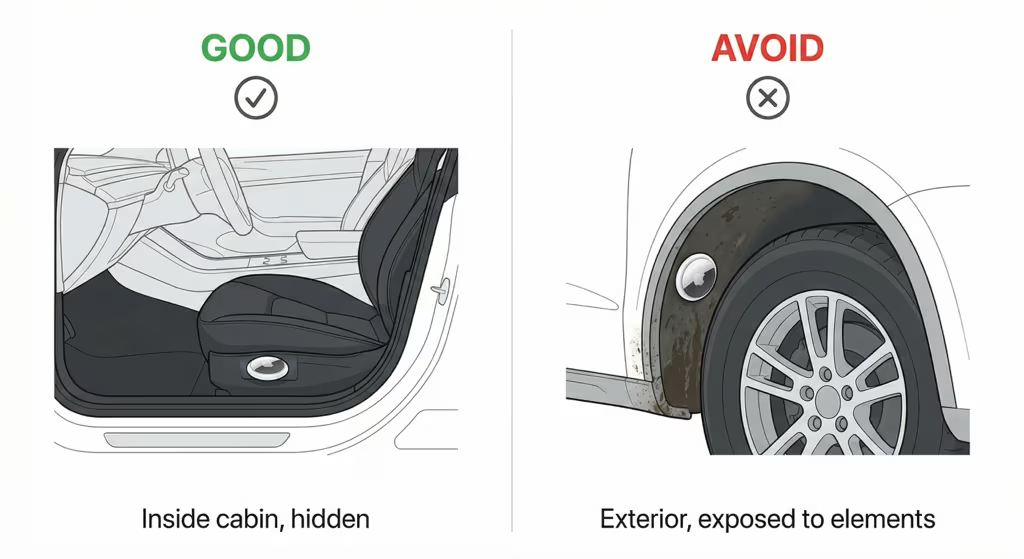
- Wheel wells (exterior): Constant vibration, road debris, water exposure, and the thick metal of the wheel arch will destroy the AirTag and block signal. AirTag’s IP67 water resistance is for submersion, not continuous spray from a spinning wheel.
- Under the hood / engine bay: Extreme heat from the engine can permanently damage the AirTag. The operating temperature limit is 60°C (140°F), which an engine bay easily exceeds.
- On top of the battery: Electrical interference from the 12V battery affects Bluetooth performance. High heat and corrosive gases from battery off-gassing also cause problems.
- Roof rack / exterior magnetic mount: While exterior magnetic mounts exist for AirTag, they are obvious to any thief scanning for trackers with an iPhone or Android app, and signal quality suffers due to the surrounding metal body acting as a Faraday cage at certain mounting angles.
Why AirTag 2 Is Better for Car Tracking
The AirTag 2 (2025) is the better choice for car anti-theft use over the original, for two specific reasons that matter in this context. Our full AirTag 2 review covers every spec in detail—here’s what’s most relevant for vehicle use:
Apple AirTag 2 (2025)
Recommended for car anti-theft — longer range, louder speaker
Why It’s Better for Cars
- 60m detection range (vs 40m original) — picks up passing iPhones from a greater distance, critical when the car is parked in an isolated area
- Louder 60dB speaker — more audible if you trigger the sound at a junkyard or chop shop to help recovery teams locate it
- IP67 water resistance — handles trunk and interior humidity, door panel condensation
- No subscription fee — own it once, track forever
Limitations
- No real-time GPS — relies on Find My network (requires nearby iPhones)
- No geofencing or speed alerts (see GPS trackers below for those features)
- Anti-stalking alerts notify Android users of an unknown AirTag — a thief who drives to an area with Android devices may get an alert on an iOS device near them
Check Price on Amazon → Buy 4-Pack on Amazon →
One practical note for covert car tracking: the AirTag 2’s louder speaker works both ways. Left separated from its paired iPhone for three days, it will beep — which can reveal a hidden tracker to an alert thief. Some owners choose to disable the AirTag speaker for vehicle use, though Apple considers this a modification that voids the warranty. Also make sure you’re sourcing from Apple or an authorized retailer: fake AirTags sold through third-party listings look identical to the real thing but won’t connect to Find My, giving you zero protection when it counts.
AirTag vs Dedicated GPS Tracker for Your Car
AirTag is the right choice if your car is in an urban or suburban area where Apple devices pass regularly and you want zero ongoing cost. For rural parking, high-value cars that warrant professional protection, or any situation where real-time speed and location data matters, a dedicated GPS tracker is more capable — see our full AirTag vs GPS tracker comparison.
One limitation worth knowing: AirTag shows only current position. It doesn’t store a route or trip log. For a full explanation of what data is actually retained, see AirTag location history.
If subscription cost is a concern, our no-monthly-fee GPS tracker roundup covers options that minimize ongoing charges. Here’s the quick feature breakdown for the car use case:
| Feature | AirTag 2 | GPS Tracker (e.g., Bouncie) |
|---|---|---|
| Real-time location | ✗ Last known only | ✓ Every 15–60 sec |
| Works without nearby iPhones | ✗ Requires crowd-sourcing | ✓ Cellular independent |
| Geofencing alerts | ✗ Not available | ✓ Yes |
| Speed / trip history | ✗ Not available | ✓ Full trip log |
| Monthly cost | $0 | $8–$10/month |
| 2-year total cost | ~$29 | ~$220–$270 |
| Concealment size | 31.9mm disc — tiny | Larger plug-in or wired unit |
Legal Considerations
Hiding a tracker in your own car is completely legal in all U.S. states. However, placing an AirTag in someone else’s vehicle without their knowledge is illegal under federal stalking statutes and an increasing number of state laws. As of 2025, Texas, Florida, Pennsylvania, and several other states have passed specific anti-tracker legislation making covert tracking of another person’s vehicle a criminal offense.
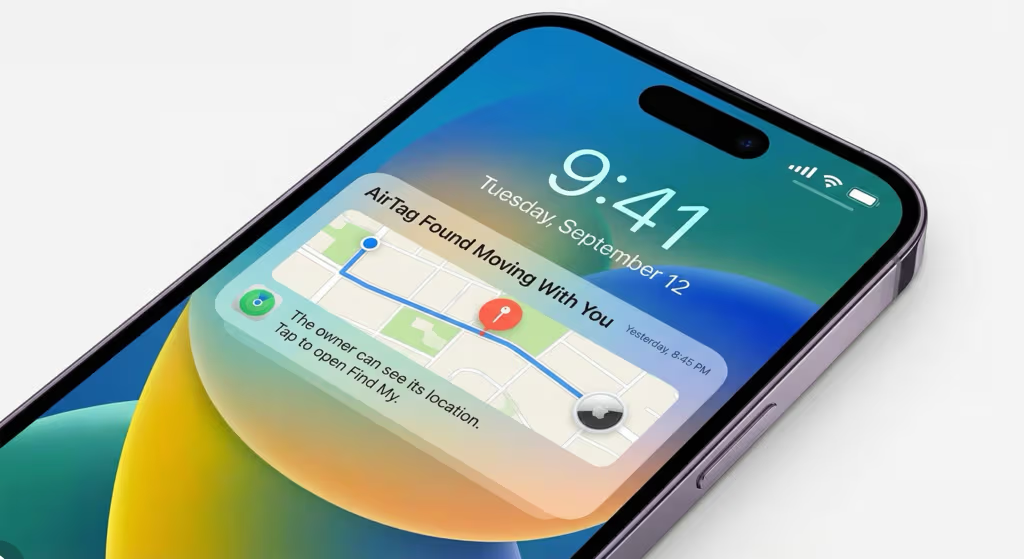
Apple’s own anti-stalking system (unwanted AirTag alerts, introduced in iOS 14.5 and expanded in iOS 17) notifies iPhone users if an unknown AirTag has been traveling with them. Android users can scan for nearby AirTags using the Tracker Detect app. If you are using an AirTag in a shared vehicle, inform all regular drivers to avoid triggering these alerts.
For a full overview of the legal landscape around AirTag tracking, see our AirTag for car guide.
Practical Installation Tips
- Use a silicone case or foam wrap: Bare AirTag against metal creates rattling noise. A snug silicone skin absorbs vibration and protects the device.
- Use 3M VHB tape for adhesive mounts: Standard double-sided tape fails in heat. VHB tape holds in temperatures up to 93°C and in humid environments.
- Label your AirTag in Find My: Name it something generic like “Car” or “Vehicle” rather than a name that reveals its purpose. If someone finds it and scans it, the name doesn’t give away that you’re tracking theft.
- Set a reminder for battery replacement: The CR2032 lasts about 12 months. Set a calendar reminder so you don’t discover a dead AirTag when you need it most.
- Test signal after installation: After hiding the AirTag, walk away from the car ~50m and confirm it appears on Find My. If it’s not updating, signal is blocked and you need a different spot.
- Use two AirTags in different locations: One obvious (license plate area), one deeply hidden (door panel or spare tire). If a thief finds and discards the obvious one, the hidden one remains active. A 4-pack brings the per-unit cost down significantly.
Frequently Asked Questions
Can I put an AirTag on the outside of my car?
You can, but it’s not recommended as a primary hiding spot. Exterior locations like wheel wells or roof racks expose the AirTag to vibration and water damage beyond its design limits, and are often the first locations a thief checks with a signal scanner. Interior placements outperform exterior ones in both concealment and signal reliability.
Will AirTag work if my car is in a parking garage?
It depends on foot traffic. In a busy urban garage with steady iPhone user traffic, your AirTag will update location regularly through the Find My network. In an empty overnight garage with few Apple device users, updates may be infrequent. The last known location before the garage will still be recorded.
Can a thief detect my AirTag?
Yes, potentially. An iPhone will alert the user if an unknown AirTag has been traveling with them for 8–24 hours (the timing varies to prevent counter-scanning). Android users can actively scan with the Tracker Detect app. A thief who systematically scans a stolen car could potentially locate an AirTag, which is why deeply concealed placements inside door panels or trunk linings are preferable over obvious locations.
How many AirTags should I put in my car?
Two is the practical recommendation. One in an accessible but hidden interior location (OBD area, under rear seat), and one in a deeply concealed location requiring disassembly (door panel, trunk lining). This way, if one is found and discarded, the other continues tracking. A 4-pack of AirTag 2 lets you cover the car plus additional items like a backpack or keys.
Does hiding the AirTag affect signal strength?
Interior plastic and fabric have minimal effect on Bluetooth. Thick metal body panels do reduce signal. The spots in this guide are chosen specifically because they’re shielded from view but surrounded by signal-transparent materials (plastic trim, carpet, fabric). Always test with a 50m walk-away check after installation.
Can I use an AirTag to track a rental car?
Only with explicit permission from the rental company. Placing a tracker in a rental car without authorization may violate the rental agreement and could create legal issues under stalking or surveillance statutes, even if the intent is to track the car itself.
Buy AirTag 2 (1-Pack) on Amazon → Buy AirTag 2 (4-Pack) on Amazon →