You bought a Jiobit Gen 3 because the spec sheet promised long battery life and the quad-mode (GPS + LTE + WiFi + BLE) sounded indestructible. Then Low Battery alerts started arriving earlier than expected. Jiobit’s official support documentation is the right place to confirm the current app settings and battery guidance for your plan.
On the Jiobit Gen 3, tight geofences, frequent updates, and weak signal all force more radio activity. The five fixes below target those settings and can recover meaningful runtime on a heavily drained unit.
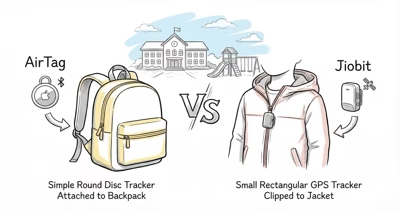
If battery life is only one part of your buying decision, our GPS tracker for kids comparison shows where Jiobit fits against watches, AirTag, and higher-support child trackers.
- Jiobit runtime is setting-sensitive. More frequent updates and smaller geofences require more radio activity.
- Tight geofences are a major drain accelerator. Boundary-crossing checks add cellular load.
- Use the least aggressive update interval that still fits the use case. Faster updates cost battery.
- BLE scanning should stay on the app's lower-power option when available, so the device can sleep radios when it doesn't need them.
- Cold weather reduces available lithium battery capacity, so winter carry routines need more charging margin.
How Long Does Jiobit Gen 3 Battery Actually Last?
Jiobit’s spec sheet gives a best-case battery figure, but that number assumes a favorable configuration. Many owners change the defaults.
According to Jiobit’s press kit specifications, “Under typical use, the Jiobit can last a full week between charges.” That “typical use” language matters: the closer your setup stays to normal update frequency, good LTE coverage, and low radio load, the closer it’ll get to the rated baseline.
Real-world usage drifts from this baseline. Parents reported that they tighten geofences to 100-200 feet to track a child crossing a specific yard.
School-day pickups can generate repeated boundary-crossing checks. Update interval gets bumped for “better” tracking, increasing LTE radio time. Stack several high-drain settings, and the rated battery target becomes much harder to hit.
Why Does Jiobit Drain Faster Than Rated?
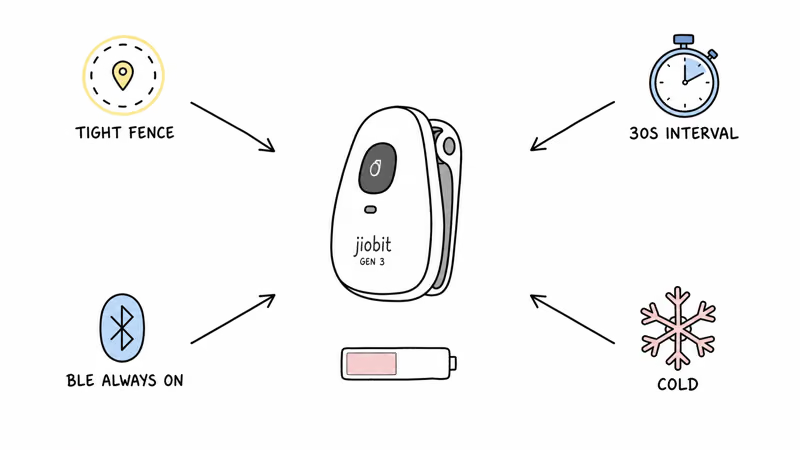
Four drain accelerators stack on Jiobit Gen 3. Most owners trigger at least two of them daily without realizing it.
Tight geofences. A narrow geofence around your front door can trigger a ping every time the wearer crosses the boundary during normal indoor-outdoor movement. Each ping consumes LTE radio cycles, so a tight geofence drains the battery faster than a wider one under the same movement patterns.
Fast update interval. The Jiobit app lets you choose how aggressively the tracker checks location. Faster settings increase LTE radio duty cycle while adding little tracking value when the wearer is walking or stationary. Battery University’s lithium battery guide confirms that “high load discharges” will shorten battery life, and frequent LTE transmits are exactly that kind of sustained high-current load on a small cell.
Always-On BLE scanning. Jiobit’s BLE scanner detects when the device enters known WiFi/BLE zones (home, school). “Always On” mode keeps the radio active continuously. “Auto” mode lets the device sleep BLE when LTE coverage is strong and there are no nearby known beacons.
Cold weather. Jiobit’s lithium-polymer cell has less usable capacity in cold conditions. The drain isn’t immediate; it shows up as faster apparent depletion across the day.
How to Diagnose Your Jiobit's Drain Pattern
The Jiobit app shows current battery percentage but doesn’t graph it over time. Use a 7-day log to identify which accelerator applies to your situation. If the device also shows stale positions while you diagnose drain, work through our Jiobit location update troubleshooting steps first, since a struggling GPS lock and fast battery drain often share the same root cause.
- Note the starting battery percentage in the Jiobit app with date and time.
- Log all geofence configurations: count, radius of each. Tighter than 500 ft? Note it.
- Check current update interval in app settings. 30, 60, or longer?
- Track cold-weather exposure: any days the Jiobit was outdoors below 40°F (4°C) for more than an hour.
- Check battery percentage daily at the same time. After 7 days, calculate per-day drop.
If the log shows a much faster drop on school days, outdoor days, or days with lots of boundary crossings, one of the four accelerators is probably active.
5 Fixes for Jiobit Gen 3 Faster Drain
Ordered from highest impact to lowest. The first three recover the most runtime on a heavily drained unit.
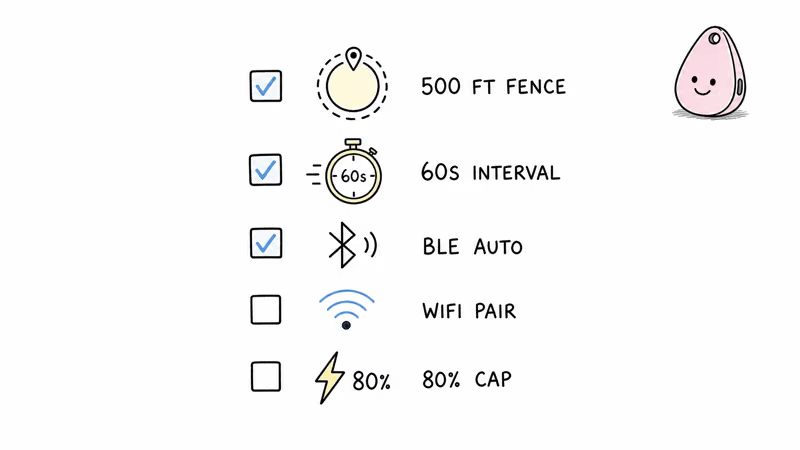
Fix 1: Widen tight geofences. Open the Jiobit app, edit each geofence, and give the boundary enough buffer to avoid constant edge crossings. For school pickups, set the geofence around the entire school block, not the single classroom door.
Fix 2: Use a less aggressive update interval. App settings, Tracking, Update Interval. You’ll lose some rapid-movement granularity, but you’ll reduce LTE radio load. For walking or stationary tracking, the fastest setting usually isn’t necessary.
Fix 3: Switch BLE scanning to “Auto” when available. App settings, Advanced, BLE Mode.
Fix 4: Enable WiFi assist for known networks. Pair the Jiobit with your home and school WiFi networks. The device prefers WiFi over LTE when in range, cutting cellular consumption significantly.
Fix 5: Avoid extreme charge habits. Lithium-polymer cells like Jiobit’s age faster when they’re held at full charge or run close to empty all the time. A regular charging routine with some margin is better than repeated deep drains.
Signs Your Jiobit Needs Replacement
A settings tune usually fixes drain on an otherwise healthy Jiobit. There are scenarios where the device itself, not just the configuration, has reached end of useful life. Start with settings before replacing hardware, because the device can burn power for reasons that have nothing to do with cell health. If the recurring $9/month plan is the real frustration rather than the battery, our guide to GPS trackers with no monthly fee covers subscription-free options worth weighing against a replacement.
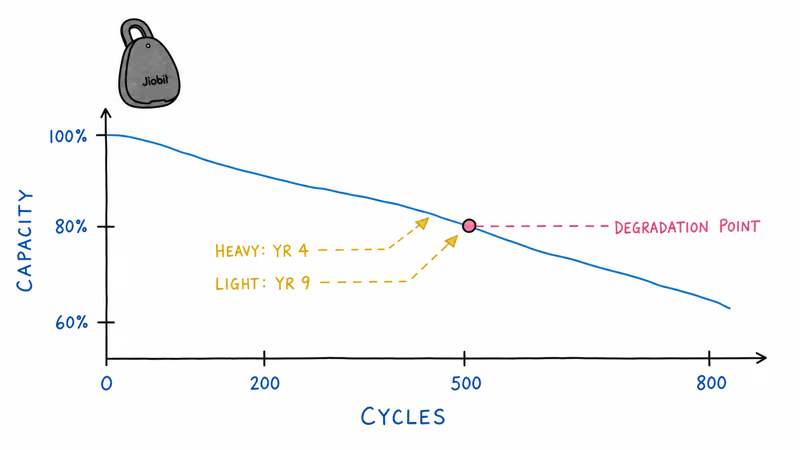
Battery cell degradation. Rechargeable lithium cells lose capacity with age and charge cycles. If your Jiobit used to last comfortably between charges but now drains quickly even with conservative settings, the cell may have degraded.
Hardware damage. Drops, sustained submersion past IPX8 limits (1 meter for 30 minutes), or charging-port corrosion can short the LTE module. A Jiobit that won’t connect cellularly after a fresh charge is hardware-failed, not user-error.
Subscription cost vs upgrade. Jiobit’s $9/month subscription is the largest ongoing cost. If you’ve been paying for 3-4 years on an older device, the math may favor upgrading to current hardware with current battery life and offloading the old unit. Our Jiobit alternatives guide covers competitor options if you want to leave the subscription model.
Jiobit Gen 3
Winter and Cold-Weather Jiobit Usage Tips
Cold weather is a meaningful drain accelerator for the Jiobit Gen 3 lithium-polymer cell. Two practical adjustments help.
Bring the Jiobit indoors overnight. A Jiobit left on an outdoor coat or backpack in freezing weather starts the next day with less usable capacity. Setting a routine of clipping the tracker to a charging dock indoors overnight also keeps you from waking up to a Low Battery alert before the morning school run.
Charge at room temperature, not in the cold. Charging a cold lithium-polymer cell can permanently reduce capacity. Let the Jiobit warm to room temperature for at least 30 minutes before plugging in the USB-C cable, especially after sub-zero outdoor exposure.
Bottom Line
Jiobit’s battery rating assumes favorable settings. Many owners change them.
Fix it through settings: widen tight geofences, use a less aggressive update interval, set BLE to Auto when available, and pair home WiFi for cellular offload. Heavy Live Mode use or weak coverage may still require more frequent charging.
FAQ
Why is my Jiobit battery draining in 3 days?
The most common cause is a tight geofence combined with an aggressive update interval. Both settings add radio activity. Widen tight geofences and use a less aggressive update interval; battery should improve after the next charge cycle.
Does Jiobit Gen 3 battery degrade over time?
Yes. The lithium-polymer cell loses capacity with age and charge cycles. Sudden drain on a newer unit is more likely configuration-related, while a much older unit that still drains quickly on conservative settings may have cell wear.
Can I replace the Jiobit battery myself?
No. The Jiobit Gen 3 is sealed for IPX8 waterproofing and the lithium-polymer cell isn't user-replaceable. If you suspect cell failure even with conservative settings, Jiobit's support can quote service options, or you can upgrade to a current unit.
Will Jiobit's cellular plan affect battery life?
Indirectly, yes. The cellular plan determines LTE band access. In areas with weak coverage on your plan's primary carrier, the Jiobit boosts radio power to maintain connection, which drains battery faster. If you live in fringe coverage, contact Jiobit support to confirm your unit uses the strongest available band for your location.
Does cold weather damage Jiobit batteries permanently?
No. Cold reduces effective capacity temporarily, but the cell returns closer to normal once warmed. Sustained extreme exposure can accelerate cell aging, but normal winter use shouldn't ruin the battery by itself.
How often should I charge my Jiobit Gen 3?
Charge when battery drops to 20-30%, not below 10%. Lithium-polymer cells degrade fastest when run to depletion. For maximum lifespan, charge to 80% rather than 100% (settings let you set a custom charge limit). Daily charging in light use isn't necessary; weekly is the design target.
Will turning off WiFi tracking save battery?
No. WiFi tracking actually reduces LTE radio usage when the device is in range of known networks (home, school). Disabling WiFi forces the device to use LTE always, increasing power consumption. Keep WiFi tracking enabled and pair frequently-visited networks.
Should I switch to a competitor if my Jiobit battery is poor?
Run through the 5-fix checklist before switching. Most "poor battery" complaints resolve at the settings level. If after settings tuning you still see less than 4-day battery on a unit under 3 years old, consider the [Jiobit alternatives guide](/jiobit-alternative/) for hardware options. Otherwise, the issue is configuration, not hardware.