Quick Answer: If someone hid an AirTag in your car, your iPhone will alert you automatically — but the delay ranges from 30 minutes to 9 hours depending on how long the AirTag has been moving with you. For Android, download the Google Find My Device app (automatic on Android 6.0+) or AirGuard for continuous scanning. Physically, check the wheel wells first, then under the chassis, the OBD-II port, and under the seats. When you find one, do not turn it off — preserve it as evidence and call police.
An AirTag is small enough to drop in a wheel well in two seconds. At $29 with no subscription, it’s cheap enough that stalkers use them regularly. Courts in the US now treat vehicle AirTag placement as electronic stalking, and Apple has progressively tightened the detection window. The system still has gaps. This guide covers every detection method, every hiding spot, and exactly what to do after you find one.
How Your iPhone or Android Detects a Hidden AirTag
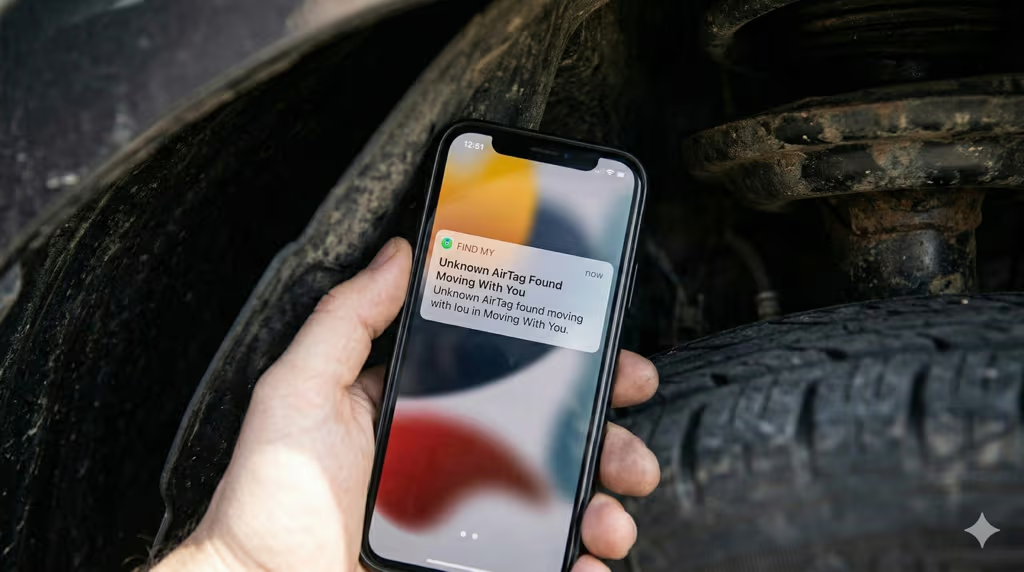
Your iPhone detects a traveling AirTag automatically, with no app download required. When an AirTag that isn’t registered to you has been moving alongside you for a period of time, Find My sends an alert to your phone: “Unknown AirTag Found Moving With You.” Tapping the notification shows you the AirTag’s serial number and lets you play a sound to locate it.
The delay is 30 minutes to 9 hours, depending on how the algorithm assesses movement. Apple doesn’t publish the exact formula, but the window is intentional: it’s long enough to avoid false positives when an owner briefly leaves their bag in your car, and short enough to catch sustained tracking. AirTag 2 (released 2025) kept the same alert window but added a speaker that’s 50% louder (the tone jumps from an F note to a G note), making the audible locate much easier once an alert fires.
One significant AirTag 2 update: if you’re being tracked and receive an Unknown AirTag alert, you can now use Precision Finding to locate it. On iPhone 11 or later, Precision Finding guides you to within a few inches using Ultra Wideband. The original AirTag limited Precision Finding to the registered owner only. AirTag 2 extends it to the person being tracked, expanding the effective locate range from roughly 15 meters to 60 meters. That’s enough to pinpoint which part of your car the AirTag is hidden in before you start touching anything.
For Android users, the situation improved in 2023. Google Find My Device now automatically scans for unknown Bluetooth trackers in the background on Android 6.0 and later, with no manual action needed. You can also install AirGuard (free, by TU Darmstadt) for continuous monitoring with more granular alerts. Apple’s own Tracker Detect app for Android still exists but requires manual scans, making it less useful for real-time detection. For more on how AirTags handle privacy and tracking, the AirTag stalking and anti-tracking guide covers the full system design.
Where to Check — Common Hiding Spots in a Car
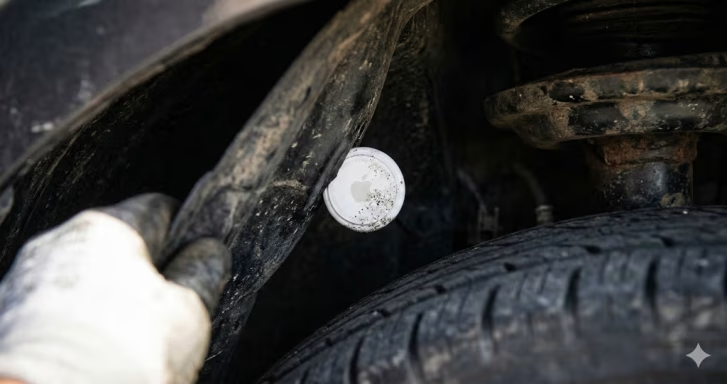
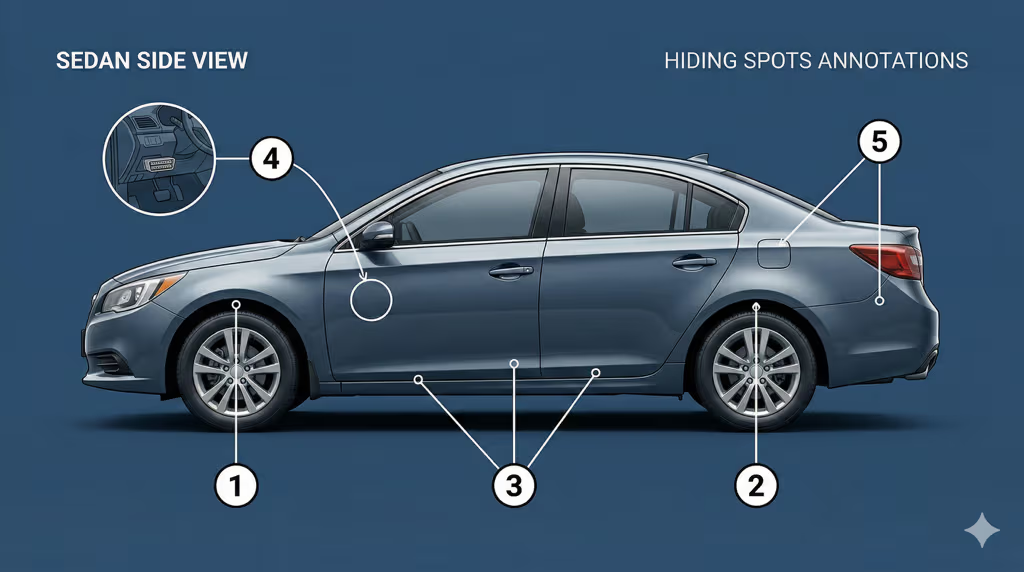
Wheel wells are the most common location. They’re accessible in seconds without tools, magnetic surfaces on modern cars hold a case-equipped AirTag firmly, and the plastic liner conceals it from a casual glance. Start there.
Work through the car in order of how accessible each spot is from outside the vehicle:
- Wheel wells (all four): Run your hand around the inside of each plastic liner. Check the forward and rear sections especially — the leading edge of the liner has natural crevices.
- Under the chassis and frame rails: Crouch down and look along the underside. Magnetic AirTag holders attach to any steel surface, including crossmembers, exhaust hangers, and tow hitches.
- Under the rear bumper: The plastic bumper cover typically has a recessed channel along the bottom edge where a small tracker sits invisibly.
- OBD-II port area: The diagnostic port under the dashboard (driver’s side, near the steering column) is an easy interior access point. A tracker tucked behind the panel trim nearby is hard to spot.
- Under seats and seat rails: The metal frame under front seats has multiple crevices. Slide both seats fully forward and backward and feel along the rails.
- In the trunk: Spare tire well, trunk liner edges, and beneath the cargo tray are all usable spaces that owners rarely access.
- Inside door panels and sun visors: Less common because it requires more effort, but not rare in targeted cases where someone had prolonged access to the vehicle.
Magnetic attachment is the default for most hidden AirTags. If your car has significant plastic or fiberglass body panels (some EVs), check where the metal subframe is still exposed. The best places to hide an AirTag in a car article details the same spots from the tracker-owner perspective, which gives you the full picture of where to look.
How to Physically Search Your Car
The most effective physical search takes about 15 minutes and requires a flashlight, a small mirror (optional), and clean gloves if you want to preserve fingerprints.
If you’ve already received an iPhone Precision Finding alert, use it. Open the Find My app, tap the unknown AirTag, and tap “Find Nearby.” Walk slowly around the car while watching the distance indicator; it guides you to within inches. This is faster than any manual search and works reliably with AirTag 2 up to about 60 meters. Without a Precision Finding alert, do the physical search by starting at the exterior and working inward.
Don’t rely on your ears alone. The AirTag plays a sound only when triggered: either when you’re a significant distance from the AirTag’s owner, or when you manually play a sound from the Find My alert. Between those windows, it’s silent. Searching by sound only works if you’ve already triggered the play-sound function from the app.
If you want to use a separate scanning tool, a Bluetooth scanner app like LightBlue (iOS) or nRF Connect (Android) can show raw Bluetooth device signals in the area. An AirTag advertising its presence shows up as a Bluetooth LE device with an Apple-assigned UUID. This is useful if you’re skeptical of the Find My alert system but want independent confirmation. For background on how AirTag location technology actually works, see does AirTag have GPS. The answer affects what signals you can detect.
What to Do When You Find an AirTag
Don’t touch it with bare hands if you think this is a police matter. Your fingerprints on the casing can complicate evidence collection. If you’re going to handle it, use a bag or gloves.
To disable it: the AirTag opens by pressing down on the polished silver side and rotating counter-clockwise. The CR2032 battery pops out. The AirTag stops broadcasting immediately without a battery. Keep both the AirTag and the battery. Together, they’re evidence.
Document everything first: photograph the AirTag in place (before removing it), the serial number visible on the back, and the exact location on your vehicle. The serial number is the critical piece. While you can’t look up who registered the AirTag yourself, police can subpoena Apple for the Apple ID linked to that serial number. Apple retains pairing records for 25 days. Acting quickly matters. If you wait a month, the registration records may be gone.
Call local police and file a report before the 25-day window closes. Bring the AirTag, photographs, and any other evidence. Some jurisdictions have specific electronic stalking statutes; others file under general stalking or harassment laws. Every US state now has laws that cover electronic tracking without consent. If police are unresponsive, a civil attorney can also file for emergency injunctive relief requiring Apple to provide identification.
Do not confront whoever you suspect placed the AirTag. You may not know who actually put it there, and confrontation before you have a police report can complicate legal proceedings. For more on what AirTag notifications reveal and how Apple’s system handles privacy reporting, see AirTag anti-stalking protections.
What If the Speaker Has Been Disabled?
Disabling the AirTag speaker is possible and documented. It involves opening the AirTag and cutting or removing the tiny piezo buzzer inside. It’s not difficult, and there are online tutorials for it. A stalker who knows what they’re doing may use a speaker-disabled AirTag specifically to avoid the audible locate feature.
Here’s the important part: disabling the speaker does not defeat iPhone or Android detection. The detection alert fires based on Bluetooth proximity and movement patterns, not on sound. Your phone detects that an unknown tracker has been moving with you regardless of whether the AirTag can make noise. Precision Finding also still works. It uses Ultra Wideband radio, not the speaker.
What the disabled speaker does cost you is the manual play-sound option. You can’t cause the AirTag to chirp from the app. Your physical search has to rely on Precision Finding or visual inspection rather than following audio cues. In practice this means the physical search becomes more systematic: work through all the common hiding spots rather than listening for a beep.
AirTag 2’s louder speaker (50% increase over the original) makes the non-disabled version easier to find by sound. But if you’ve found no AirTag by sound and still suspect one, complete the full physical search regardless.

Legal Options
Placing an AirTag in someone’s vehicle without consent is illegal in every US state. The applicable laws vary. Some states have specific GPS tracking statutes; others use broader electronic surveillance or stalking laws. Either way, there is no state where covert vehicle tracking is legal.
The most important legal step is that police report filed within 25 days. Apple will provide Apple ID information for the registered owner of an AirTag in response to a valid law enforcement request. That Apple ID includes the account’s associated name, email, and payment method. For domestic situations (partners, ex-partners), police often already know the suspect; the tracker becomes corroborating evidence for a restraining order or criminal charge.
A class action lawsuit (Hughes v. Apple) was filed in 2022 alleging Apple failed to do enough to prevent AirTag stalking. The case was ongoing as of early 2026. Apple has since added multiple rounds of anti-stalking improvements (the 8-hour maximum alert window, Precision Finding for non-owners, and louder speaker on AirTag 2) partly in response to this legal and public pressure.
If you own your car and want to legitimately track it yourself against theft rather than stalking, a properly registered AirTag for your own vehicle is a reasonable option. The AirTag for car guide covers the best mounting spots for owner use, including the best hiding spots if your concern is theft recovery. If you need live GPS rather than Bluetooth crowd-sourcing, the car GPS tracker no monthly fees guide compares real-time options.
Frequently Asked Questions
How do I know if there’s an AirTag in my car?
Your iPhone will automatically send an “Unknown AirTag Found Moving With You” notification after 30 minutes to 9 hours if an unregistered AirTag has been traveling with you. Android users get automatic alerts via Google Find My Device (Android 6.0+) or through the AirGuard app. Without a phone alert, you’d need to physically search the vehicle, starting with wheel wells, the undercarriage, and the OBD-II port area.
Where are AirTags most often hidden in cars?
Wheel wells are the most common location. They’re accessible without tools, and magnetic AirTag holders stick to metal surfaces behind the plastic liner. The undercarriage, rear bumper recess, under seats, and the trunk are also common. Anywhere outside the vehicle that a person can reach without opening a door is a primary target.
Can someone track my car with an AirTag without me knowing?
For a limited time, yes. The iPhone alert fires after 30 minutes to 9 hours of continuous movement, so a short trip may not trigger a notification. If you drive somewhere and park, the AirTag relays your location through any nearby iPhone that passes the car, without triggering an alert, because you’re not moving. The alert system is designed for sustained tracking, not single-destination logging.
Does the AirTag have to be moving to be detected?
For the iPhone Unknown AirTag alert to fire, the AirTag needs to be traveling with you, meaning you and the AirTag are moving together. If you’ve parked and an AirTag is sitting in your car, it won’t trigger an alert on your phone. However, you can still find it by using the play-sound feature from any active Find My notification, or by manually scanning with Bluetooth scanner apps.
Can I find an AirTag that has the speaker removed?
Yes. A speaker-disabled AirTag still broadcasts a Bluetooth signal and still triggers iPhone Unknown AirTag notifications. Precision Finding on iPhone 11 and later (including for non-owners with AirTag 2) still works. It uses Ultra Wideband, not the speaker. The only thing you lose is the ability to follow a chirp. Systematic physical inspection or Precision Finding navigation will still locate it.
What should I do with the AirTag after I find it?
Photograph it in place first, including the serial number. Remove the battery by pressing and twisting counter-clockwise. Keep the AirTag and battery as evidence. File a police report within 25 days. Apple retains Apple ID registration data for that period and can provide it to law enforcement. Do not confront anyone before the police report is filed.
Can I track who put the AirTag in my car?
Directly, no. The serial number alone doesn’t tell you the owner. Indirectly, yes: police can subpoena Apple for the Apple ID linked to that serial number, which includes the account name, email address, and payment method. In most cases where there’s a known suspect (ex-partner, someone with a grudge), police can match the Apple ID to confirm identity. Act within 25 days of finding the AirTag.
Is it illegal to put an AirTag in someone’s car?
Yes, in every US state. Depending on the jurisdiction, it may fall under GPS tracking without consent statutes, electronic surveillance laws, or general stalking laws. Multiple courts have treated AirTag placement as criminal stalking. The exact charge and penalties vary by state, but there is no legal framework that permits covert vehicle tracking of another person’s car without consent.
What’s the difference between AirTag 2 and the original for stalking detection?
AirTag 2 (2025) kept the same alert timing window as the original but added three detection improvements: the built-in speaker is 50% louder (making it easier to locate by sound), Precision Finding now works for non-owners on iPhone 11 and later (previously only the registered owner could use it), and the Precision Finding locate range extended from roughly 15 meters to 60 meters. For stalking victims, the most meaningful change is non-owner Precision Finding. It means you can guide yourself within inches of the AirTag using your phone, even without the audio cue.