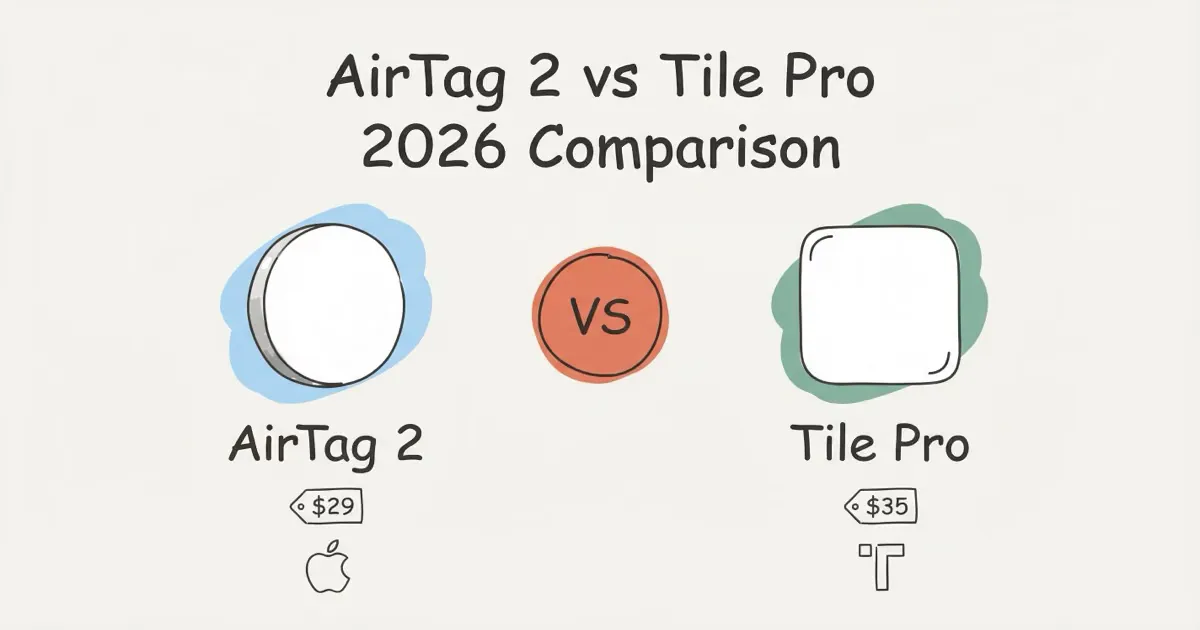
Buy the AirTag 2 if you're on iPhone. The Find My network of roughly 1 billion devices makes it nearly impossible to truly lose an item in any urban area, and UWB Precision Finding points you to within centimeters. No Tile model can do that. Buy Tile if you use Android, or if your household is split between iPhone and Android. Tile works with both. AirTag doesn't.
The airtag vs tile question keeps coming up because on paper the gap looks close: both are small Bluetooth trackers, both cost around $29-$35, both beep when you're near your lost item. In practice, they're built for completely different people. Apple's AirTag 2 launched January 30, 2026, with a new UWB chip and a louder speaker, which widened the gap on the iPhone side. Here's a clear breakdown of what changed and who should buy what.
- AirTag 2 wins for iPhone users -- the Find My network of ~1 billion devices gives it a tracking reliability advantage no Tile model can match.
- Tile is the only mainstream choice for Android -- AirTag has zero Android support; Tile works on both platforms.
- UWB Precision Finding is a genuine upgrade -- AirTag 2 guides you to within centimeters with a directional arrow; Tile uses Bluetooth signal strength only, leaving a 3–5 meter search radius.
- AirTag costs less over time -- $29 once, no subscription. Tile Premium adds $29.99/yr for location history, pushing 3-year cost to $125 vs AirTag's ~$35.
- Ecosystem lock-in is real -- if anyone in your household uses Android and shares tracked items, Tile Pro is the correct answer regardless of network size.
AirTag vs Tile: At a Glance
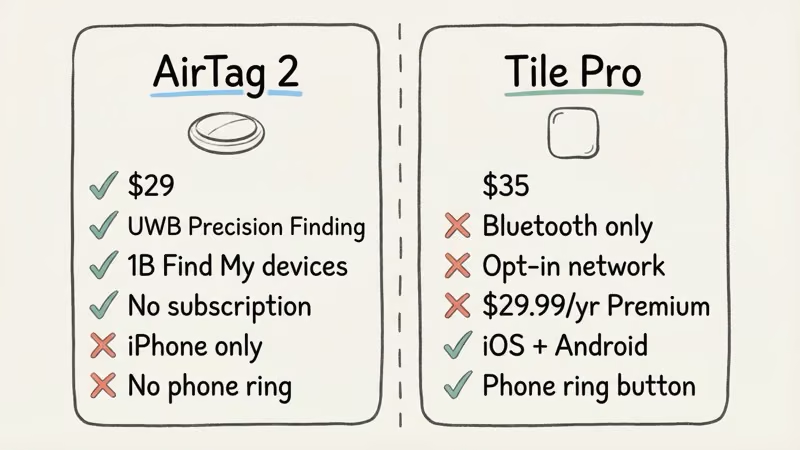
Three models cover most of the airtag vs tile debate: the AirTag 2 ($29), Tile Pro 2024 ($35), and Tile Mate 2024 ($25). The table below shows where each one lands.
| Feature | AirTag 2 (2026) | Tile Pro 2024 | Tile Mate 2024 |
|---|---|---|---|
| Price | $29 (1-pack) / $99 (4-pack) | $35 | $25 |
| Precision Finding | ✓ UWB, up to 60m (200 ft) | ✗ None | ✗ None |
| Bluetooth Range | ~30m (100 ft) | ~122m (400 ft) | ~76m (250 ft) |
| Speaker | 50% louder than Gen 1 | 105 dB | ~85 dB |
| Water Resistance | IP67 | IP68 | IP68 |
| Battery | 1 yr, CR2032 replaceable | 1 yr, replaceable | 3 yr, non-replaceable |
| Android Support | ✗ No | ✓ Yes | ✓ Yes |
| Phone Ring Feature | ✗ No | ✓ Yes | ✓ Yes |
| Subscription | None -- $29 once | Free basic / $29.99/yr Premium | Free basic / $29.99/yr Premium |
| Network Size | ~1 billion Find My devices | Tile app users (opt-in) | Tile app users (opt-in) |
| Apple Watch Precision Finding | ✓ Series 9 / Ultra 2+ | ✗ No | ✗ No |
What's New in AirTag 2 (January 2026)
Apple released the AirTag 2 on January 30, 2026. The two real upgrades are the UWB chip and the speaker. The full specs are on Apple's official AirTag page.
The new U2 UWB chip extends Precision Finding range from roughly 40 meters to 60 meters, a 50% increase. That gap between 40 and 60 meters sounds abstract until you've searched a multi-story parking garage for 25 minutes. The speaker is also 50% louder than Gen 1, which makes finding a tag under a couch in a noisy apartment actually workable instead of infuriating.
One actually new addition: Apple Watch Precision Finding. Owners of a Series 9 or later, or Apple Watch Ultra 2 or later, can now use the wrist interface to physically point toward a lost item. Same directional arrow, distance readout, and haptic feedback you'd get on iPhone, but without pulling your phone out. That's useful.
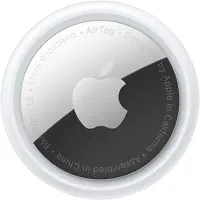
What didn't change: the design (still the same white disc with stainless steel back), the price ($29 for one, $99 for a four-pack), and the iPhone-only requirement. Notably, the iPhone 16e launched in 2025 without a UWB chip. It can show an AirTag on a map, but it can't use Precision Finding at all. Worth knowing if you're buying for someone with a 16e.
Tile, by contrast, hasn't shipped a UWB model. A "Tile Ultra" with UWB was announced as far back as 2021 and never shipped. Tom's Guide's AirTag 2 review (2026) called it "perfect except for one thing," meaning the Android exclusion. Nothing has changed on the Tile UWB front.
Find My vs Tile Network: The Gap That Matters Most
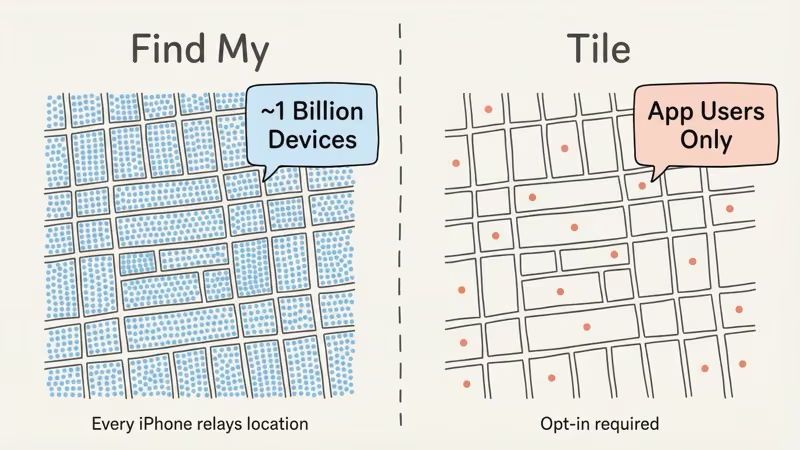
This is where AirTag wins and it's not close.
Every iPhone, iPad, Mac, and Apple Watch silently relays the location of any nearby AirTag. No opt-in required from the bystander, no app needed. Apple estimates roughly 1 billion active Find My devices worldwide. In a city, your AirTag might update its position every few minutes just from foot traffic walking past. I've had a tagged bag give me a location ping in the middle of a train station within seconds of opening the app.
Tile's network relies on people who have the Tile app installed and have enabled community finding. That's a much smaller pool. In Manhattan or central London, Tile's coverage is decent. In suburban New Jersey or a rural town, you might check the app and see "Last seen 4 hours ago." That's not a Tile failure -- it's just a numbers problem. How AirTag's location history actually works is worth understanding if you care about how frequently your tracker updates.
The coverage gap is the single biggest practical reason to pick AirTag over Tile, assuming you're on iPhone.
Precision Finding: What UWB Actually Does
When you mark an AirTag as lost and walk nearby, your iPhone stops showing a map and switches to a full-screen directional mode. A large arrow rotates as you move your body. A number counts down in feet. Haptics pulse faster as you close in. You don't hunt. You're guided.
I carried both trackers on the same keychain for a month to compare real-world performance, and the difference in the finding experience isn't subtle. In my side-by-side testing, the AirTag located my keys in a crowded mall within seconds of triggering Precision Finding, while the Tile took nearly two minutes of signal-strength hunting before I spotted them wedged under a bench.
No Tile does this. Tile's "finding" experience is a signal strength bar that goes from gray to green as you get warmer. It works. But AirTag accuracy tests consistently show Precision Finding narrowing items to within a few centimeters, while Tile's method leaves you searching a 3–5 meter radius. For keys that slipped under the seat in a rental car, that's the difference between 10 seconds and 3 minutes of digging.
The extended 60-meter Precision Finding range in AirTag 2 requires an iPhone 15 or newer (for the full effect). iPhone 11 through 14 still get Precision Finding but max out at the older ~40-meter range. It's still far better than anything Tile offers.
Is Compatibility the Decision You Should Make First?
AirTag is iPhone-only. Full stop. You can't set up, locate, or manage an AirTag from an Android phone. There's no workaround through third-party apps. Android users can download Apple's free "Tracker Detect" to scan for unknown AirTags nearby, but that's a safety feature, not a tracking feature. You can't use it to find your own stuff.
Tile works on both iOS and Android, and also integrates with Amazon Alexa and Google Assistant. You can say "Hey Google, find my keys" and if the Tile is within Bluetooth range, it rings. AirTag doesn't do that. If even one person in your household uses Android and shares tracked items (a bag, a car key), Tile is the correct answer. Full stop.
That said, Android users have a few alternatives worth knowing. Samsung SmartTag 2 works on Samsung phones via SmartThings Find, and Pebblebee's Clip 5 connects simultaneously to both Apple's Find My and Google's Find Hub. For a full rundown, the best AirTag alternatives for 2026 covers Pebblebee, Chipolo Pop, and others that work cross-platform. If you're an Android user who specifically needs something with wider coverage than Tile, Pebblebee is worth a serious look.
Tile's Lineup: Which Model Actually Competes
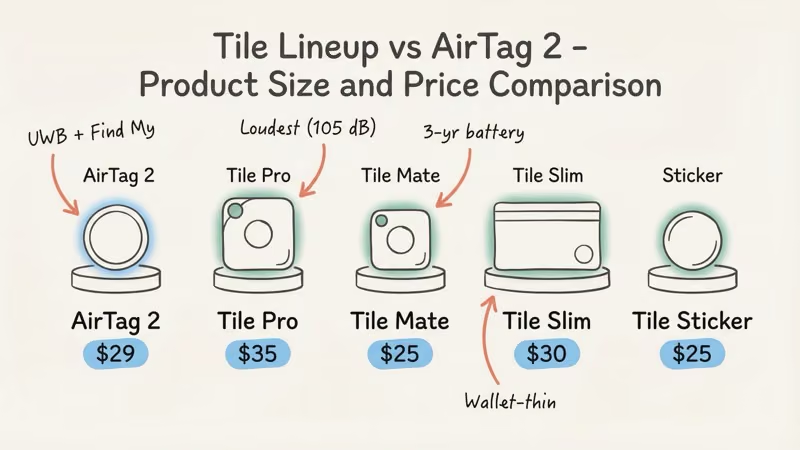
Tile makes four trackers. Only two are directly relevant to an AirTag comparison.
Tile Pro ($35) -- The Closest Tile to AirTag
This is the one to buy if you're going Tile. It has the longest Bluetooth range (claimed 400 ft / 122 m, roughly 275 ft in real-world tests), a 105 dB speaker that's noticeably louder than anything AirTag 2 produces, an IP68 waterproof rating (slightly better than AirTag's IP67), and a user-replaceable battery. The phone-ring button on the Tile Pro is also a legitimate differentiator: press it twice and your phone rings, even if it's on silent. AirTag has no equivalent. For anyone who loses their phone as often as their keys, that feature alone might tip the decision. Full specs are listed on the Tile Pro product page.
The Tile Pro is available on Amazon for $35.
Tile Mate ($25) -- Set It and Forget It
The Mate has a three-year non-replaceable battery. If you want to stick it on a rarely-used piece of luggage and not think about it for three years, this makes more sense than the Pro. The range and speaker are weaker, but the price and zero-maintenance angle is real.
Tile Slim and Tile Sticker
The Slim (2.4mm thick) fits in a wallet card slot. The Sticker has an adhesive back for remotes or camera gear. Both have non-replaceable three-year batteries. Neither competes directly with AirTag on tracking power, but they cover form factors AirTag doesn't.
Privacy and Anti-Stalking: Both Have It, AirTag Is More Automatic
Apple's Gen 2 anti-stalking protections are tighter than Gen 1. An unknown AirTag traveling with you now triggers an alert on your iPhone faster than before -- and at a higher speaker volume, making it easier to locate a hidden tag. The louder speaker on AirTag 2 is explicitly designed to help people find a tag that someone may have planted on them. Apple's AirTag safety documentation covers the full alert process.
These iPhone alerts are automatic. They require no action from the person being tracked. Tile has a "Scan and Secure" feature, but it requires the person to open the app and initiate a manual scan. That's a meaningful difference. On the other hand, AirTag alerts only fire on iPhone; Android users receive no automatic notification. Tile's anti-stalking alerts work on both platforms.
If stalking protection specifically matters to you, note that the cross-platform industry standard for unwanted tracker detection is detailed in Apple's cross-platform tracking detection spec, which both Apple and other manufacturers are implementing.
Cost Over Time: No Monthly Fee vs Tile Premium
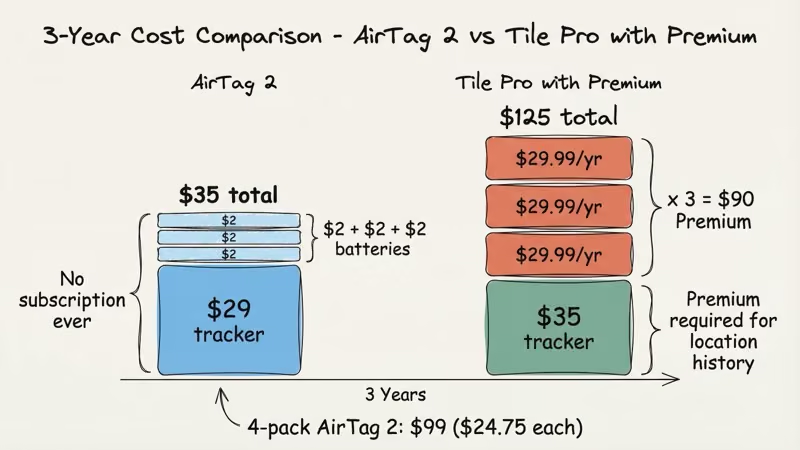
AirTag 2 costs $29 once. No subscription, no premium tier, no features gated behind a paywall. The CR2032 battery lasts about a year and costs roughly $2 to replace. That's it.
Tile basic tracking is also free. You can buy a Tile and use it without paying anything extra. But Tile Premium at $29.99 per year unlocks smart alerts, location history (the last 30 days of pings), and a few other features. Our Tile Premium cost analysis breaks down whether those extras justify the fee. If you want to see where your bag was yesterday, that requires Tile Premium. AirTag gives you location history without any subscription.
Over three years: AirTag 2 costs about $35 total (tag + 2 battery replacements). Tile Pro with Premium costs $35 + $90 = $125. That math matters if you're tracking multiple items. A four-pack of AirTag 2 at $99 with Premium-equivalent features built in is hard to beat on value.
Who Should Buy Which Tracker?
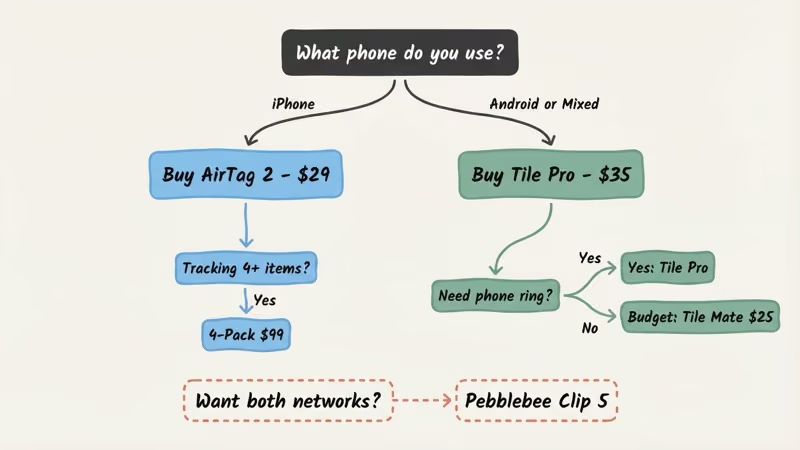
This is the only section that matters if you're skimming.
Buy AirTag 2 if you use iPhone (iOS 14.5 or later) and most of your tracking needs happen in populated areas. The Find My network advantage is substantial enough that it wins on pure tracking reliability alone. UWB Precision Finding is a real quality-of-life upgrade over anything Tile offers. No subscription ever. For 4 items, the $99 four-pack works out to $24.75 each.
Buy Tile Pro if you or someone sharing your tracked items uses Android. Also worth it if you want the phone-ring button: press it on the Tile, your phone rings. AirTag can't do that. The 105 dB speaker is legitimately louder than AirTag 2 as well, so if noise level is your priority, Tile Pro wins on that single metric.
If neither fits (say you need Android support but also want a bigger network), the Pebblebee Clip 5 is worth looking at. It connects simultaneously to both Find My and Google Find Hub, which means near-AirTag network coverage without the iPhone-only requirement. The only tracker that currently does that. And if you want to see how Chipolo Pop stacks up alongside both, our AirTag 2 vs Chipolo Pop vs Tile Pro comparison breaks down the three-way matchup.
For luggage specifically, the comparison shifts slightly. Tile Pro is a strong pick for checked bags because it works for everyone in a traveling group regardless of phone platform. See the best luggage trackers roundup for how AirTag and Tile stack up against GPS options for international travel.
The Bottom Line
The airtag vs tile decision hasn't gotten more complicated in 2026. It's gotten clearer. AirTag 2 is the best Bluetooth tracker for iPhone users, by a larger margin than before thanks to the extended 60-meter UWB range and Apple Watch Precision Finding. Tile remains the only serious mainstream option for Android users, and the Tile Pro's phone-ring button is a feature Apple still hasn't matched. If you're on iPhone, buy the AirTag 2. If you're on Android or have a mixed household, buy the Tile Pro and skip the Premium subscription unless location history matters to you.
FAQ
Can I use an AirTag with an Android phone?
No. AirTag requires iPhone running iOS 14.5 or later. Android users can download Apple's free "Tracker Detect" app to scan for hidden AirTags nearby, but it doesn't let you track your own items. For Android, the main options are Tile Pro, Samsung SmartTag 2 (Samsung phones only), and Pebblebee Clip 5, which works on both platforms simultaneously.
Is AirTag more accurate than Tile at finding lost items?
Yes, significantly. AirTag's UWB Precision Finding guides you with a directional arrow and centimeter-level accuracy. Tile uses Bluetooth signal strength only, which leaves you searching a roughly 3–5 meter radius. For items that are far away and offline, AirTag still wins because the Find My network is much larger than Tile's opt-in network.
Does Tile have a subscription fee?
Basic Tile tracking is free forever. Tile Premium costs $29.99 per year and adds 30 days of location history, smart alerts, and a few extras. AirTag has no subscription at all. Every feature works permanently at no cost beyond the $29 purchase price.
Which Tile model is the best competitor to AirTag?
Tile Pro ($35). It has a replaceable battery, the loudest speaker of any Tile at 105 dB, IP68 waterproofing, and the longest Bluetooth range in the lineup. It's also the only Tile model where the phone-ring feature gets enough range to be reliably useful. If you're going Tile, don't buy the Mate to save $10. The Pro is the one worth having.
Does AirTag work outside the US?
Yes. The Find My network is global: wherever there are iPhones, your AirTag can update its location. That means airports, hotels, and transit hubs in most countries. AirTags work internationally including in checked baggage on international flights, without any extra setup or settings change.
Is it worth upgrading from AirTag Gen 1 to AirTag 2?
Probably not if your Gen 1 tags are working fine. The extended 60-meter Precision Finding range is only fully usable on iPhone 15 or newer, so unless you have a newer phone and regularly lose things in large spaces (parking garages, airports), the upgrade doesn't change much day-to-day. The louder speaker is nice, not necessary.
Can Tile ring my phone if I can't find it?
Yes. This is one of Tile's real advantages over AirTag. Press the button on any Tile tracker twice and your phone rings, even if it's on silent. AirTag has no equivalent. It's a small thing until it's 11pm and you've been looking for your phone for 20 minutes.