
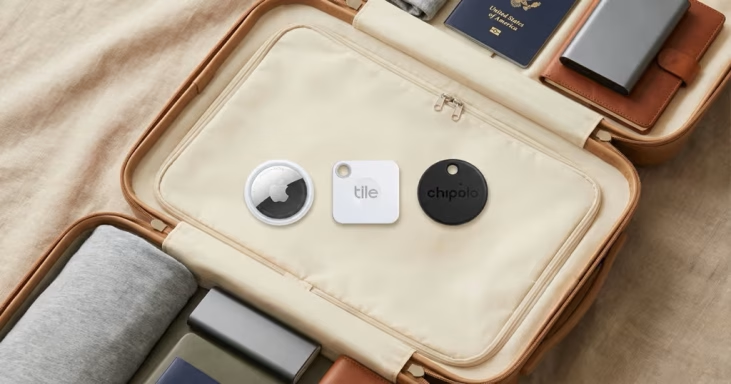
Lost luggage is one of the most stressful travel experiences — and a good tracker can be the difference between finding your bag in 30 minutes or waiting three days for the airline to locate it. We’ve tested and evaluated the top luggage trackers available in 2026, across iPhone, Android, and GPS categories.
Below: how each tracker performs at airports in practice, what actually changed with the AirTag 2, and which one makes sense for your setup.
How Luggage Trackers Work
Three different technologies power luggage trackers — and the right choice depends on where you’re traveling.
Bluetooth crowd-finding (AirTag, Tile, Chipolo): The tracker emits a Bluetooth signal. When any phone from that tracker’s network passes nearby, it anonymously reports the tracker’s location to your app — without the phone owner knowing. Range depends entirely on network density: AirTag’s Find My network has over 1 billion Apple devices, making airports excellent for location updates. Tile uses 70+ million devices. No subscription needed.
GPS + Cellular (Tracki, LandAirSea): Uses satellites and cell towers to report real-time location every few seconds. Works anywhere with cellular coverage — no other users required. Requires a monthly subscription ($5–15/month). Battery typically lasts days, not months.
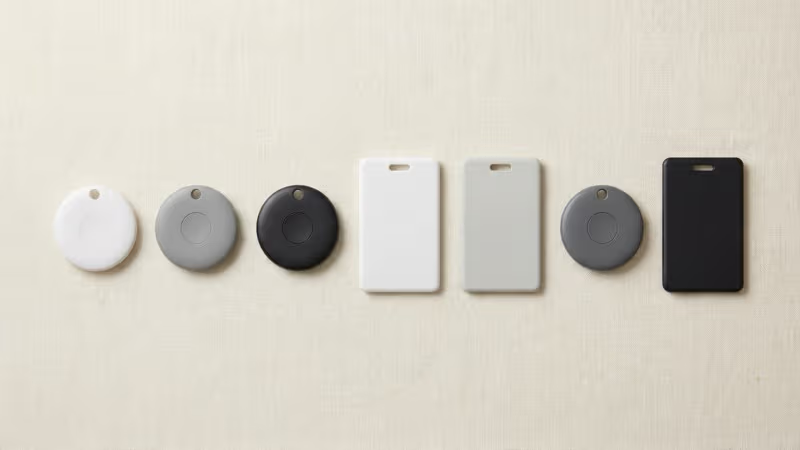
Built-in luggage tag trackers (Satechi, Chipolo Card): Tracker built into a luggage tag shape — flat enough to slide into a luggage tag holder. Works the same as Bluetooth crowd-finding, but integrates more cleanly with the bag.
For most travelers flying through major airports, a Bluetooth crowd-finder like AirTag gives you enough location updates to know where your bag is. GPS is only necessary if you’re traveling through remote regions or need true real-time tracking.
The 7 Best Luggage Trackers of 2026
1. Apple AirTag (2nd Generation) — Best for iPhone Users
No other luggage tracker comes close for iPhone users. The 2026 AirTag update makes an already-strong tracker better for travel: 50% longer Precision Finding range, a louder speaker, and Apple Watch support for the first time.
| Price | $29 (1-pack) / $99 (4-pack) |
| Network | Apple Find My — 1 billion+ devices |
| Precision Finding | Yes (UWB directional arrow + distance) |
| Battery | CR2032, ~1 year, user-replaceable |
| Water resistance | IP67 |
| Subscription | None |
| Compatible with | iPhone only (not Android) |
At airports — which are densely packed with iPhones — AirTag typically updates location every few minutes. Multiple testers have confirmed seeing their bag’s location update via Find My before the airline’s own app refreshed. The new Gen 2 model also includes the Share Item Location feature (introduced in iOS 18.2), letting you share your AirTag’s live location directly with airline staff when filing a claim — and it actually speeds the process up.
One persistent limitation: no built-in attachment hole. You need a luggage loop or case (~$8–15) to secure it to a bag. The AirTag is FAA-approved for checked luggage — it contains only 0.1g of lithium, well below the FAA limit. Keep it inside the bag, not attached to the outside where it can be damaged.
Who it’s for: Any iPhone user who travels with checked bags. Get the 4-pack at $99 to cover all your bags — at $24.75 per tag, it’s the best value.
Read our full AirTag 2026 review for a complete breakdown of Gen 2 improvements.
2. Tile Mate (by Life360) — Best for Android Users
If you don’t have an iPhone, Tile is the realistic choice. It works on both iOS and Android, has been acquired by Life360, and integrates with family-tracking features.
| Price | $25 (1-pack) / $55 (4-pack) |
| Network | Tile network — 70+ million devices |
| Precision Finding | No (sound only, no directional UWB) |
| Battery | CR2032, ~3 years, non-replaceable |
| Water resistance | IP67 |
| Subscription | Free tier available; Premium $3/month |
| Compatible with | iOS and Android |
Tile’s key advantage is a built-in attachment hole — no extra accessories needed to clip it to a bag handle. The 3-year battery is also a real practical advantage over AirTag’s 1-year. The tradeoff: the Tile network is significantly smaller than Apple’s, which matters most in less-trafficked areas. At major international airports, Tile provides reliable updates. In smaller regional airports or rural transit hubs, updates can be slower or absent.
Tile has no Precision Finding equivalent — when you’re close, you trigger a sound and hunt by ear. Fine for most situations, less useful in noisy airports.
Who it’s for: Android users, mixed iPhone/Android households, or iPhone users who want cross-platform compatibility. Also a good backup tracker alongside an AirTag for critical trips.
See our detailed AirTag vs Tile comparison if you’re deciding between the two.
3. Chipolo ONE Point — Best Find My Alternative
Works inside Apple’s Find My app while adding features AirTag lacks. The Chipolo ONE Point is one of the few third-party trackers licensed to use Apple’s Find My network, meaning it shows up alongside your AirTags in the same app.
| Price | ~$28 |
| Network | Apple Find My (same as AirTag) |
| Precision Finding | No UWB — sound only |
| Battery | CR2032, ~2 years, non-replaceable |
| Subscription | None |
| Advantage over AirTag | Built-in keyring hole, 2-year battery, brighter colors |
The biggest practical advantage: a built-in attachment hole, so no accessory needed. The ~120dB speaker is also notably louder than AirTag, which helps when hunting for a bag in a noisy baggage claim. The tradeoff is no Precision Finding — Chipolo uses Bluetooth only, not UWB, so you can’t get the directional arrow guidance AirTag provides.
For luggage tracking specifically, where you mainly need “is my bag at the airport or still on the plane,” the Chipolo performs identically to AirTag on the same Find My network. It’s also cheaper per unit if you need to equip multiple bags.
Who it’s for: iPhone users who want a Find My tracker with a built-in keyring hole and longer battery, and don’t need Precision Finding.
See our full comparison: AirTag vs Chipolo ONE Spot.
4. Tracki GPS Tracker — Best Real-Time GPS Option
The only tracker on this list that updates location in real time, regardless of who’s nearby. If you’re traveling through remote regions, taking connecting flights through smaller airports, or carrying irreplaceable items, a GPS tracker gives certainty that Bluetooth crowd-finders simply can’t.
| Price | ~$45 device + ~$15/month plan |
| Technology | GPS + Cellular + WiFi + Bluetooth |
| Update frequency | Every 60 seconds when in motion |
| Battery | Rechargeable, ~3–5 days active use |
| Subscription | Required (~$15/month) |
| Compatible with | iOS and Android |
The main drawbacks are real: short battery life means you need to recharge before every trip, and the monthly subscription adds up to $180/year. For occasional travelers, that’s hard to justify. For frequent travelers with high-value contents — camera gear, medical equipment, musical instruments — it’s worth it.
Tracki uses 4G LTE and also has a worldwide SIM supporting coverage in 190+ countries, making it one of the most capable trackers for international travel.
Who it’s for: Frequent travelers, digital nomads, anyone with high-value checked items, or travelers going through regions with sparse iPhone or Android user populations. Read our full Tracki GPS tracker review.
5. Samsung SmartTag2 — Best for Samsung Galaxy Users
The AirTag equivalent for Samsung phones — uses the SmartThings Find network and supports UWB-based AR Finder on compatible Galaxy devices, similar to AirTag’s Precision Finding.
| Price | ~$30 |
| Network | Samsung SmartThings Find |
| Precision Finding | Yes (UWB AR Finder, Galaxy S/Z series) |
| Battery | CR2032, ~6 months, replaceable |
| Subscription | None |
| Compatible with | Samsung Galaxy only (not iPhone) |
SmartThings Find is growing but still smaller than Apple’s network. At major airports, it performs well. In areas with fewer Samsung users, it updates less frequently than AirTag. Best paired with a Samsung Galaxy S or Z series phone to use the AR Finder feature.
Who it’s for: Samsung Galaxy users who want the equivalent AirTag experience without switching ecosystems. See our AirTag vs SmartTag comparison.
6. Satechi Find My Luggage Tag — Best Built-In Luggage Tag
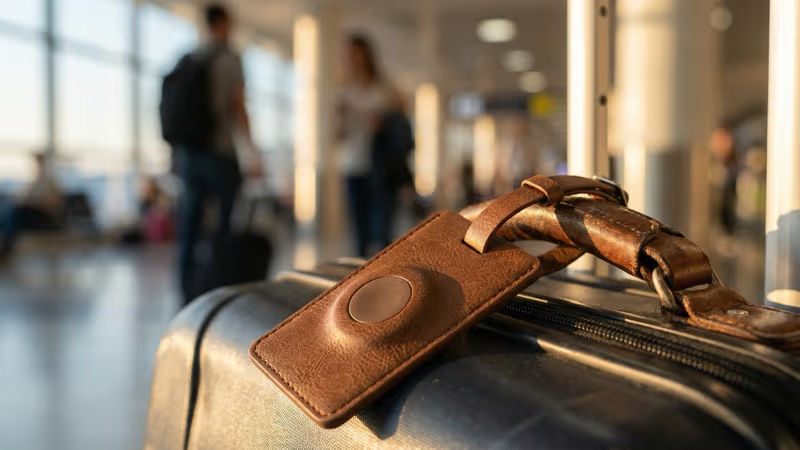
A tracker built into a luggage tag — the cleanest solution for travelers who want no extra accessories. The Satechi Find My Luggage Tag uses Apple’s Find My network and integrates the tracker directly into a leather luggage tag with a privacy flap for your contact info.
| Price | ~$40 |
| Network | Apple Find My |
| Form factor | Luggage tag shape, no extra holder needed |
| Battery | Rechargeable (wireless charging), ~8 months |
| Subscription | None |
| Available colors | Black, Sand, Desert Rose |
The wireless recharging is a nice convenience — use your iPhone or AirPods charger. No Precision Finding (Bluetooth only, no UWB), and the 10–50m indoor/outdoor range is shorter than AirTag. But as a luggage tag, it combines two accessories into one and looks far better on a suitcase than a round disc stuck in a pocket.
Who it’s for: iPhone users who travel frequently and want a premium, all-in-one luggage tracking solution.
7. LandAirSea 54 — Best Subscription GPS for Heavy Travelers
Real-time GPS tracking at an affordable device price, with a subscription plan. The LandAirSea 54 reports location every few seconds via GPS and cellular — ideal for travelers who need certainty, not crowd-sourced estimates.
| Price | ~$30 device + ~$25/month plan |
| Technology | GPS + Cellular (4G LTE) |
| Update frequency | Every 3–60 seconds |
| Battery | Rechargeable, ~2 weeks standby |
| Geofencing | Yes — custom zone alerts |
| Subscription | Required (~$25/month) |
The ~2-week standby battery is significantly better than Tracki for travel, since you won’t need to recharge mid-trip. The custom geofencing feature is particularly useful — set an alert if your bag leaves the airport without you. Higher monthly cost than Tracki but the device is cheaper upfront.
Who it’s for: Travelers who want GPS tracking with better battery life, or who need geofencing alerts.
Side-by-Side Comparison
| Tracker | Best For | Price | Network | Sub? | Precision Finding |
|---|---|---|---|---|---|
| AirTag 2 | iPhone users | $29 | 1B+ Apple devices | No | ✅ Yes (UWB) |
| Tile Mate | Android users | $25 | 70M+ devices | Optional | ❌ No |
| Chipolo ONE Point | Find My + keyring hole | $28 | Apple Find My | No | ❌ No UWB |
| Tracki GPS | Real-time anywhere | $45 + $15/mo | GPS Cellular | Yes | N/A |
| SmartTag2 | Samsung users | $30 | Samsung SmartThings | No | ✅ Yes (AR) |
| Satechi Luggage Tag | All-in-one tag+tracker | $40 | Apple Find My | No | ❌ No UWB |
| LandAirSea 54 | GPS with geofencing | $30 + $25/mo | GPS Cellular | Yes | N/A |
How to Choose: By Traveler Type
📱 iPhone User
→ AirTag 2 (4-pack)
Best network, Precision Finding, no subscription. Get 4-pack for all your bags at $24.75/tag.
🤖 Android User
→ Tile Mate
Only real cross-platform option. Works on all Android phones, no subscription required for basic tracking.
🌍 Frequent International Traveler
→ AirTag 2 + Tracki GPS
Use AirTag for everyday tracking and keep Tracki as backup for critical trips or remote destinations.
📷 Traveling with High-Value Items
→ Tracki GPS or LandAirSea 54
Real-time GPS worth the subscription when bag contains camera gear, instruments, or medications.
💼 Samsung Galaxy User
→ Samsung SmartTag2
Seamless Galaxy integration with AR Finder. Same $30 price as AirTag, no subscription.
🎒 Minimalist / Style-Conscious Traveler
→ Satechi Find My Luggage Tag
Combines luggage tag and tracker in one. Looks better, fewer accessories to manage.
Pro Tips: Getting the Most from Your Tracker
Replace or recharge before every trip. AirTag gives you a battery notification in Find My, but check it a week before travel so you have time to buy a CR2032. Rechargeable trackers should be at 100% before departure.
Place it inside, not outside. Put AirTag inside a zippered interior pocket. An experienced luggage handler at an airport can spot and remove an external tracker. Multiple travel experts suggest hiding it in a toiletry kit or along the inner lining.
Use multiple trackers for critical trips. If you’re traveling internationally with irreplaceable items, consider two trackers per bag — one AirTag in the outer pocket and one in the inner lining. Some travelers use an AirTag plus a Tile for redundancy across networks.
Test it before you leave home. Open Find My or the Tile app and confirm your tracker shows up with a recent location update. A tracker with a dead battery or connectivity issue is useless at the airport.
Use Share Item Location proactively. With AirTag (iOS 18.2+), you can share your tracker’s live location with airline staff when filing a claim — before they ask. This significantly speeds up the recovery process. See our guide on AirTag in checked luggage for more tips.
Check for AirTag interference on some international routes. On certain flights, especially connecting through airports with few Apple devices, your AirTag may show its last location rather than a live update. This is normal — the location will update once near Apple devices again. Don’t panic if the location doesn’t change mid-flight.
Looking for more options? See our roundup of the best Bluetooth trackers and best item trackers overall.
Frequently Asked Questions
What is the best luggage tracker in 2026?
The Apple AirTag (2nd generation) is the best luggage tracker for iPhone users. It has the largest tracking network (1 billion+ Apple devices), Precision Finding for locating bags precisely, no subscription fee, and costs $29. The 2026 update adds 50% longer Precision Finding range and Apple Watch support. Android users should use the Tile Mate instead.
Are luggage trackers allowed in checked bags?
Yes. Bluetooth trackers like AirTag, Tile, and Chipolo are FAA-approved for checked luggage. They use tiny CR2032 batteries containing under 0.1g of lithium — far below the FAA’s 2g limit. GPS trackers with rechargeable lithium batteries (Tracki, LandAirSea) should be checked against the specific battery capacity for FAA compliance.
Will the airline remove my luggage tracker?
No reputable airline should remove a properly placed tracker without notifying you. In fact, many airlines now officially support Share Item Location — you can share your AirTag’s location directly with airline staff via the Find My app to help recover lost bags faster. Place trackers inside the bag, not visibly attached to the outside.
Does AirTag work with Android for luggage tracking?
No. AirTag pairs only with iPhone and other Apple devices. Android users cannot track an AirTag. For Android, the best alternatives are the Tile Mate (works on all Android phones) or Samsung SmartTag2 (Samsung Galaxy only). Both have no subscription requirement for basic tracking.
How often does a luggage tracker update location?
Bluetooth crowd-finding trackers (AirTag, Tile) update when another device from their network passes within range. At major airports densely packed with iPhones, AirTag typically updates every few minutes. In quieter transit areas, updates may be less frequent. GPS trackers (Tracki, LandAirSea) update every 60 seconds or less regardless of who is nearby.
Can I track my luggage internationally?
Yes, in most cases. AirTag works wherever there are iPhones — which includes most international airports and major cities. Tile works wherever Tile users are present. Both have global coverage in practice. For remote international destinations with few local smartphone users, a GPS tracker with international SIM (like Tracki) gives more reliable real-time updates. See our guide on whether AirTags work internationally.
Do I need a subscription for a luggage tracker?
Not for Bluetooth trackers. AirTag, Tile (basic tier), Chipolo, Samsung SmartTag2, and Satechi Find My Tag all work without any ongoing fees. GPS trackers (Tracki, LandAirSea) require a monthly subscription of $15–25/month for cellular data. The subscription is what pays for the real-time cellular updates.
How do I hide an AirTag in my luggage?
The most effective spots: inside a toiletry bag zipped inside the main compartment, sewn into the luggage liner, or inside a shoe within the bag. Travel expert Anne McAlpin recommends placing two AirTags per bag — one in the zippered lining and one within the bag’s contents — for redundancy. Avoid outer pockets where it could be spotted and removed.


