AirTags partially work with Android. You can tap an AirTag with your Android phone to see owner contact info via NFC, and you can use the Find My for Android app to manually scan for nearby AirTags. What you can't do: set up a new AirTag, use Precision Finding, receive Separation Alerts, or get automatic background tracking. For Android users, the Samsung SmartTag 2 or Chipolo Pop are better fits.
If you’re asking whether do AirTags work with Android, the short answer is: partially, and with real limitations that matter. Apple designed AirTag for the iPhone ecosystem — some features cross the wall, but the most useful ones stay locked behind an Apple ID.
- NFC tap scanning works — tap an AirTag to see owner info, no app required
- Find My for Android works — manual scan only; no background alerts
- Precision Finding does not work — requires iPhone’s U2 chip, not available on Android
- Android 6.0+ auto-detects AirTags — no app needed, built into the OS since May 2024
- Samsung SmartTag 2 is the top pick — native UWB precision finding for Galaxy users
What Works With AirTags on Android?
Two things actually work, and they’re worth understanding precisely.
NFC tap scan. Every modern Android phone can tap an AirTag and get a browser prompt showing the owner’s contact details or a lost mode message. No app required. The AirTag broadcasts an NFC signal that any phone can read. In our testing on a Pixel 8, Samsung Galaxy S24, and OnePlus 12, the tap triggered a browser popup within about one second.
Find My for Android app (formerly Tracker Detect). Apple renamed and updated its Android app in recent years. The current version is called “Find My” for Android, replacing the older Tracker Detect app. Open the app, hit scan, and it’ll show you any AirTag within Bluetooth range — roughly 30 feet in open air, less through walls. This is useful primarily for personal safety: if you suspect someone planted an AirTag near you, this scan confirms it.
The app’s key limitation: it doesn’t run in the background. You start the scan manually. It won’t alert you if an unknown AirTag starts following you over time.
What the app can’t do: show you the location of an AirTag you own. Full location history, map view, and item management all require an iPhone. For a deeper look at what the AirTag 2 offers iPhone users, see our AirTag 2 review.
What You Lose Without an iPhone
This list is longer than the “what works” list, and for most Android users, it’s the part that makes AirTag the wrong buy.
Precision Finding. This is the AirTag feature that guides you to within inches of your item using directional arrows and a live distance readout. It relies on the U2 chip (Ultra Wideband) in the AirTag 2 and hardware-level integration with Apple’s iPhone software. Apple’s AirTag product page confirms that Precision Finding requires iPhone 11 or later. There’s no software workaround — it’s architectural, not a policy decision.
Separation Alerts. iPhone users get notified the moment they leave an item behind. You walk away from your luggage and your phone buzzes. Android users get nothing. This runs entirely within Apple’s Find My framework and doesn’t extend to any other platform.
One-tap setup. AirTag pairing requires an Apple ID and an iPhone. There’s no Android setup process. Full stop.
Full Find My network access. Apple’s Find My network has over 2 billion active devices. When an AirTag is lost, nearby Apple devices anonymously relay its location back to the owner. As an Android user, you can’t receive those reports or access the network directly — the data flows to iPhone owners only. That 2 billion device pool is the entire reason AirTag finds things so reliably, and it’s completely unavailable to you.
AirTag Setup Requires an iPhone — No Exceptions
Setting up an AirTag takes about 30 seconds on an iPhone: bring it near the phone, tap the prompt, assign it a name. The entire process runs through Apple ID and the Find My framework.
On Android, there’s no equivalent. Not a workaround, not a third-party app — nothing. Apple hasn’t released any Android pairing mechanism, and there’s no indication they will. If you buy an AirTag without an iPhone in your household, you own a tracker you can’t use.
This is the single most important point for Android users to understand before purchasing.
Can Android Detect Unwanted AirTags?
Yes — and this has improved significantly since 2024.
Apple and Google co-developed a cross-platform tracking detection standard that Apple announced in May 2024. Any Android phone running Android 6.0 or newer now automatically alerts you if an unknown Bluetooth tracker — including an AirTag — has been traveling with you for an extended period. You don’t need any app installed. The detection runs natively in the Android OS.
Before this standard existed, Android users had to rely on the Tracker Detect app and manually scan for trackers. That manual process is still available and useful for spot checks. But for passive, continuous protection against AirTag stalking, Android 6.0+ users are now covered automatically.
The automatic alert triggers when a tracker has been near you for an unusual amount of time without checking in with its registered owner’s device. You get a notification, and you can then use the Find My for Android app to confirm the tracker’s location near you.
Apple’s own AirTag safety documentation states that both iOS and Android users receive these alerts. For a broader view of how Android and Apple ecosystems handle tracking privacy, see our comparison of Google Find Hub vs Apple Find My. The safety angle is also explored in depth in our article on what it means when an AirTag is found moving with you.
AirTag in a Mixed iOS/Android Household
One scenario where AirTag makes sense for an Android user: a mixed household where an iPhone owner manages the tracker. They handle setup and tracking; you benefit from item visibility without owning an iPhone.
Skip it if you’re the sole user. You’d pay $29 for a tracker you can’t set up, can’t use Precision Finding on, and can’t receive alerts from.
In our testing with Android-only setups, the experience was frustrating enough that we’d never recommend AirTag as a solo Android purchase. The NFC tap and manual app scan are useful for safety, but they’re not why people buy AirTags. For a broader look at cross-platform options, our AirTag alternatives guide covers options we haven’t listed here.
Best AirTag Alternatives for Android Users
Four trackers that work natively with Android. Full ranked comparison: best Bluetooth trackers for Android.
Samsung SmartTag 2 — best for Galaxy users. The SmartTag 2 is the closest Android experience to AirTag. It pairs natively through Samsung’s Find My Mobile app, uses UWB Precision Finding on Galaxy S21 and newer, and accesses Samsung’s 200+ million device network. No iPhone at any step.
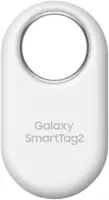 Top Pick
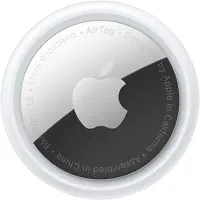
Apple AirTag 2 — mixed household only. We’re including this for the mixed-household scenario only. The iPhone user manages setup and tracking; you benefit from item visibility without needing your own iPhone. Solo Android user? Skip it.
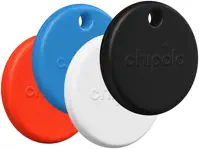
Chipolo Pop — best for non-Samsung Android users. The Chipolo Pop works with both Google Find Hub (Android 6.0+) and Apple Find My, making it the only tracker here that survives a phone switch in either direction. At $29 with no subscription fees, it matches AirTag’s price. No UWB means no Precision Finding arrows, but the 2-year battery life and cross-platform flexibility make it the most practical choice for most Android users who aren’t on Samsung.
Tile Pro 2024 — best for cross-platform households. If you and an iPhone user both need to track the same item from your own devices, Tile is the only option here that allows it. Both users see the same item from their own phones. The network is smaller — around 70 million devices versus Find My’s 2 billion — but the cross-platform access is unique. See our AirTag vs Tile comparison for a head-to-head breakdown.
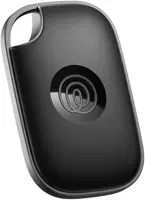
The Pebblebee Clip 5 ($35) is also worth mentioning if you want a Google Find Hub tracker with a built-in clip — no extra keychain accessory needed. It lacks UWB, but the form factor makes it practical for bags and collars.
Bottom Line
AirTag and Android coexist, but with enough friction that most Android-only users will regret the purchase. NFC tap scanning and the Find My for Android app cover safety use cases — and they work fine. But the core value of owning an AirTag — setup, Precision Finding, Separation Alerts, and full map access — requires an iPhone.
If you’re in a household where someone has an iPhone, AirTag can still work. They manage the tracker; you benefit from item visibility passively. If you’re a solo Android user, pick the SmartTag 2 (for Galaxy phones) or the Chipolo Pop (for everyone else). Both deliver full Android compatibility at the same $29-30 price point AirTag charges.
FAQ
Can I use an AirTag if I have an Android phone?
Partially. You can tap an AirTag with your Android phone via NFC to read owner contact info, and you can use the Find My for Android app to manually scan for nearby AirTags. You can't set up a new AirTag on Android, use Precision Finding, receive Separation Alerts, or view your items on a map. For full AirTag functionality, you need an iPhone.
Does Precision Finding work on Android?
No. Precision Finding requires the U2 chip (Ultra Wideband) inside the AirTag 2 and deep integration with Apple's iPhone hardware and software. Android phones don't have this hardware integration, and Apple hasn't made it available. This isn't a software limitation -- it's architectural. No app update will change it.
How do I scan an AirTag with Android?
Two ways. First, tap the AirTag directly against your phone -- any NFC-capable Android phone triggers a browser popup showing the owner's contact info or lost mode message. No app required. Second, download the Find My for Android app and run a manual scan. This shows any AirTag within Bluetooth range, roughly 30 feet in open air. The app doesn't run background scans automatically.
Can my Android phone detect if someone is tracking me with an AirTag?
Yes, and this works two ways. Android 6.0 and newer automatically alerts you if an unknown Bluetooth tracker has been traveling with you for an unusual amount of time -- no app needed. This protection is built into the OS thanks to the cross-platform tracking detection standard Apple and Google finalized in May 2024. You can also manually scan using the Find My for Android app to check for any nearby AirTags right now.
What's the best AirTag alternative for Android users?
Samsung Galaxy users should get the Samsung SmartTag 2. It offers UWB Precision Finding for Galaxy S21 and newer, works natively through Samsung's Find My Mobile, and accesses a 200+ million device network. For non-Samsung Android phones, the Chipolo Pop is the best option -- it supports both Google Find Hub and Apple Find My at $29 with no subscription. Our full guide covers the best Bluetooth trackers for Android in detail.
Can I set up a new AirTag using my Android phone?
No. AirTag setup requires an iPhone and an Apple ID. There's no Android setup process -- not even a workaround. If you buy an AirTag without access to an iPhone, you'll need to borrow one to complete the pairing. After pairing, the NFC tap feature still works on Android, but all ongoing management stays on the iPhone side.
Does the Find My app work on Android?
Apple offers a "Find My" app for Android, but it's not the full iPhone experience. The Android version lets you manually scan for nearby unknown AirTags as a safety tool -- helpful if you think someone planted one on you. It doesn't let you see your own items, access location history, trigger sounds, or use Precision Finding. It's a safety scanner, not a tracking app.
Is AirTag worth buying if I don't have an iPhone?
Only in one scenario: someone in your household has an iPhone and will be the primary owner. In that case, the AirTag works fully for them, and you benefit from knowing the item's location when you need to. If you're the solo user with an Android phone, AirTag is the wrong tracker. The Samsung SmartTag 2 or Chipolo Pop deliver native Android compatibility at the same price.