Quick Answer
AirTag launched in April 2021 and quickly became one of the most talked-about tracking devices for a troubling reason: some people began using them covertly to monitor others without consent. Apple responded with iterative safety improvements, most significantly in iOS 17 and with the January 2026 AirTag 2 hardware update. Understanding what protections exist—and where their limits are—is important for anyone who has found a suspicious AirTag or wants to understand the technology.
How AirTag Anti-Stalking Alerts Work
AirTag’s anti-stalking system operates on two parallel tracks: alerts to the person being tracked (the potential victim) and audible chimes from the AirTag itself.
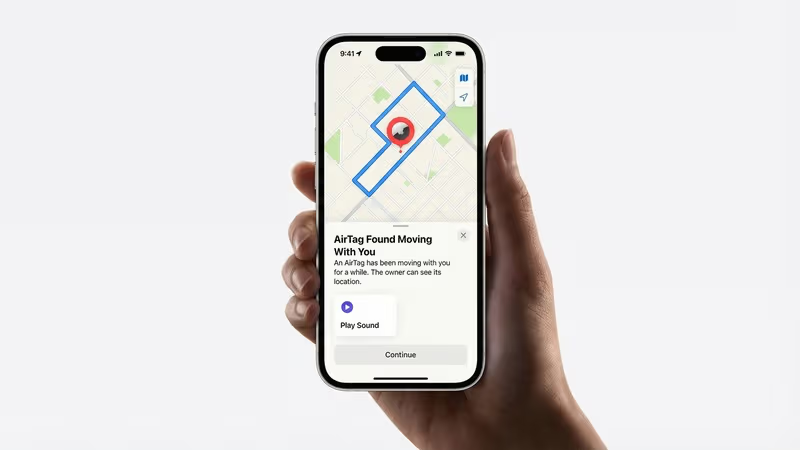
iPhone alerts (iOS 14.5+): If an AirTag separated from its owner travels with a non-owner iPhone for a period of time, iOS sends a notification: “AirTag Found Moving With You.” This alert shows the AirTag’s serial number and links directly to instructions for disabling it. Since iOS 17, the alert also shows the approximate time the AirTag was first detected and the last known location where it was detected near you.
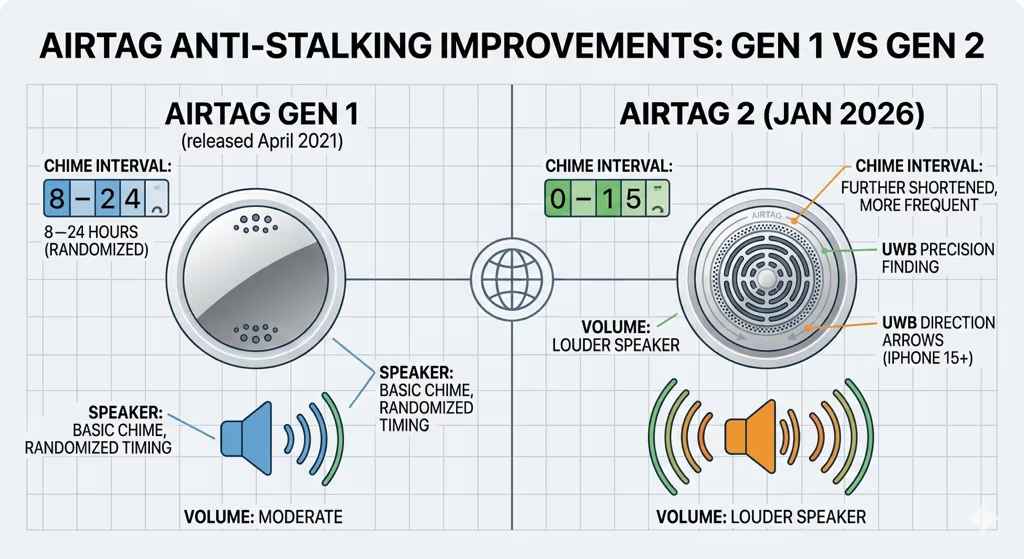
Audible chimes: If an AirTag has been separated from its owner and is near someone who has not received an iPhone alert (for example, an Android user), it is programmed to play an audible chime after a set period of time. Apple has reduced this window multiple times since 2021:
- Original (2021): chime after 3 days of separation
- Post-criticism update (2022): chime after 8–24 hours (randomized, to prevent predictable timing)
- AirTag 2 (2026): chime interval further shortened; speaker volume increased to better penetrate bags and vehicles
NFC scanning: Any smartphone—including Android without the Find My app—can tap an AirTag to read its serial number and owner contact information (if the owner has enabled Lost Mode). This provides a way for anyone who finds a suspicious AirTag to identify it, regardless of their device.
iOS 17 and AirTag 2 Safety Improvements
Apple released iOS 17 in September 2023 with the most significant anti-stalking updates since AirTag’s launch. Key changes included:
- Precision Finding for unknown AirTags: On compatible iPhones (iPhone 15 series and AirTag 2), iOS 17 allowed the Find My app to guide you directly to a nearby unknown AirTag using UWB direction arrows—the same Precision Finding feature previously available only to AirTag owners. This makes physically locating and removing a covert AirTag significantly easier.
- Improved alert detail: The “AirTag Found Moving With You” notification now shows a map of where the AirTag was first detected near you, helping users understand the timeline and location of potential tracking.
- Cross-platform Android detection: Apple and Google collaborated on a cross-industry specification (released 2024) for unwanted tracker detection. Android devices running Google Play Services can now detect AirTags (and other Find My network items) traveling with them, not just Tile or Samsung devices. This closed a significant gap that had existed since 2021.
AirTag 2 hardware improvements (January 2026): The second-generation AirTag includes a louder speaker and more frequent chime intervals compared to the original. Apple has not published the exact new chime timing, but independent testing confirms the chime activates faster and is audible at greater distances—making it harder to suppress a covert AirTag in a vehicle or bag over an extended period.
Apple Lawsuit and 2023 Settlement
In December 2022, two women filed a class-action lawsuit against Apple, alleging that AirTag’s stalking protections were inadequate and that Apple had failed to act on documented reports of abuse. The lawsuit cited numerous incidents in which AirTags were placed covertly in vehicles and personal belongings to track domestic violence victims and others without consent.
Apple settled the class-action lawsuit in 2023. The settlement did not include a public admission of wrongdoing, but Apple agreed to a financial settlement fund and committed to continuing safety improvements—including the iOS 17 updates and the Android cross-platform detection initiative that followed. The settlement also funded public safety resources about how to detect and respond to unwanted tracking.
The lawsuit and settlement reflected a genuine tension in AirTag’s design: the same features that make it an excellent legitimate tracker—small size, long battery life, silent operation, vast crowd-sourced network—also make it attractive for covert misuse. Apple’s iterative safety improvements since 2021 have meaningfully reduced the viability of using AirTag for sustained covert tracking, but the debate about whether current protections are sufficient continues.
2025 State Anti-Tracking Laws
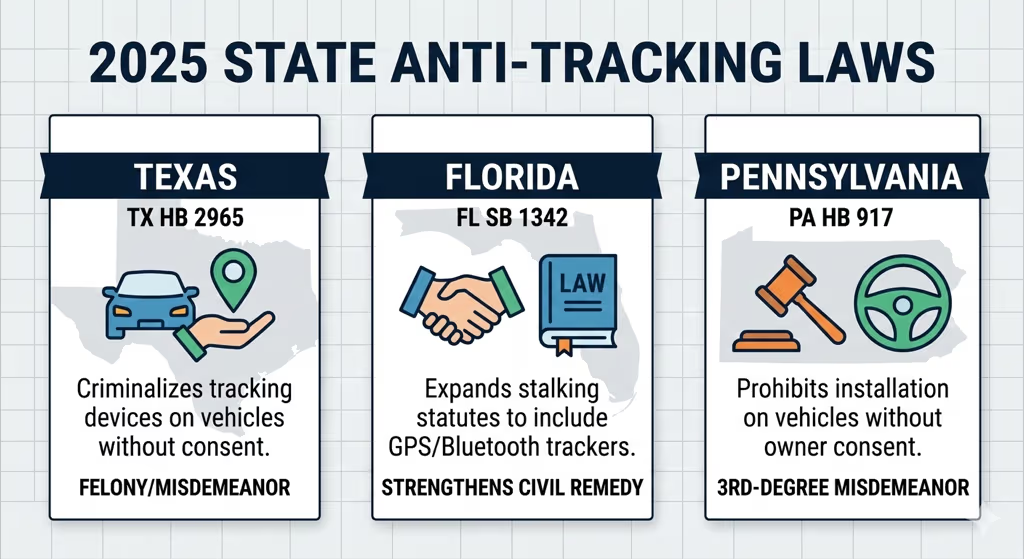
In addition to Apple’s technical improvements, several U.S. states passed new laws specifically addressing covert GPS and Bluetooth tracking in 2025. These laws vary by state and typically focus on criminal penalties for placing tracking devices on vehicles without consent.
| State | Law / Bill | Key Provision | Effective |
|---|---|---|---|
| Texas | TX HB 2965 (2025) | Criminalizes placing a tracking device on a vehicle without consent; misdemeanor to felony depending on circumstances | September 2025 |
| Florida | FL SB 1342 (2025) | Expands existing stalking statutes to explicitly include GPS and Bluetooth tracking devices; strengthens civil remedy provisions | July 2025 |
| Pennsylvania | PA HB 917 (2025) | Prohibits installation of tracking devices on vehicles without owner consent; third-degree misdemeanor on first offense | August 2025 |
Most states already had stalking statutes that could apply to covert tracking, but these 2025 laws explicitly include electronic tracking devices—including Bluetooth trackers like AirTag—rather than requiring prosecutors to apply broader stalking definitions. For up-to-date information on your state’s specific laws, consult a legal professional or your state’s attorney general office, as legislation in this area continues to evolve.
Note: The same legal considerations apply to other trackers covered in our AirTag in a car guide—including GPS trackers and other Bluetooth devices placed in vehicles.
What to Do If You Find an Unwanted AirTag
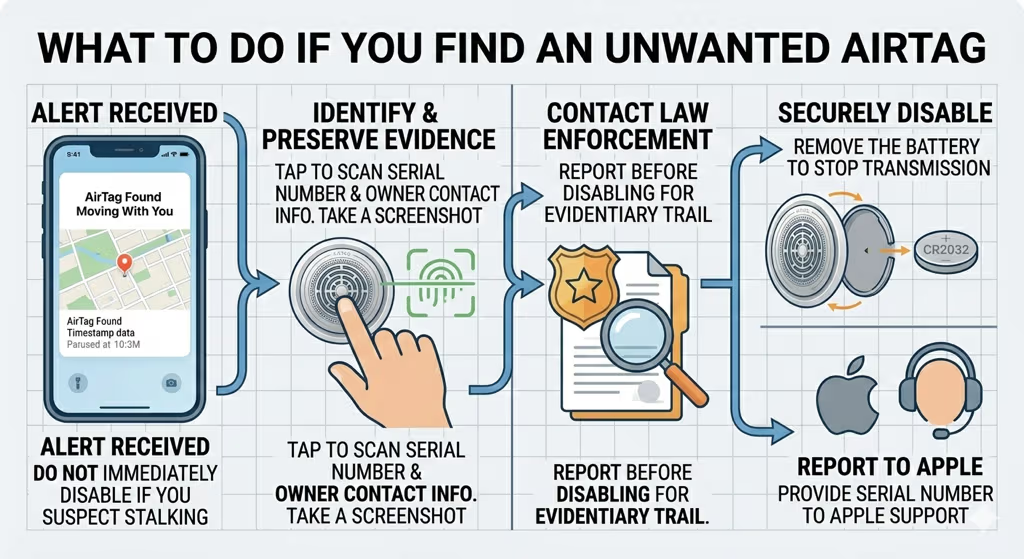
If your iPhone shows an “AirTag Found Moving With You” alert, or if you physically find a suspicious AirTag attached to your vehicle or belongings, here are the recommended steps:
1. Do not immediately disable it if you suspect criminal stalking. If you believe you are being stalked or harassed, contact law enforcement before disabling the AirTag. Law enforcement can potentially use the AirTag’s serial number to identify the registered owner through Apple with proper legal process. Disabling the AirTag destroys the evidentiary trail.
2. Identify it. Tap the AirTag with any smartphone (NFC-enabled). The AirTag’s serial number and any owner-provided contact information (if in Lost Mode) will display. Take a screenshot. You can also open the Find My app on iPhone and tap the alert to see more details.
3. Disable it if safe to do so. To disable an AirTag: press down on the polished stainless steel back and rotate counterclockwise; the back cover and battery will separate. Remove the CR2032 battery. The AirTag is now inert and cannot transmit or chime.
4. Report to Apple. Apple accepts reports of AirTag misuse through their support channels. Provide the serial number if available. Apple states they will cooperate with law enforcement investigations involving AirTag serial numbers.
5. Consider an Android alert app. Android users who want proactive protection can use Google’s Find Hub app (Android 6.0+), which now detects AirTags and other Find My network devices traveling with you as part of the 2024 cross-platform specification.
AirTag vs GPS Trackers: Stalking Risk Comparison
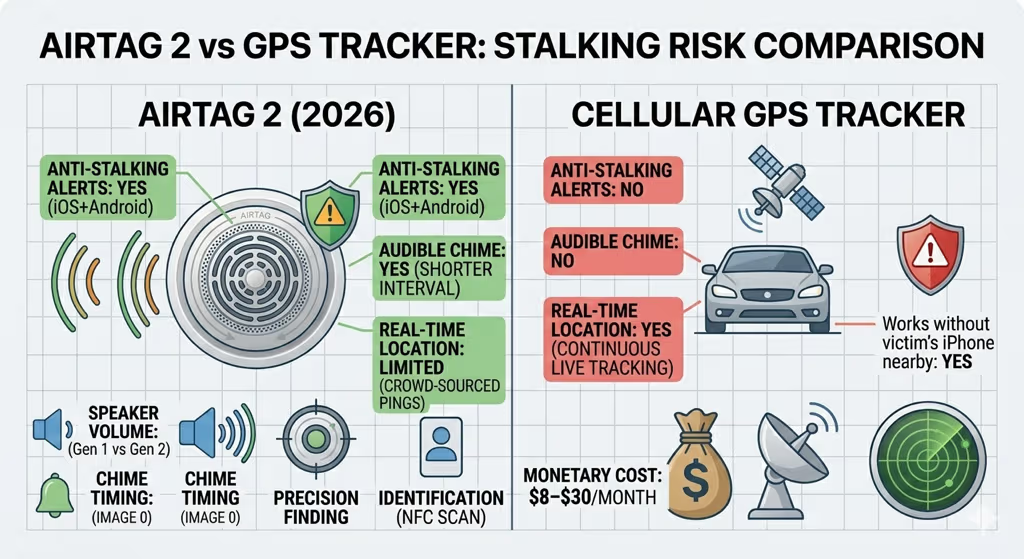
It is worth noting that AirTag is not the only tracking device that can be misused for stalking. Dedicated GPS trackers—including cellular GPS devices like LandAirSea 54 or Bouncie—can be placed covertly and provide real-time location data without any of AirTag’s anti-stalking alerts.
| Feature | AirTag 2 | GPS Tracker (cellular) |
|---|---|---|
| Anti-stalking alerts | Yes — iOS + Android cross-platform alerts | None built-in |
| Audible chime | Yes — after separation period | No |
| Real-time location | No — only crowd-sourced pings | Yes — continuous live tracking |
| Works without victim’s iPhone nearby | Limited — needs Find My crowd to ping | Yes — works anywhere with cell coverage |
| Detectable by NFC scan | Yes — any NFC phone | Typically no |
| Monthly cost | None | $8–$30/month |
AirTag’s anti-stalking protections, while imperfect, make it significantly harder to use for sustained covert tracking compared to a cellular GPS device. A GPS tracker placed in a vehicle will provide real-time location updates indefinitely, make no sound, and trigger no alerts on the victim’s phone. For context on how these devices compare in legitimate use cases, see our AirTag vs GPS tracker comparison.
AirTag 2: Current Generation
Apple AirTag 2 (2026)
Stronger anti-stalking protections — louder chime, faster alerts, UWB Precision Finding
Anti-Stalking Pros
- Faster, louder audible chimes — harder to suppress covertly
- iOS alerts show map of when/where unknown AirTag was detected
- Precision Finding lets you locate and retrieve an unknown AirTag
- NFC-readable by any smartphone for identification
- Cross-platform: Android Find Hub now detects AirTags
Remaining Limitations
- Chime can still be temporarily suppressed by enclosing in a sound-deadening material
- Find My crowd-sourcing means location updates require nearby iPhone users
- Serial number-to-owner lookup requires law enforcement request to Apple
Frequently Asked Questions
Can AirTag be used to stalk someone without them knowing?
Apple’s anti-stalking protections make sustained covert AirTag tracking very difficult. iPhone users will receive an alert if an unknown AirTag travels with them for a period of time. The AirTag itself will also play an audible chime. AirTag 2 strengthened both of these protections. While no system is perfectly foolproof, AirTag’s anti-tracking alerts are the most comprehensive of any mainstream tracker on the market. GPS trackers designed for vehicle monitoring have none of these protections.
How long before an unknown AirTag starts beeping?
Apple has not published the exact timing and randomizes it to prevent predictable detection evasion. The original AirTag chimed after up to 3 days; subsequent updates reduced this to 8–24 hours. AirTag 2 (released January 2026) reduced the interval further and increased speaker volume. The chime triggers when the AirTag has been separated from its owner and is traveling with a non-owner—it does not chime when the owner is present, which is why a tracker placed on a shared vehicle may take time to activate.
What should I do if I get an iPhone alert about an unknown AirTag?
Open the Find My app and tap the alert. It will show the AirTag’s serial number, where it was first detected near you, and instructions for disabling it. If you suspect criminal stalking, contact law enforcement before disabling it—the serial number can help police identify the owner through Apple with proper legal process. To disable: twist the back of the AirTag counterclockwise and remove the CR2032 battery.
Can Android users detect AirTags?
Yes, as of 2024. Google and Apple collaborated on a cross-industry specification for unwanted Bluetooth tracker detection. Android devices running Google Play Services (Android 6.0+) can now detect AirTags—and other Find My network items—traveling with them. The alert appears through the Android “Find Hub” interface. Previously, Android users had to rely on a separate app or NFC tapping to identify an unknown AirTag.
Is it illegal to track someone with an AirTag?
Placing a tracking device on another person or their property without consent is illegal in most U.S. states, either under existing stalking statutes or under new laws specifically targeting electronic tracking devices. Texas, Florida, and Pennsylvania passed explicit AirTag-applicable tracking laws in 2025. Federal law (18 U.S.C. § 2261A) also covers electronic stalking. The laws vary by state and circumstance—for specific legal advice, consult an attorney in your jurisdiction.
How do I find where an AirTag is hidden on my car?
When you receive an iPhone alert, tap “Play Sound” in the Find My app—the AirTag will chime and help you locate it. On AirTag 2, Precision Finding (UWB direction arrows) also works for non-owners on iPhone 15 and later, guiding you directly to the AirTag’s location within range. Common hiding spots include the OBD-II port, under rear bumper, inside wheel wells, and behind license plates—all of which are covered in more detail in our guide to AirTag hiding locations in cars.
Does AirTag 2 have better stalking protections than the original?
Yes. AirTag 2 includes a louder speaker (making chimes easier to hear in vehicles and bags), faster chime activation when separated from the owner, and hardware-level support for non-owner Precision Finding—allowing victims to locate an unknown AirTag using UWB direction arrows on iPhone 15 and later. These changes address the two most common criticisms of the original: chimes were too quiet and too infrequent to be reliably detected. For a full feature comparison, see our AirTag 2 review. For details on why AirTag does not store location history and how the privacy architecture works, see our AirTag location history guide.