
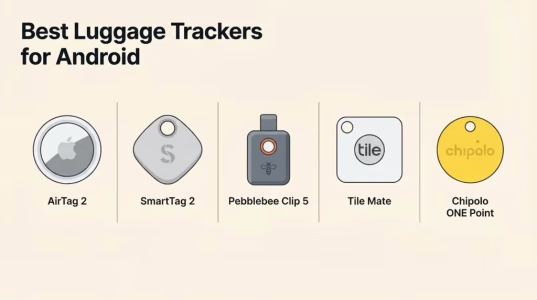
Every “best luggage tracker” article puts AirTag at number one. That’s fine — for iPhone users. But if you have an Android phone, AirTag is essentially useless: you can’t track it, can’t use Precision Finding, and the only thing you get is a NFC tap that shows your contact info if someone else finds your bag. That’s not a tracker, that’s a business card.
This guide is specifically for Android users. We cover what actually works, explain the three different tracker networks available for Android in 2026 (and which one your specific phone supports), and give you clear picks for every budget and travel style.
The Best Luggage Tracker for Android: Why AirTag Doesn’t Make the Cut
AirTag 2 (January 2026) is exclusively designed for Apple’s Find My ecosystem. Tracking requires an iPhone running iOS; there is no official AirTag app for Android, and the AirTag does not connect to Android phones for location updates. When your luggage moves, an AirTag near a Samsung Galaxy or Google Pixel reports nothing to you.
The one Android-compatible AirTag feature is NFC scanning: if someone finds your lost bag and taps the AirTag with an Android phone, they see a webpage with your contact information. That’s it. There’s no step-by-step Precision Finding, no map, no location history. For a $29 device, that’s a very poor value if you’re on Android.
AirTag 2’s new features (the U2 UWB chip, 1.5× extended Precision Finding range, louder speaker, Apple Watch support, and 50+ airline partner integrations) are all Apple-only. None of these benefits transfer to Android. If your household has a mix of iPhone and Android users, the iPhone user in the family can track an AirTag; the Android user cannot.
Bottom line: If you use an Android phone as your primary device, do not buy an AirTag for luggage tracking. Every tracker in this guide works properly on Android — AirTag does not.
The Three Android Tracker Networks Explained
Unlike the iPhone world (where essentially everything runs through Apple Find My), Android has three separate tracker networks in 2026, and each one works with different phones and different products. Understanding which network your phone supports before buying is essential.
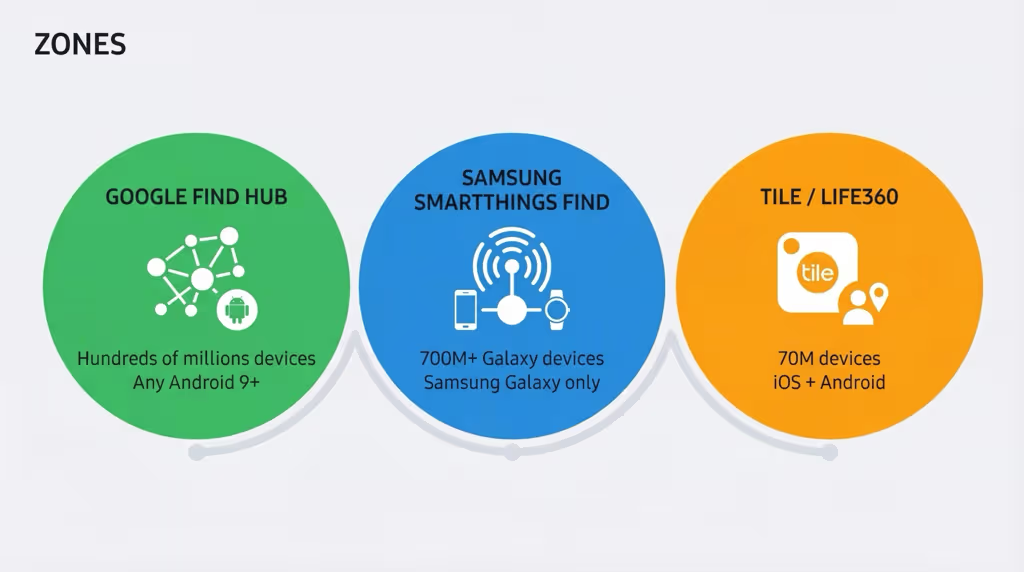
Google Find Hub (formerly “Find My Device,” rebranded 2025) is Google’s answer to Apple Find My. It launched a crowdsourced Bluetooth network in April 2024, enabling lost-device tracking through hundreds of millions of opt-in Android phones worldwide. Compatible trackers include Chipolo ONE Point, Chipolo Pop, Pebblebee Clip 5, and (coming Q2 2026) Motorola Moto Tag 2. Find Hub works on any Android phone running Android 9+ with Google Play Services, covering virtually every non-Samsung Android device. Important note: despite some Find Hub trackers supporting UWB hardware, Google has not yet enabled UWB-based Precision Finding in the Find Hub app as of February 2026.
Samsung SmartThings Find is Samsung’s proprietary network, powered by over 700 million Samsung Galaxy devices. It’s not the same as Google Find Hub; it runs separately and is only accessible from Samsung Galaxy phones and tablets. The SmartTag 2 uses this network and benefits from its enormous Galaxy device density, particularly in South Korea and major Asian markets. SmartThings Find also has the only Android-side airline integration in 2026 (Turkish Airlines, launched December 2025).
Tile / Life360 Network has approximately 70 million active Tile devices worldwide and works on both iOS and Android. Tile deliberately does not participate in Google Find Hub; instead, Life360 (which acquired Tile in 2024) is investing in satellite-based tracking as a longer-term alternative to phone-crowd-sourced networks. The Tile app works on any Android device and is fully functional without a subscription, though Tile Premium ($2.99/month) adds location history and smart alerts.
At a Glance: Best Android Luggage Trackers Compared
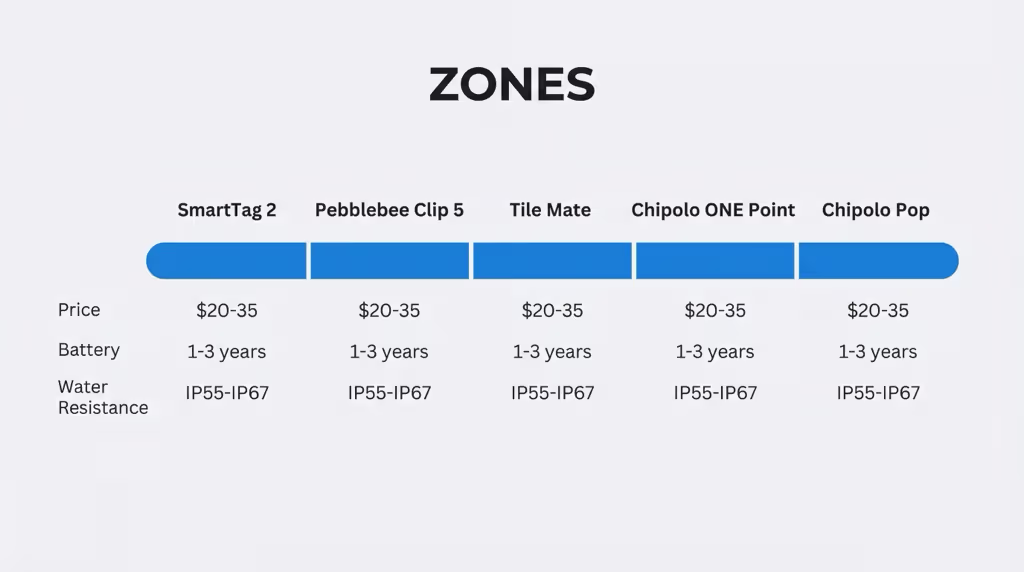
| Tracker | Network | Price | Battery | Water Resist. | Android Phones | Best For |
|---|---|---|---|---|---|---|
| Samsung SmartTag 2 | SmartThings Find | ~$20–30 | Up to 700 days (CR2032) | IP67 | Samsung Galaxy only | Samsung users, best battery |
| Pebblebee Clip 5 | Find Hub or Find My | $35 | 12 months (USB-C rechargeable) | IP66 | Any Android (Find Hub) | Non-Samsung Android, rechargeable |
| Tile Mate | Tile (70M devices) | ~$25 | 3 years (non-replaceable) | Water-resistant | Any Android | Budget, long battery, no subscription |
| Chipolo ONE Point | Google Find Hub | ~$28 | ~1 year (replaceable) | Water-resistant | Any Android (Find Hub) | Google Pixel / non-Samsung Android |
| Chipolo Pop | Find Hub or Find My | ~$29 | 12 months (replaceable) | IP55 | Any Android or iPhone | Mixed Android/iPhone households |
Note: “Find Hub or Find My” trackers work with one network at a time — choose during setup. Cannot run both simultaneously.
The 5 Best Luggage Trackers for Android
1. Samsung SmartTag 2 — Best for Samsung Galaxy Users
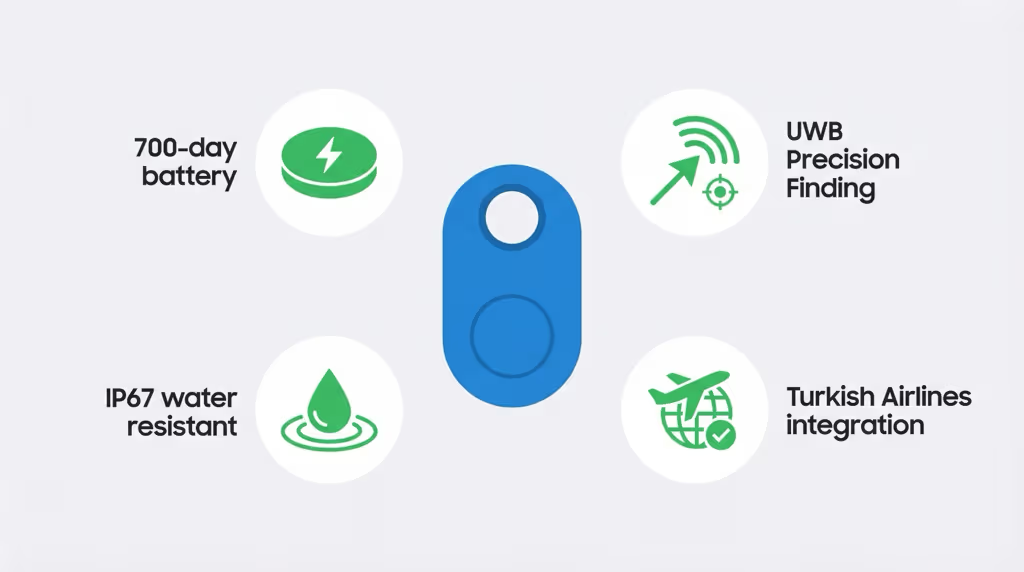
If you have a Samsung Galaxy phone, the SmartTag 2 is the best luggage tracker you can buy; it’s not particularly close. Samsung’s SmartThings Find network, backed by over 700 million Galaxy devices worldwide, provides coverage that rivals Apple Find My in many markets. The SmartTag 2 adds genuine UWB Precision Finding (AR-guided arrow to your bag when you’re nearby), a 700-day CR2032 battery that you’ll likely replace once every couple of years, and IP67 water resistance for the realities of airport baggage handling.
The SmartTag 2’s biggest 2025 news for travelers: Samsung launched a partnership with Turkish Airlines in December 2025, integrating SmartThings Find with the airline’s baggage recovery system. When bags are delayed or misrouted on Turkish Airlines, passengers can upload photos of their luggage to the SmartThings app and the airline’s staff can search for the specific bag, not a generic “black suitcase.” Samsung has announced plans to expand this airline integration to additional carriers, making SmartTag 2 the most airline-forward Android tracker currently available.
The limitation is firm: SmartTag 2 only works with Samsung Galaxy phones running Android 11 or later with 3GB+ RAM. If you have a Google Pixel, Motorola, OnePlus, or any non-Galaxy Android, the SmartTag 2 is not compatible with your phone. If you’re on a Galaxy but still weighing it against Tile’s Android option, our Samsung SmartTag 2 vs Tile comparison covers the key tradeoffs.
Price: ~$20–30 (single) | Network: SmartThings Find (Samsung Galaxy only) | Battery: up to 700 days CR2032 | Water: IP67
Buy SmartTag 2 (1-pack) on Amazon → Buy SmartTag 2 (4-pack) on Amazon →
2. Pebblebee Clip 5 — Best for Non-Samsung Android Users
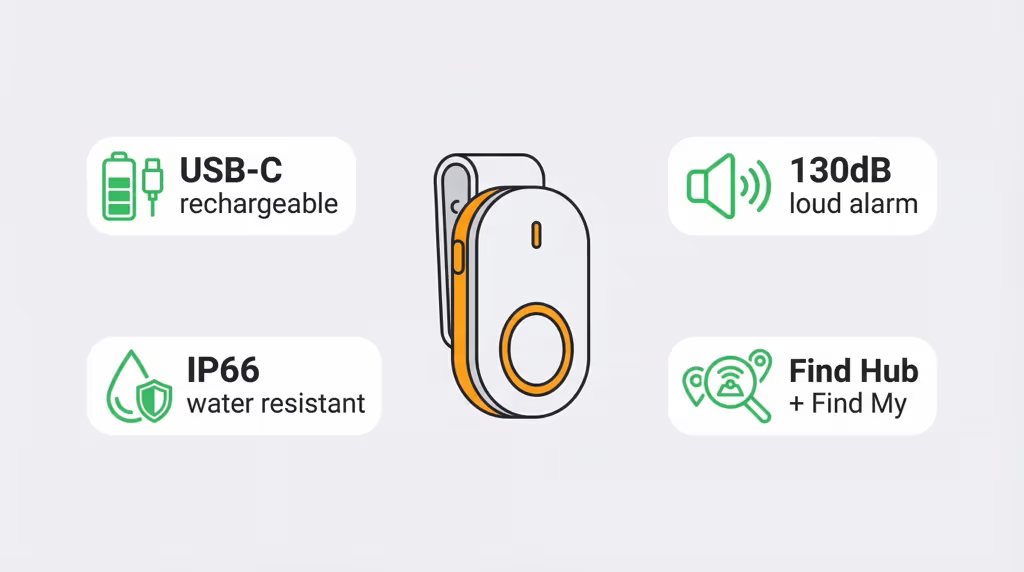
For Android users on any phone except Samsung (Google Pixel, Motorola, OnePlus, Sony, and others), the Pebblebee Clip 5 ($35) is the strongest all-round luggage tracker in 2026. It works on Google’s Find Hub network (compatible with any Android phone running Android 9+), uses a clip design that attaches securely to luggage handles or interior loops, and charges via USB-C; no hunting for CR2032 batteries mid-trip. The 12-month battery life between charges means most travelers will charge it once a year.
Pebblebee added meaningful upgrades with the Clip 5 (launched early 2026): a 130dB alarm siren (making it the loudest tracker in this guide; useful for locating bags on a packed carousel) and an ultra-bright LED strobe that makes it visible in dim baggage areas. IP66 water resistance handles rain and wet cargo hold conditions without issue. It also works on Apple Find My if you ever switch to an iPhone; just reset it and re-configure to the other network. You can’t use both simultaneously, but switching is simple.
The Clip 5’s form factor is particularly well-suited to luggage: the clip attaches to external handle straps or slides into interior pockets, and the compact 10g weight adds nothing meaningful to bag weight.
Price: $35 | Network: Google Find Hub or Apple Find My (choose one) | Battery: 12 months USB-C rechargeable | Water: IP66 | Alarm: 130dB
Buy Pebblebee Clip 5 on Amazon → View on Pebblebee.com →
3. Tile Mate — Best Budget Option & Widest Android Compatibility
The Tile Mate ($25) remains the easiest and most established cross-Android option; it works with any Android phone (Samsung, Pixel, Motorola, everything) without needing to understand Google Find Hub setup, and the 3-year fixed battery means you buy it and essentially forget it for years.
Tile’s network spans approximately 70 million active Tile devices worldwide and is iOS + Android compatible via the Tile app. This is a separate network from Google Find Hub; Tile / Life360 has explicitly chosen not to integrate with Find Hub, instead investing in a satellite-based tracking network for longer-range future use. The current 70-million-device crowd-sourced network is mature and reliable in North America and Europe, though it covers a narrower population than Apple Find My or Google Find Hub in markets where those networks dominate.
An important nuance: after Life360’s acquisition of Tile in 2024, Tile Premium is now managed through a Life360 account at $2.99/month or $29.99/year. The free Tile tier still includes basic tracking. Premium adds 30-day location history, smart alerts, and up to $100 in item reimbursement; this is actually useful for luggage if a bag is lost and you need historical location data. For casual use, the free tier is adequate.
For a slightly longer range and a replaceable CR2032 battery, the Tile Pro ($35) is the step-up option. The Pro’s ring volume is also louder (useful on noisy baggage carousels), and it has a 1-year replaceable battery rather than the 3-year fixed cell in the Mate. If Tile’s standalone network doesn’t appeal, our Tile alternatives guide covers what Find Hub and SmartThings trackers offer instead.
Tile Mate: ~$25 | Tile Pro: ~$35 | Network: Tile (70M devices, iOS + Android) | Tile Mate battery: 3 years (fixed) | Tile Pro battery: 1 year (replaceable)
Shop Tile Mate on Amazon → Shop Tile Pro on Amazon →
4. Chipolo ONE Point — Best Native Google Find Hub Tracker
The Chipolo ONE Point ($28) is the cleanest purpose-built Google Find Hub tracker for non-Samsung Android users. It’s designed specifically for the Find Hub network; setup is simple through the Google Find Hub app, and it works with any Android phone running Android 9+ with Google Play Services. The small disc format (similar in size to AirTag) attaches to luggage keyrings or fits inside any card-slot pocket with a small holder.
Chipolo makes both the ONE Point (for Google Find Hub / Android) and the ONE Spot (for Apple Find My / iPhone); they look identical but connect to different networks. Make sure you buy the ONE Point for Android. The replaceable battery (~1 year) means you’re not locked into replacing the whole device when power runs out. It’s water-resistant, though Chipolo doesn’t publish a specific IP rating.
The ONE Point is a solid, no-frills choice if you’re firmly in the Android/Google ecosystem and don’t need the flexibility of dual-network compatibility.
Price: ~$28 | Network: Google Find Hub (any Android) | Battery: ~1 year replaceable
Buy Chipolo ONE Point (4-pack) on Amazon → View on Chipolo.net →
5. Chipolo Pop — Best for Mixed Android/iPhone Households
If your household has both Android and iPhone users who share luggage, or you’re planning to switch phones in the near future, the Chipolo Pop (~$29) is the most flexible pick. It’s compatible with both Apple Find My and Google Find Hub; you configure it to one network during setup, and if you later switch phones or ecosystems, you reset it and configure for the other. The switch takes a few minutes.
One clarification the marketing often glosses over: the Chipolo Pop does not run on both networks simultaneously. It’s “one or the other” at any given time; not truly dual-network in the sense of reporting to both Apple and Android users at once. For household sharing, the practical solution is to pick whichever ecosystem has the most users.
The Pop has a 12-month replaceable battery, IP55 water resistance, and a 94dB alarm. It launched mid-2025 and received new color options (Hot Coral, Subzero) in February 2026. See our AirTag alternatives guide for how it compares to other cross-platform options.
Price: ~$29 | Network: Apple Find My OR Google Find Hub (choose one) | Battery: 12 months replaceable | Water: IP55
📅 Coming in 2026: Motorola Moto Tag 2 & Eufy SmartTrack Card E40
Two notable new products announced at CES 2026 are worth watching. The Motorola Moto Tag 2 ($30) (available Q2 2026) upgrades to Bluetooth 6.0, IP68 water resistance, and 500-day battery life while supporting Google Find Hub. The Eufy SmartTrack Card E40 ($35) (available Q1 2026) is a credit-card-shaped tracker just 1.7mm thin, compatible with both Find Hub and Find My, with wireless Qi charging. For luggage use, the card format is particularly useful for sliding into a bag’s interior document pocket. Keep an eye on both.
Airline Integration: What Android Travelers Get in 2026
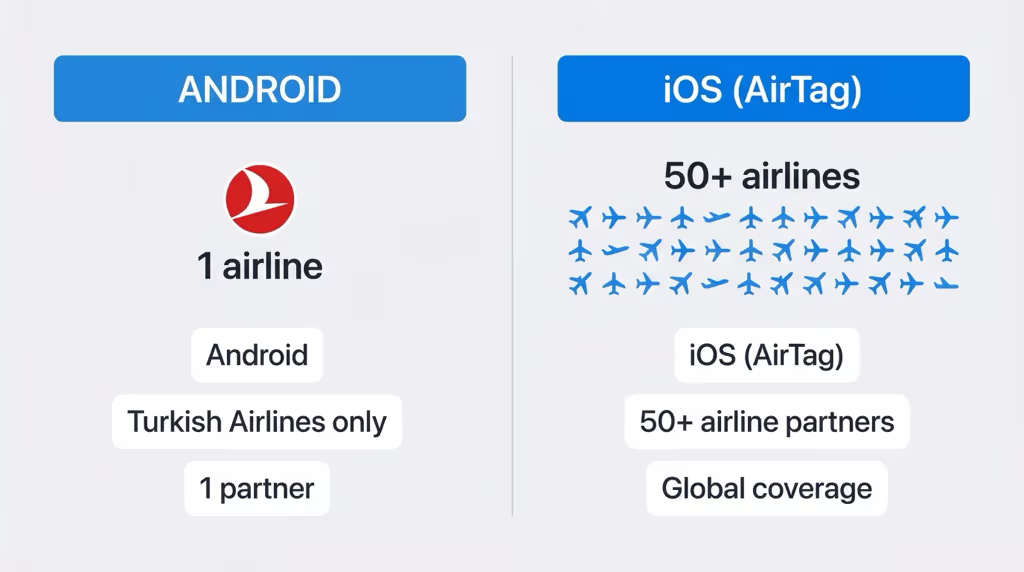
Apple’s AirTag 2 integrates with 50+ airline partners through Find My: a significant advantage that helps travelers share luggage location directly with airlines for baggage recovery. For Android users, this is currently more limited:
Samsung SmartTag 2 + Turkish Airlines (December 2025): Samsung launched the first Android-side airline tracker integration with Turkish Airlines. Passengers on Turkish Airlines can use SmartThings Find to help airline staff locate specific delayed or misrouted bags. Samsung has announced plans to expand this partnership to additional carriers. As of February 2026, Turkish Airlines is the only live integration.
Tile, Chipolo, and Pebblebee: No airline-specific integrations as of February 2026. These trackers work by crowd-sourced Bluetooth; if your bag is in a location where other Tile or Android users are present, they update location. Airports are generally high-density for both Android users (good for Find Hub and SmartThings) and Tile users (established network), so location updates in major airports tend to be frequent regardless of tracker brand.
The practical reality: for most misrouted luggage scenarios (bag diverted to the wrong city, sitting in an airport baggage area), any of these trackers will reliably report a last-known location to help you identify where your bag ended up. Airline integrations matter most when the bag is actively in airline custody and you want the airline’s baggage staff to proactively assist.
How to Choose: Which Tracker Fits Your Android Phone
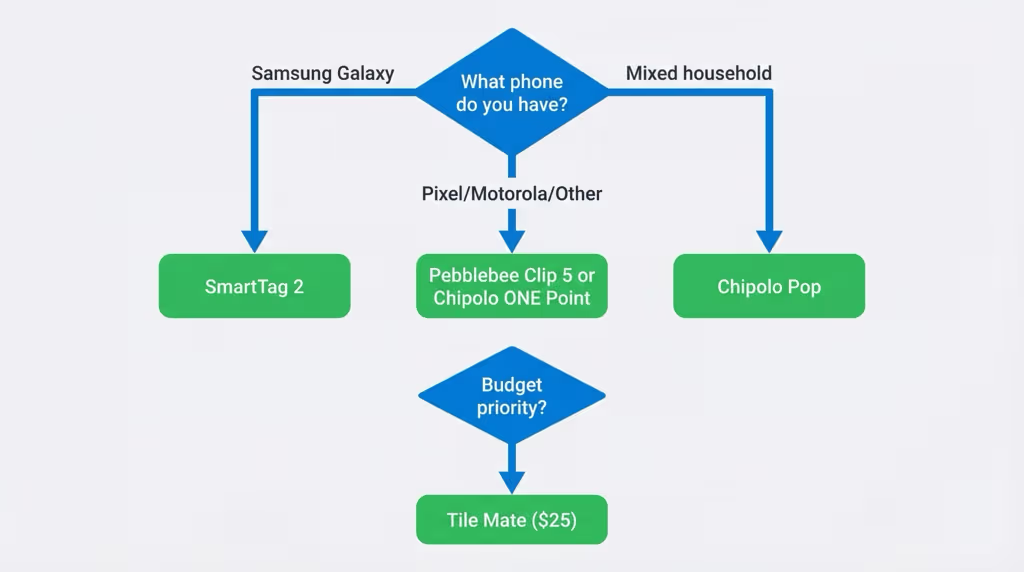
📱 I have a Samsung Galaxy phone
→ Samsung SmartTag 2 (~$20–30). Best battery (700 days), UWB Precision Finding via SmartThings, airline integration with Turkish Airlines, and backed by 700M Galaxy devices. It’s the clear pick for Galaxy users.
📱 I have a Google Pixel, Motorola, OnePlus, or other non-Samsung Android
→ Pebblebee Clip 5 ($35) for the best combination of loudness, water resistance, and rechargeable convenience. Or Chipolo ONE Point (~$28) if you want a simpler disc format and replaceable battery at slightly lower cost.
👫 My household mixes Android and iPhone
→ Chipolo Pop (~$29). Configure to whichever network your primary phone uses. Can be switched to the other network later. One device, two ecosystems (not simultaneously, but easy to switch).
💰 I want the cheapest option that works on any Android phone
→ Tile Mate (~$25). No subscription required, 3-year battery, works on all Android phones, established 70M-device network. Tile Premium ($2.99/mo) is optional but adds useful features for travelers.
🌍 I travel internationally frequently and want maximum coverage
→ Pebblebee Clip 5 or Chipolo Pop (configured for Google Find Hub). Google Find Hub works globally wherever Android phones are present, which is most of the world. For Asia-Pacific specifically, SmartTag 2 benefits from extremely high Samsung Galaxy penetration. If you travel regularly to markets where Samsung is dominant (South Korea, Southeast Asia), SmartTag 2 offers better coverage there than Find Hub.
Frequently Asked Questions
Why doesn’t AirTag work on Android?
AirTag uses Apple’s proprietary Find My network, which requires an iPhone or other Apple device to relay its location. Android phones do not participate in the Find My network and cannot receive AirTag location updates. The only exception is NFC: if an Android user physically taps a lost AirTag, they see a webpage with the owner’s contact information. This is a passive identification feature, not real-time tracking. For Android users, AirTag provides no tracking functionality.
Does Google Find Hub work as well as Apple Find My for luggage tracking?
In major urban areas with high Android device density, Google Find Hub performs comparably to Apple Find My for basic location updates. The key difference is precision: Apple Find My offers UWB-based Precision Finding (AR arrow guidance) that Google Find Hub does not currently offer (as of February 2026, Find Hub trackers have not enabled UWB precision finding even on hardware that supports it. For identifying which city or airport your bag ended up in, Find Hub works well. For precise “within this room” finding, Apple Find My currently has an advantage.
Can I use a Samsung SmartTag 2 with a non-Samsung Android phone?
No. Samsung SmartTag 2 requires a Samsung Galaxy smartphone or tablet running Android 11 or later with at least 3GB of RAM. It will not work with Google Pixel, Motorola, OnePlus, or other non-Samsung Android devices. For non-Samsung Android phones, use a Google Find Hub tracker (Chipolo ONE Point, Pebblebee Clip 5) or a Tile tracker instead.
Are Bluetooth luggage trackers allowed in checked baggage?
Yes. All trackers in this guide are allowed in both carry-on and checked baggage. CR2032 coin cell batteries (used in SmartTag 2, Tile Pro, Chipolo ONE Point) contain only ~0.109 grams of lithium, well under the 2g TSA limit. USB-C rechargeable trackers (Pebblebee Clip 5) use small lithium-ion cells that are also compliant. Batteries must remain installed in the device; loose batteries are not allowed in checked bags.
Will a luggage tracker help if the airline loses my bag?
A tracker won’t prevent misrouted luggage, but it significantly helps recovery. When a bag is diverted to the wrong city, a tracker provides the last-known location, which can confirm your bag is at a specific airport rather than “unknown.” You can show this location to airline staff to accelerate recovery. Samsung SmartTag 2 users also benefit from the Turkish Airlines baggage integration (launched December 2025), where airline staff can actively search for your specific bag. For most misrouting situations, any tracker from this list will provide actionable location data within the airport system.
What’s the difference between Chipolo ONE Point and Chipolo ONE Spot?
They look identical but connect to different networks. The Chipolo ONE Point works with Google Find Hub (for Android phones). The Chipolo ONE Spot works with Apple Find My (for iPhone users). If you have an Android phone, buy the ONE Point. If you have an iPhone, buy the ONE Spot. The Chipolo Pop is a third variant that can be configured for either network; useful if you’re unsure or have both ecosystems in your household.
Is Tile still a good choice after Life360 acquired it?
Yes. The Tile network (70M+ devices, iOS + Android) remains fully functional and is actively maintained. Life360 has retained the Tile brand and app. The main change is that Tile Premium subscriptions are now managed through a Life360 account. Tile has not integrated with Google Find Hub and has no plans to do so; instead pursuing a satellite-based network for future expansion. For most users, Tile works exactly as it did before the acquisition. See our full Bluetooth tracker comparison for how Tile stacks up against the full competitive field.


