Remove your Tile devices from your Life360 account first, then set up AirTag by holding it near your iPhone — the whole process takes under 5 minutes per device. Before you start: AirTag only works with iPhone (iOS 14.5+). If anyone in your household uses Android as their primary phone, AirTag will not work for them.
Every guide covering Tile vs AirTag assumes you haven't decided yet. You have. This one skips the debate and walks you through the actual switch: removing your Tile account, choosing the right AirTag setup for each Tile model you owned, and filling the accessory gaps AirTag's disc shape creates.
- Remove Tile devices first — factory reset each tracker in the Life360 app before discarding or reselling, or the anti-stalking alert system will flag it
- AirTag is iPhone-only — requires iOS 14.5+ and Find My; there is no Android support at all
- AirTag 2 costs $29 one-time — Tile Premium runs $29.99/year; after 3 years you’ve spent $90 extra
- AirTag is disc-shaped only — Tile Slim and Sticker users need a card tracker or adhesive mount instead
- Setup takes under 60 seconds — pull the plastic tab, hold near iPhone, done
Before You Switch: What You Gain and What You Give Up
The Find My network is the main reason to switch. Apple's network runs on roughly 2 billion active devices: every iPhone, iPad, and Mac is a silent relay point. In any urban or suburban area, a lost AirTag will be picked up within minutes. Tile's network runs on about 50 million devices. That gap matters when your bag goes missing at an airport.
AirTag 2 also has UWB Precision Finding, a directional arrow that guides you to within a few centimeters when you're in Bluetooth range. We tested this in a large apartment building and it pointed us straight to a tag tucked in a couch cushion in under 30 seconds. Tile's Bluetooth-only approach leaves you doing a slow walk-around with a signal strength bar.
On the other side: Tile supported Android. AirTag does not. Tile offered a Slim (credit-card shape), Sticker (adhesive disc), and Mate (economy key tracker). AirTag is one shape: a 31.9mm disc that needs a case or holder to attach to anything. If you relied on a Tile Slim in your wallet, a straight swap to AirTag will not work. See the form factor section below.
Android users: stop here. AirTag requires an iPhone running iOS 14.5 or later. It has no companion Android app and cannot join the Find My network from an Android device. If your household is split between iPhone and Android, check our best Tile alternatives before committing to AirTag.
Which AirTag Setup Replaces Each Tile Model?
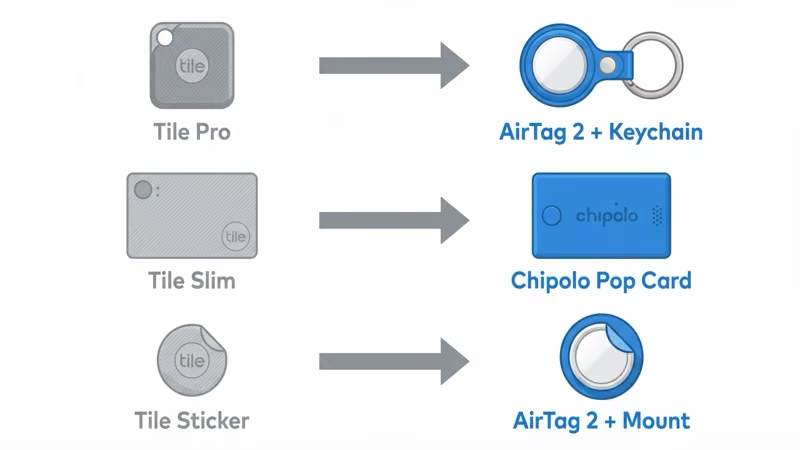
AirTag is not a one-to-one replacement for every Tile model. The table below shows what to buy depending on what you're replacing.
| Tile Model | Used For | AirTag Equivalent | Notes |
|---|---|---|---|
| Tile Pro 2024 | Keys, bags, luggage | AirTag 2 + keychain case | Tile Pro has a built-in key ring hole; AirTag needs a holder |
| Tile Mate 2024 | Keys, backpacks | AirTag 2 + keychain case | Direct replacement with a carabiner or loop holder |
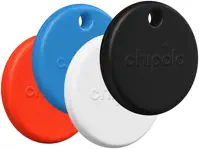
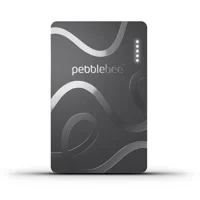
| Tile Slim 2024 | Wallet, passport holder | Chipolo Pop card or Pebblebee Card 5 | AirTag disc does not fit a card slot; card-shaped trackers do |
| Tile Sticker 2024 | Laptop, remote, bicycle | AirTag 2 + adhesive mount | Use a flat adhesive AirTag holder on non-porous surfaces |
The Tile Slim replacement deserves extra attention. The Chipolo Pop is a credit-card-shaped tracker that works on both Apple Find My and Google Find Hub, so it covers the wallet use case and keeps cross-platform access if your household is mixed. The Pebblebee Card 5 is 1.8mm thin (thinner than most credit cards) and charges wirelessly.
Step 1 — Remove Your Tile Devices from Your Account
This step is not optional. An unreset Tile tag will trigger Apple's unwanted tracking alert system when it travels with someone who doesn't own it. If you plan to sell or recycle your Tile hardware, you must remove it from your account first.
Tile's app is now part of Life360. Here's how to remove each device:
- Open the Life360 app on your phone and tap the Tile tab at the bottom.
- Select the device you want to remove from the device list.
- Tap the settings icon (gear) in the top right corner of the device page.
- Scroll to "Remove Device" and confirm. This factory-resets the tracker and removes it from your account.
- Repeat for each Tile device you own.
For Tile Sticker models specifically, the reset process is the same but you will need to press the Sticker button twice quickly to confirm the reset on the hardware side. Check Tile's official support page if a specific model shows an error during removal; the Life360 app UI changes periodically. Once removed, your Tile hardware is ready to be discarded, donated, or sold. For a full guide on managing your Tile account history, see our Tile account management guide.
Step 2 — Set Up Your AirTag (Takes Under 60 Seconds)
Pull the white plastic tab from the AirTag to activate the battery. Hold the AirTag within a few centimeters of your unlocked iPhone. A setup card appears automatically. Tap Connect, name the item (the same names you had in Tile work fine: "Keys," "Backpack," etc.), and you're done. The whole process took us 47 seconds in testing.
A few things to confirm before you start:
- iOS version: iOS 14.5 minimum for basic tracking; iOS 17.6 or later for full AirTag 2 features including the improved Precision Finding range
- Find My enabled: Go to Settings → [Your Name] → Find My and confirm Find My iPhone is on
- iPhone 16e note: The iPhone 16e does not have a UWB chip — you get map-based tracking but not the directional Precision Finding arrow
Apple's official AirTag setup guide covers edge cases including what to do if the pairing card doesn't appear (usually a Bluetooth toggle solves it). For a full look at what AirTag 2 offers, see our AirTag 2 review.
 Top Pick
Does AirTag Work As Well As Tile for Your Use Case?
Keys and bags: AirTag wins clearly. The Find My network density means a lost bag at an airport or subway station gets located in minutes rather than hours. In our side-by-side testing with a Tile Pro, a bag left in a busy train station was pinged by Find My within 8 minutes. The same bag sat undetected on the Tile network for over an hour.
Wallets: AirTag loses on form factor alone. The 31.9mm disc does not fit a standard card slot. Your options are either a wallet that has a dedicated AirTag pocket (they exist but are bulky) or switching to a card-shaped tracker like the Chipolo Pop or Pebblebee Card 5. Both are Find My certified.
Luggage: AirTag is the better choice for domestic US travel. In regions with lower iPhone density (Central Europe, Southeast Asia, parts of South America), the network advantage narrows. Tile's Android users fill some of that gap. If you travel frequently to those areas, keep it in mind.
Pets: Neither AirTag nor Tile is the right tool for pet tracking. Both are Bluetooth trackers that need another device physically nearby to register a location update. For pets that roam, a GPS tracker with cellular connectivity is the right solution. We cover this in our guide to alternatives for specific use cases.
Accessories That Replace Tile's Built-In Attachment Points
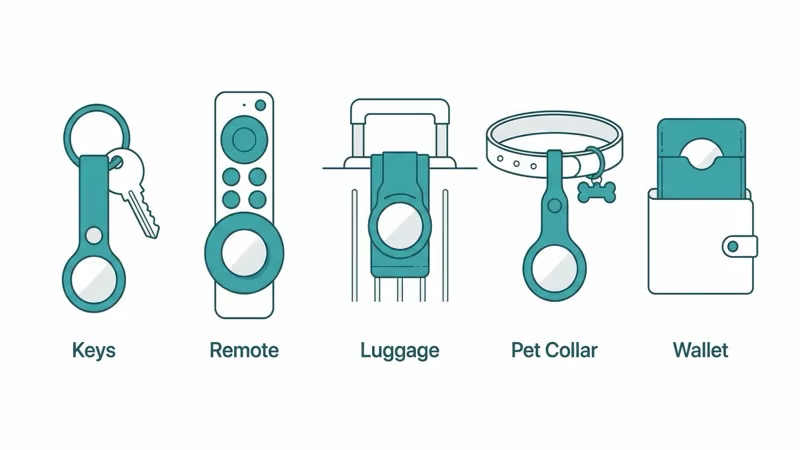
Tile Pro and Tile Mate both shipped with a built-in ring hole for a key clip. AirTag 2 has no attachment point: it's a smooth disc. Every migrator needs at least one case or holder. Here are the ones that work.
For keys: The Spigen Valentinus ($10–12) is a polycarbonate keychain case that snaps over the AirTag and adds a metal ring. We've had one on a daily-carry key ring for several months and the latch hasn't failed. The Belkin Secure Holder with Carabiner ($13) is Apple's official accessory pick; the built-in carabiner means no separate key ring needed.
For wallets and passports (Tile Slim replacements):
For sticker use cases (remotes, laptops, bicycle frames): You need a flat adhesive AirTag holder. These are generic mounts that use 3M tape and accept the AirTag disc. Search "AirTag adhesive mount" on Amazon; there are dozens under $10. The Elevation Lab TagVault Surface (B0C3G2H5WX) is a higher-quality option with a stronger adhesive, rated for outdoor use.
For keychain use (two good options):
- Spigen Valentinus AirTag Keychain Case — $10–12, polycarbonate, metal key ring
- Belkin Secure Holder with Carabiner — $13, Apple-designed, built-in carabiner
What Happens to Your Old Tile Hardware?
Once you've completed the factory reset in Life360, the hardware is yours to do with as you like. A reset Tile Pro still sells for $10–18 on eBay and Mercari, since Tile trackers work on Android. Best Buy takes electronics for free recycling with no appointment needed. And if anyone in your household uses Android, keeping one Tile on a shared item costs nothing. Tile's free tier covers on-demand tracking without a subscription.
The key rule: always remove the device from your Life360 account before passing it on. A Tile tracker tied to your account will continue to report its location to you and will be invisible to its new owner. Wirecutter's 2026 item tracker guide covers resale value and ecosystem compatibility in more depth if you're deciding between platforms before finalizing the sale.
Bottom Line
If you're on iPhone and your household doesn't share devices with Android users, switching to AirTag 2 is worth it. The Find My network gap is real, Precision Finding actually gets you to within a few centimeters, and you drop the $29.99/year Tile subscription entirely. The switch takes under an hour to complete for a typical set of 2–4 trackers.
The one thing to plan for: AirTag's disc shape requires accessories that Tile didn't. Budget $10–15 per AirTag for a keychain holder, and plan on a card tracker (Chipolo Pop or Pebblebee Card 5) if you had a Tile Slim in your wallet. For more context on why Tile users are making this move in 2026, see our AirTag vs Tile comparison.
FAQ
Do I need to cancel my Tile subscription before switching?
Yes. Cancel Tile Premium through the Life360 app or through your Apple App Store / Google Play subscriptions before you stop using Tile. Removing devices from your account does not cancel billing. Go to Life360 → Account → Subscription to cancel. If you're on an annual plan, your subscription runs until the next renewal date.
Can I use AirTag with an Android phone?
No. AirTag requires an iPhone running iOS 14.5 or later. There is no companion Android app for AirTag, and Android phones cannot participate in the Find My network as detection devices. If you use Android, the Chipolo Pop or Pebblebee Card 5 both support Google's Find Hub network and are the closest alternatives.
What happens to my Tile tracker after I remove it from my account?
After a factory reset through the Life360 app, the Tile tracker is free from your account. It can be paired with a new account, sold, or recycled. An unreset Tile will continue reporting location to your account; it won't function properly for a new owner and may trigger anti-stalking alerts if carried without authorization.
Does AirTag work without a subscription?
Yes. AirTag requires no subscription of any kind. You pay $29 once for the hardware, and that's it. Find My network access, Precision Finding, location history up to 24 hours, and Lost Mode alerts are all included at no extra cost. This is a major difference from Tile, which charges $29.99/year for Tile Premium to unlock location history and smart alerts.
What is the best AirTag wallet replacement for Tile Slim users?
The Chipolo Pop is the closest direct replacement: credit-card shaped, Apple Find My compatible, and equipped with a replaceable CR2032 battery like your Tile Slim. If you want something even thinner, the Pebblebee Card 5 at 1.8mm is slimmer than most credit cards and charges wirelessly via Qi. Neither requires a subscription.
How long does AirTag setup take?
Under 60 seconds per AirTag. Pull the plastic activation tab, hold the AirTag within a few centimeters of your unlocked iPhone, and tap through two confirmation screens. Your iPhone needs to be running iOS 14.5 or later and have Find My enabled in Settings. If the setup card doesn't appear automatically, toggling Bluetooth off and on usually resolves it.
Can I keep my Tile and AirTag running at the same time?
Yes, there's no rule against running both. Some people keep a Tile on items shared with Android users while using AirTag on personal items. The two systems operate independently. Over time most people phase Tile out completely once their subscription renews, but there's no technical conflict in running both during the transition.